
Close Menu
  • Gaming
    • Game Guides
    • Codes
    • Game News
    • Game Previews
    • Game Reviews
    • Game Features
    • Game Lists
    • Platforms
      • Nintendo
      • PC
      • PlayStation
      • Xbox
      • Mobile
  • Entertainment
    • Movies
    • Movie Features
    • Movie Reviews
    • TV
    • Reality TV
    • Royals
  • Celebrity
  • Human Interest
  • Astrology
  • Videos
  • More
    • Anime
    • Lists
    • Podcasts
    • Reviews
Facebook X (Twitter) Instagram LinkedIn YouTube
  • About Us
  • Join Our Team
  • Meet the Team
  • Privacy Policy
  • DMCA Policy
  • Contact Us
  • Terms of Use
  • Sitemap
  • Editorial Guidelines
  • Advertising Policy
The Nerd Stash
  • Gaming
  • Celebrity
  • Human Interest
  • Videos
The Nerd Stash
Home»Game Guides»The Legend of Zelda Skyward Sword HD: How to Equip, Use the Shield

The Legend of Zelda Skyward Sword HD: How to Equip, Use the Shield

Working your way through the various dungeons and locales of The Legend of Zelda Skyward Sword HD you may be left wondering – how do…

Patrick ArmstrongGrant JohnsonBy Patrick Armstrong and Grant JohnsonJuly 21, 20213 Mins Read
the legend of zelda skyward sword hd guide how to use the shield main

Skip To...

  • How to Equip the Shield in Skyward Sword HD for Switch
  • How to Use the Shield
This article is over 4 years old and may contain outdated information.

Working your way through the various dungeons and locales of The Legend of Zelda Skyward Sword HD you may be left wondering – how do I equip and use the shield? Link’s shield is, without a doubt, one of the most essential tools you have for taking on Bokoblins, Deku Babas, and all the other enemies you will face on your journey to save Zelda. It becomes important early on to learn the mechanics behind how it works if you want to be the best adventurer you can be. If you’ve been having trouble with the shield in Skyward Sword HD, we’ve got you covered. Here’s how to equip and use the shield in The Legend of Zelda Skyward Sword HD.

How to Equip the Shield in Skyward Sword HD for Switch

(Updated on August 1, 2024 – updated links and guide information)

the legend of zelda skyward sword hd guide how to use the shield free shield from Owlan

Equipping your shield is a fairly simple endeavor. Hold down the R button on the right Joycon and you should see the Pouch menu appear. Point your cursor at the shield and let go of the R button to equip it. Once you see the shield on Link’s back then you know you are ready to start using it in battle!

If you don’t have a shield already (or yours has broken) then obtaining one is reasonably simple as well. First, you will need to head to the Bazaar on the Skyloft. Navigate to the Gear Shop and speak to Rupin. He will sell you a Wooden Shield for 50 rupees. You can also obtain a free shield from Owlan by talking to him before leaving the Skyloft.

How to Use the Shield

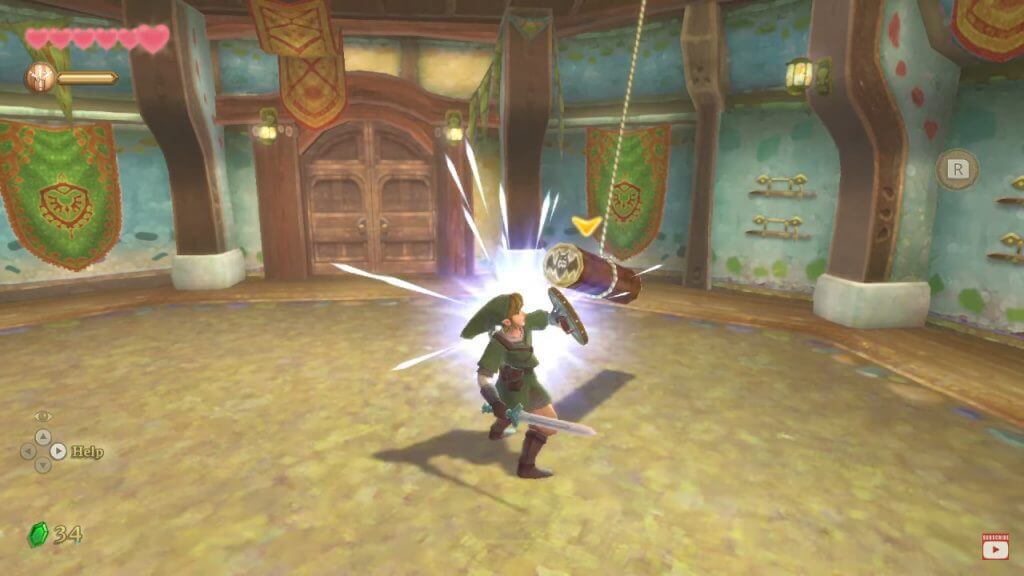
Using your shield is pretty straightforward and like many other controls in Skyward Sword can be done either through motion or the press of a button. To use the shield through motion controls you need to shake the left Joycon (or the whole controller if you are using a comfort grip). Doing so will cause Link to perform a shield bash, a very important maneuver for taking on baddies in Skyward Sword.

the legend of zelda skyward sword hd guide how to use the shield dazed enemy

If you would prefer button controls (or have a controller that makes it more necessary, such as a Pro Controller) then you can use your shield by pressing the Left Joycon joystick inwards (L3).

If you perform a shield bash right as an enemy is about to strike you then you will parry or deflect the attack (including projectiles). There is also the added bonus of dazing enemies to allow you to get some more hits in. Now that you know how to use your shield, get out there and kick some Bokoblin butt!


Related Topics
Guide Skyward Sword HD
Share. Facebook Twitter LinkedIn Reddit Email
Patrick Armstrong, Grant Johnson
  • Website

Artist and writer with a lifelong love of video games. Their favorite games include Dead by Daylight, Meet Your Maker, and Project Zomboid.

Patrick Armstrong, Grant Johnson
  • Website

Artist and writer with a lifelong love of video games. Their favorite games include Dead by Daylight, Meet Your Maker, and Project Zomboid.

SUGGESTED READS

Astra Malorum Zombies easter egg song
Game Guides

Where To Find Astra Malorum Easter Egg Song In Black Ops 7 Zombies

Path of Exile 2 The Last of the Druids Update Preview
Features

One Of the Most Unique Druid Archetypes Is Ready to Land on Path of Exile 2: The Last of the Druids

Avatar TLA Fans Are Finally Getting the Open-World Game They've Been Waiting For: 'We Got Avatar's Creed Before GTA 6'
Game News

Avatar TLA Fans Are Finally Getting the Open-World Game They’ve Been Waiting For: ‘We Got Avatar’s Creed Before GTA 6’

Best Augments in Black Ops 7 Zombies
Game Guides

Best Augments You Need To Fully Research In Call of Duty: Black Ops 7 Zombies

All Steps in the Destiny 2 Renegades Campaign
Game Guides

How To Complete the Renegades Campaign in Destiny 2

Octopath Traveler 0 PS5 Review
9
Features

Octopath Traveler 0 Review – A Tale of Revenge and Restoration

Trending
Astra Malorum Zombies easter egg song

Where To Find Astra Malorum Easter Egg Song In Black Ops 7 Zombies

Path of Exile 2 The Last of the Druids Update Preview

One Of the Most Unique Druid Archetypes Is Ready to Land on Path of Exile 2: The Last of the Druids

Avatar TLA Fans Are Finally Getting the Open-World Game They've Been Waiting For: 'We Got Avatar's Creed Before GTA 6'

Avatar TLA Fans Are Finally Getting the Open-World Game They’ve Been Waiting For: ‘We Got Avatar’s Creed Before GTA 6’

Best Augments in Black Ops 7 Zombies

Best Augments You Need To Fully Research In Call of Duty: Black Ops 7 Zombies

The Nerd Stash
Facebook X (Twitter) Instagram YouTube LinkedIn
  • About Us
  • Join Our Team
  • Meet the Team
  • Privacy Policy
  • DMCA Policy
  • Contact Us
  • Terms of Use
  • Sitemap
  • Editorial Guidelines
  • Advertising Policy
© 2025 The Nerd Stash. All Rights Reserved.

Type above and press Enter to search. Press Esc to cancel.




