Close Menu
  • Gaming
    • Game Guides
    • Codes
    • Game News
    • Game Previews
    • Game Reviews
    • Game Features
    • Game Lists
    • Platforms
      • Nintendo
      • PC
      • PlayStation
      • Xbox
      • Mobile
  • Entertainment
    • Movies
    • Movie Features
    • Movie Reviews
    • TV
    • Reality TV
    • Royals
  • Celebrity
    • Hollywood
  • Human Interest
  • Astrology
  • Videos
  • More
    • Anime
    • Lists
    • Podcasts
    • Reviews
Facebook X (Twitter) Instagram LinkedIn YouTube
  • About Us
  • Join Our Team
  • Meet the Team
  • Privacy Policy
  • DMCA Policy
  • Contact Us
  • Terms of Use
  • Sitemap
  • Editorial Guidelines
  • Advertising Policy
The Nerd Stash
  • Gaming
  • Celebrity
    • Hollywood
  • Human Interest
  • Videos
The Nerd Stash
Home»Coming Soon»Fallout 4 Patch Hits Steam First

Fallout 4 Patch Hits Steam First

Bethesda, the developer of the last two Fallout titles, released the first patch for their latest game in the series, Fallout 4. The patch is…

Benjamin JamesBy Benjamin JamesNovember 24, 20153 Mins Read
Fallout 4
Fallout 4 First Patch
This article is over 10 years old and may contain outdated information.

Bethesda, the developer of the last two Fallout titles, released the first patch for their latest game in the series, Fallout 4. The patch is considered to be a “Beta” and is initially available only for PC Steam users. The first update will launch for consoles once the PC patch version is finalized; which will likely be later this week. The patch’s official release is expected to resemble the existing Beta update. Although, it’s possible Bethesda will tweak the patch’s nuances to accommodate player feedback.
Fallout 4 Patch Hits Steam First
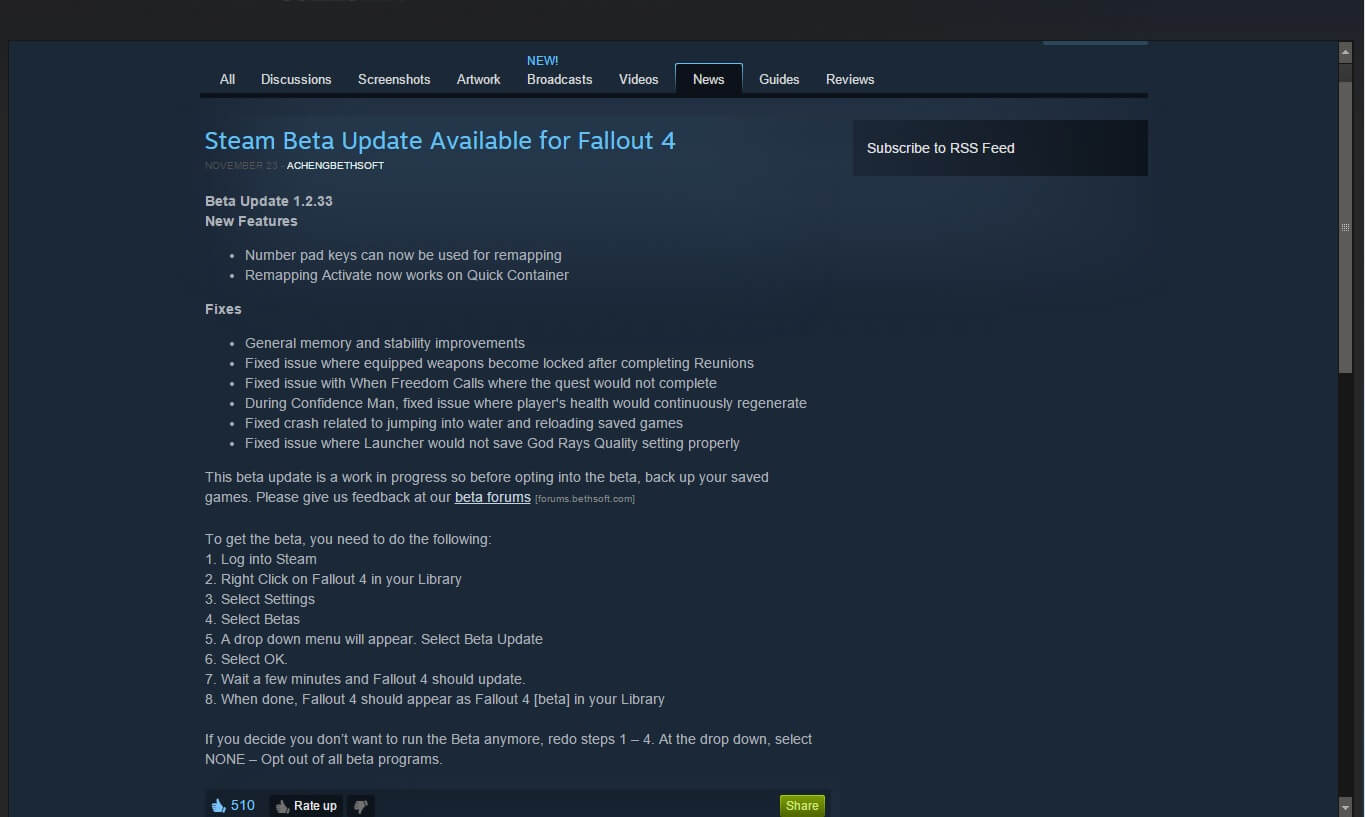
Steam’s Fallout 4 Beta Patch Notes

The update addresses several issues reported by the Fallout 4 gaming community including bugs hindering quest completion, crashes during singular gameplay events, as well as the ever ubiquitous, murky patch statement:

“General memory and stability improvements.”

Nonetheless, a gamer will always smile after reading that line in patch notes.

The first Fallout 4 patch also implements two new features inside of gameplay. The reassignment of number pad hotkeys for PC gamers is now allowed, therein improving customization. To this effect, remapping of the “Activate” action now works on Quick Container. Apparently, a bug that locked weapons after completing Reunions was resolved, and the Launcher will now properly save the graphical God Rays Quality setting.

For gamers interested in trying out the Fallout 4 patch before an official version is released to console and PC alike, Steam recommends that you first backup your saved games to avoid a possible catastrophe. A Beta update is not automatically installed in the same manner of a normal patch, so below is a step by step guide provided by Steam outlining the details on how to grab the patch for yourself. I know I will be installing it as soon as I get the chance if FPS improvements are involved.

This beta update is a work in progress so before opting into the beta, back up your saved games. Please give us feedback at our beta forums.

To get the beta, you need to do the following: 
1. Log into Steam 
2. Right Click on Fallout 4 in your Library 
3. Select Settings 
4. Select Betas 
5. A drop down menu will appear. Select Beta Update 
6. Select OK. 
7. Wait a few minutes and Fallout 4 should update. 
8. When done, Fallout 4 should appear as Fallout 4 [beta] in your Library 

Comment below if you have an opinion about using PC gamers as guinea pigs in order to beta test new patches.


Related Topics
Bethesda Fallout4
Share. Facebook Twitter LinkedIn Reddit Email
Benjamin James
  • Website
  • X (Twitter)

Benjamin is a writer for both Newegg and TheNerdStash, providing PC-related articles focused on gaming and hardware. Tinkerer and TV junkie, he also owns a computer repair business and constantly invents unreasonable justifications to upgrade his rig.

SUGGESTED READS

AI That Plays Games for You? Sony and Other Gaming Giants Filed 49 Gen AI-Related Patents in the Last Three Months
Game News

AI That Plays Games for You? Sony and Other Gaming Giants Filed 49 Gen AI-Related Patents in the Last Three Months

Clair Obscur: Expedition 33 Becomes Second Most Awarded Game Ever With 330+ GOTY Wins, But Which One Is Still No. 1?
Features

Clair Obscur: Expedition 33 Becomes Second Most Awarded Game Ever With 330+ Industry Awards, But Which Game Still Holds the No. 1 Spot?

StarRupture Unlock Recipes
Game Guides

How To Unlock New Recipes in StarRupture

StarRupture Data Points Farm
Game Guides

How To Earn Data Points in StarRupture

StarRupture Corporation Leveling Guide
Game Guides

Best Corporation to Level Up First in StarRupture

StarRupture Opening Underground Caves
Game Guides

How To Enter Underground Caves in StarRupture

Trending
AI That Plays Games for You? Sony and Other Gaming Giants Filed 49 Gen AI-Related Patents in the Last Three Months

AI That Plays Games for You? Sony and Other Gaming Giants Filed 49 Gen AI-Related Patents in the Last Three Months

Clair Obscur: Expedition 33 Becomes Second Most Awarded Game Ever With 330+ GOTY Wins, But Which One Is Still No. 1?

Clair Obscur: Expedition 33 Becomes Second Most Awarded Game Ever With 330+ Industry Awards, But Which Game Still Holds the No. 1 Spot?

StarRupture Unlock Recipes

How To Unlock New Recipes in StarRupture

StarRupture Data Points Farm

How To Earn Data Points in StarRupture

The Nerd Stash
Facebook X (Twitter) Instagram YouTube LinkedIn
  • About Us
  • Join Our Team
  • Meet the Team
  • Privacy Policy
  • DMCA Policy
  • Contact Us
  • Terms of Use
  • Sitemap
  • Editorial Guidelines
  • Advertising Policy
© 2026 The Nerd Stash. All Rights Reserved.

Type above and press Enter to search. Press Esc to cancel.