Close Menu
  • Gaming
    • Game Guides
    • Codes
    • Game News
    • Game Previews
    • Game Reviews
    • Game Features
    • Game Lists
    • Platforms
      • Nintendo
      • PC
      • PlayStation
      • Xbox
      • Mobile
  • Entertainment
    • Movies
    • Movie Features
    • Movie Reviews
    • TV
    • Reality TV
    • Royals
  • Celebrity
    • Hollywood
  • Human Interest
  • Astrology
  • Videos
  • More
    • Anime
    • Lists
    • Podcasts
    • Reviews
Facebook X (Twitter) Instagram LinkedIn YouTube
  • About Us
  • Join Our Team
  • Meet the Team
  • Privacy Policy
  • DMCA Policy
  • Contact Us
  • Terms of Use
  • Sitemap
  • Editorial Guidelines
  • Advertising Policy
The Nerd Stash
  • Gaming
  • Celebrity
    • Hollywood
  • Human Interest
  • Videos
The Nerd Stash
Home»Game Guides»How to Mount in Call of Duty Modern Warfare 2

How to Mount in Call of Duty Modern Warfare 2

Taking cover is often essential for surviving an enemy assault in Call of Duty: Modern Warfare 2, and using the Mount function will enable combatants to…

AugustBy AugustNovember 8, 20222 Mins Read
Performing a Mount in Call of Duty Modern Warfare 2
This article is over 3 years old and may contain outdated information.

Taking cover is often essential for surviving an enemy assault in Call of Duty: Modern Warfare 2, and using the Mount function will enable combatants to retaliate against their opponents effectively. For those unfamiliar with Mount, it is a combat mechanic that enables players to rest their weapon on a solid surface to receive a substantial buff to their firearm’s recoil control and stability. Although Mounts are excellent for defensive positioning, they are also a great way to prepare for an offensive ambush or peak around a corner with increased firing precision. Therefore, knowing how to Mount in MW2 will be a significant advantage for taking down foes. 

Performing a Mount in MW2

Performing a Mount on a flowerbed in MW2

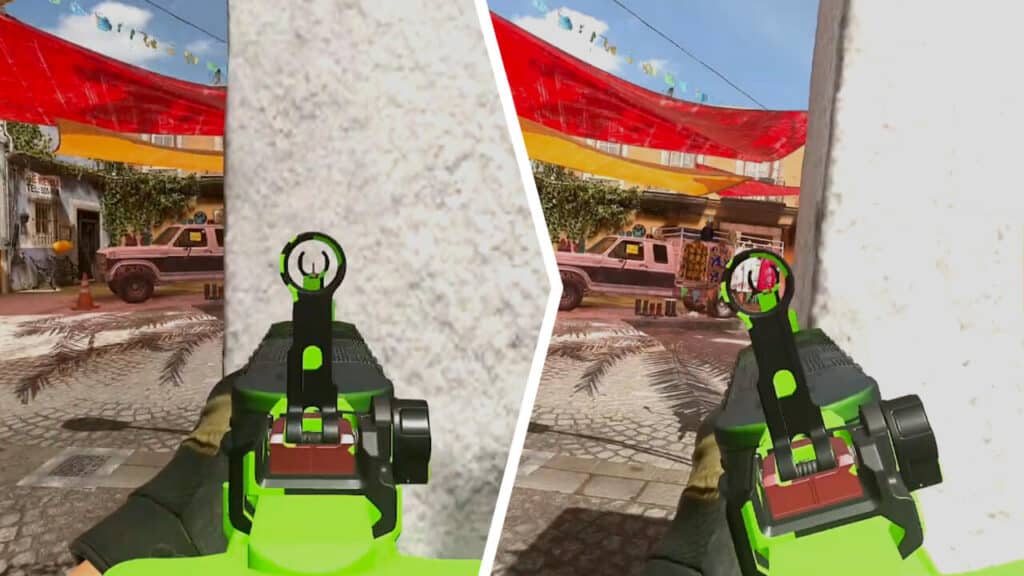
To perform a Mount in Modern Warfare 2, players must approach a wall or waist-high surface, enter ADS mode with their firearm, and press the corresponding input required to Mount. The perspective will switch to a slight zoom, and the weapon’s range of movement will be significantly limited. However, combatants should notice a considerable improvement in their stability and control.

Related: 

Best STB 556 Loadout in Modern Warfare 2 (Attachments & Class)

The input for Mounting in MW2 will vary depending on the platform players are using. For instance, PC users must press T, while those on Xbox will need to push their RS stick to enter Mounted mode. As for PlayStation players, the R3 stick is the input to Mount on their platform. Whenever combatants come into contact with the corner of a wall or the waist-high surface of a window sill, they will be able to initiate a Mount, altering their posture and weapon control.

Keep in mind that while in Mount mode in MW2, players’ mobility will be greatly reduced unless they exit the position. The range of movement that their weapons are capable of will also receive a debuff in exchange for improved recoil control and stability. Therefore, combatants should always be sure that their surroundings are safe before committing to a Mounted position. Of course, it is not possible to consistently predict a potential flank. Therefore, players are encouraged to practice moving swiftly in and out of Mounting to ensure they never become too comfortable in an immobile posture.

Related Topics
Call Of Duty: Modern Warfare 2 Guide
Share. Facebook Twitter LinkedIn Reddit Email
August

August Webb is TNS's Lead Guide Editor who additionally helps in covering celebrity and pop culture news. She provides assistance to other freelancers and staff on trendy topics to write about. When not working, she's playing a visual novel, fanning over an indie gem, or lost in the world of VR. Residing in Daegu, South Korea, August has a Bachelor's, double-majoring in Media and Communication and Business Administration. She graduated in Yeungnam University of Gyeongsan, South Korea. August's areas of expertise include Game Strategy Guides, Video Game Features, and Celebrity News and Gossip. August has worked in online media for over four years since 2021. Starting out as a freelancer, she's written for TNS, ScreenRant of Valnet, and Gamepur of GAMURS GROUP. She has experience publishing short and long-form video game guides, game features, and game reviews. Currently serving as the Lead Guide Editor for the Guide Writing department at The Nerd Stash, she edits a variety of articles while also helping with providing topics to write about via tools like Google Trends or SemRush. She works alongside TNS's Editorial Team, discussing and executing strategies to better improve the site's traffic and experience for users.

SUGGESTED READS

Inner voice key art
Game News

Inner Voice Brings Grief-Soaked Psychological Horror to Steam With New PC Demo

Nightmare Geese Gameplay
Game Previews

Fatal Fury: Nightmare Geese Hands-On Impressions – The Boss Is Here

Destiny 2 Shadow and Order Delay
Game News

‘At This Point, I Don’t Think It’s Enough to Save the Game,’ Destiny 2 Players Heartbroken After Shadow and Order Delay

How to Spectate a Trade in Adopt Me on Roblox
Game Guides

How to Spectate a Trade in Adopt Me on Roblox

People of Note Release Date
Game News

Musical RPG, People of Note, Announces Its Release Date and Launches Public Demo

People of Note Demo Hands-on Impressions
Game Previews

People of Note Demo Hands-On Impressions – Embrace the Beat

The Nerd Stash
Facebook X (Twitter) Instagram YouTube LinkedIn
  • About Us
  • Join Our Team
  • Meet the Team
  • Privacy Policy
  • DMCA Policy
  • Contact Us
  • Terms of Use
  • Sitemap
  • Editorial Guidelines
  • Advertising Policy
© 2026 The Nerd Stash. All Rights Reserved.

Type above and press Enter to search. Press Esc to cancel.