Clear communication is essential when cooperating with teammates in Call of Duty: Warzone 2.0, and using a Ping is one of the most accessible means of…
This article is over 3 years old and may contain outdated information.
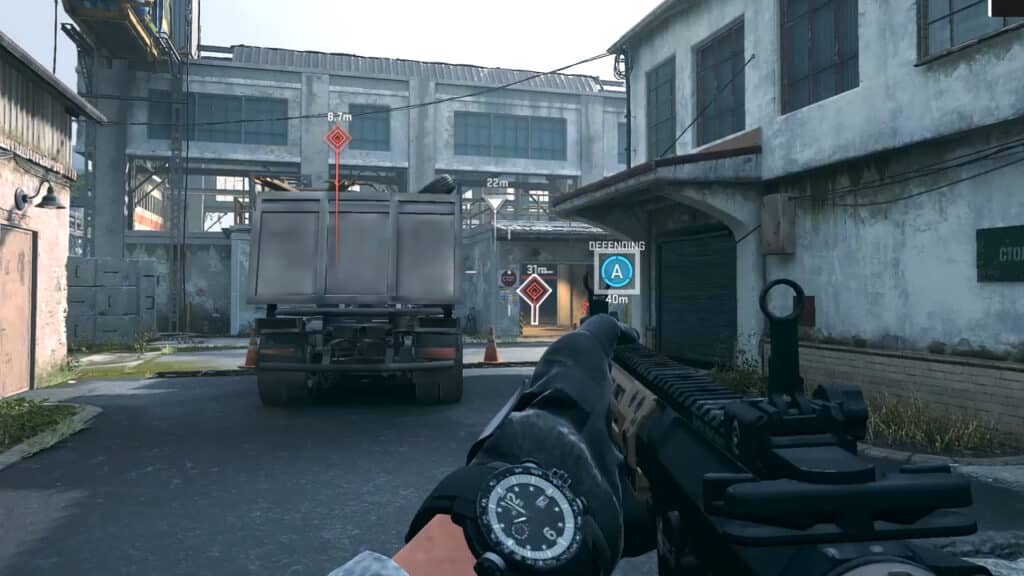
Clear communication is essential when cooperating with teammates in Call of Duty: Warzone 2.0, and using a Ping is one of the most accessible means of disclosing information to allies. Those familiar with past Call of Duty titles or general FPS games should be well-acquainted with the ability to Ping in a match. For newcomers, Pinging is a mechanic that enables players to highlight an object, enemy, or location within their view for their teammates to see. This feature is much easier than typing out a message or even using voice chat since a Ping is sent and received instantly by all allies.
[Updated August 22, 2024 – Updated links]
Using Ping in Call of Duty: Warzone 2
The default input for the Ping mechanic in Warzone 2.0 is the Up button on the D-pad for Xbox and PlayStation gamepads. This action will bring up the Ping Wheel, granting players a variety of communicatory choices. For PC users, the default input for Pinging is Alt on the keyboard or holding down the mouse wheel. There are two primary options for the Ping Mechanic: “Ping” and “Ping Wheel.” Ping enables players to bind a button or key that enables them to send a specific Ping with the tap of the input. On the other hand, the Ping Wheel is the mechanic mentioned above that lets users choose which Ping marker they wish to use. For more details about these markers, fans can refer to the index below:
Ping Type
Description
Ping
This Ping is designed to point out an object, location, or enemy without any related text.
Attacking
This Ping is designed for squads preparing for an offensive play or telling allies where to push.
Help
This Ping is designed to let teammates know a user is in need of assistance.
Quiet
This Ping is designed to communicate to teammates that stealth is the recommended strategy.
Loot
This Ping is designed to let allies know where goods for combat can be found.
Watch
This Ping is designed to reveal areas or spots that others should keep an eye on.
Defend
This Ping is designed to tell players to protect or hold down a position.
Regroup
This Ping is designed to let squad members know where they should meet up after looting or group for a play.
Players who do not like the default inputs for Pinging in Call of Duty: Warzone 2.0 can freely change their hotkeys and controller keybind options in the game’s settings, regardless of platform.
August Webb is a Staff Writer and former Lead Guide Editor of TNS.
When not working, she's playing a visual novel, fanning over an indie gem, or lost in the world of VR.