Close Menu
  • Gaming
    • Game Guides
    • Codes
    • Game News
    • Game Previews
    • Game Reviews
    • Game Features
    • Game Lists
    • Platforms
      • Nintendo
      • PC
      • PlayStation
      • Xbox
      • Mobile
  • Entertainment
    • Movies
    • Movie Features
    • Movie Reviews
    • TV
    • Reality TV
    • Royals
  • Celebrity
    • Hollywood
  • Human Interest
  • Astrology
  • More
    • Anime
    • Lists
    • Podcasts
    • Reviews
Facebook X (Twitter) Instagram LinkedIn YouTube
  • About Us
  • Join Our Team
  • Meet the Team
  • Privacy Policy
  • DMCA Policy
  • Contact Us
  • Terms of Use
  • Sitemap
  • Editorial Guidelines
  • Advertising Policy
The Nerd Stash
  • Gaming
  • Celebrity
  • Hollywood
  • Human Interest
The Nerd Stash
Home»Game Guides»How to Lock On in Pokémon Scarlet and Violet

How to Lock On in Pokémon Scarlet and Violet

Do you want to know how to lock on Pokémon Scarlet and Violet? Pokemon Go is a game that has become extremely popular over the…

Asanga WijeratneBy Asanga WijeratneNovember 19, 20223 Mins Read
lock on in Pokémon Scarlet and Violet
This article is over 3 years old and may contain outdated information.

Do you want to know how to lock on Pokémon Scarlet and Violet? Pokemon Go is a game that has become extremely popular over the past few years. It has allowed players to explore the world of Pokemon in a virtual environment. Pokémon Scarlet and Violet is the newest game as part of Pokemon Go, and it is a great way to get out and explore the world, but for some of us, it’s not always easy to keep track of our favorite Pokémon. Locking on is an important technique that can help you in many situations, like battles and catching wild Pokémon. Luckily, locking on to a specific Pokémon in the game is simple! This guide will show you how to lock on Pokémon Scarlet and Violet.

[Updated August 21, 2024 – Updated links and fixed inconsistencies]

What is Lock on in Pokémon Scarlet and Violet?

The lock-on feature in Pokémon Scarlet and Violet is a valuable tool for trainers who want to ensure their attacks always hit their target. By locking on to a Pokémon, you can ensure that your moves will always land on that specific Pokémon, regardless of where it is on the battlefield. This can be particularly helpful in fast-paced battles where there is a lot of movement or when you are up against multiple opponents and need to focus your attacks on one specific target. While the lock-on feature is not required to win battles, it can certainly give you an advantage.

Related:

Where to find Eevee in Pokémon Scarlet and Violet

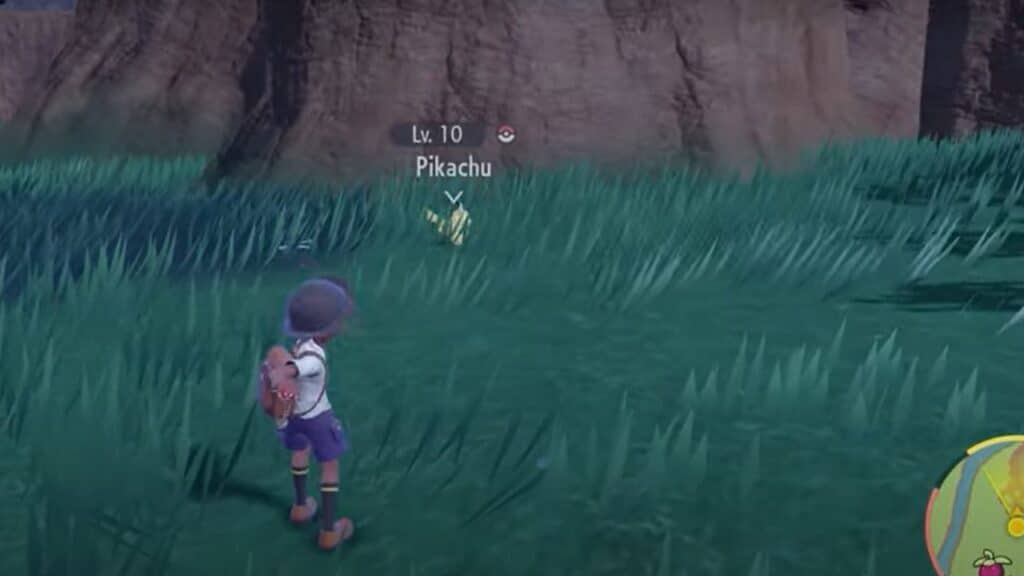
Pokémon Scarlet and Violet: How to Lock On

lock on in Pokémon Scarlet and Violet

Here are the steps  to use the lock-on feature:

  1. Select your Pokémon from the party menu
  2. Press the ZL button to activate the lock-on feature
  3. Move the reticle onto the Pokémon you want to target
  4. Press ZR to initiate the attack

Once the Pokémon is locked, you can use any move that targets it. Additionally, the reticle will stay locked onto the Pokémon, even if it moves around the battlefield. This can be especially useful in fast-paced battles where you must switch targets quickly.

Locking on in this game is a great way to ensure that your attacks will always hit their intended target. Also, if you lock on a Pokemon you have already caught, you will see its basic information, such as gender, level, and name. We hope this guide has been helpful and that you can now take advantage of the lock-on feature in Pokémon Scarlet and Violet.  Good luck out there! Happy hunting!

Related Topics
Guide Pokemon Scarlet and Violet
Share. Facebook Twitter LinkedIn Reddit Email
Asanga Wijeratne
  • Website

SUGGESTED READS

How to Subscribe & Cancel Adopt Me Pet Plus Subscription
Game Guides

How to Subscribe & Cancel Adopt Me Pet Plus Subscription

Saros Outlets Previews
Game Features

Saros Previews Round-Up: Refining What Was Already Flawless

Crimson Desert Community Tips and Tricks
Game Guides

I Played Crimson Desert for 90 Hours and STILL Learned These 10 Tricks From Social Media

Doom Co-creator and Wife Say The Current Game Industry Is 'Crashier' Than the '80s Crash: 'It Can't Stay Like This Forever'
Game News

Doom Co-Creator and Wife Say the Current Game Industry Is ‘Crashier’ Than the ’80s Crash: ‘It Can’t Stay Like This Forever’

Marathon PC Review
9.5
Game Features

Marathon Review – Bungie’s Finest

XBox Partner Preview November 2025 Announcements
Game Features

Every Major Announcement at the Xbox Partner Preview (March 2026)

The Nerd Stash
Facebook X (Twitter) Instagram YouTube LinkedIn
  • About Us
  • Join Our Team
  • Meet the Team
  • Privacy Policy
  • DMCA Policy
  • Contact Us
  • Terms of Use
  • Sitemap
  • Editorial Guidelines
  • Advertising Policy
© 2026 The Nerd Stash. All Rights Reserved.

Type above and press Enter to search. Press Esc to cancel.