Close Menu
  • Gaming
    • Platforms
      • Nintendo
      • PC
      • PlayStation
      • Xbox
  • Entertainment
    • Movies
    • TV
    • Royals
  • Celebrity
    • Hollywood
  • Human Interest
  • Astrology
  • More
    • Reviews
Facebook X (Twitter) Instagram LinkedIn YouTube
  • About Us
  • Join Our Team
  • Meet the Team
  • Privacy Policy
  • DMCA Policy
  • Contact Us
  • Terms of Use
  • Sitemap
  • Editorial Guidelines
  • Advertising Policy
The Nerd Stash
  • Gaming
  • Celebrity
  • Hollywood
  • Human Interest
The Nerd Stash
Home»Gaming»How to Get Cherry Blossoms in Minecraft Early

How to Get Cherry Blossoms in Minecraft Early

Minecraft 1.20 update will include a lot of brand new stuff for you to play around with, including a new biome known as the Cherry…

Sidharta F. RasidiBy Sidharta F. RasidiFebruary 22, 20232 Mins Read
How to Get Cherry Blossoms in Minecraft Early
This article is over 3 years old and may contain outdated information.

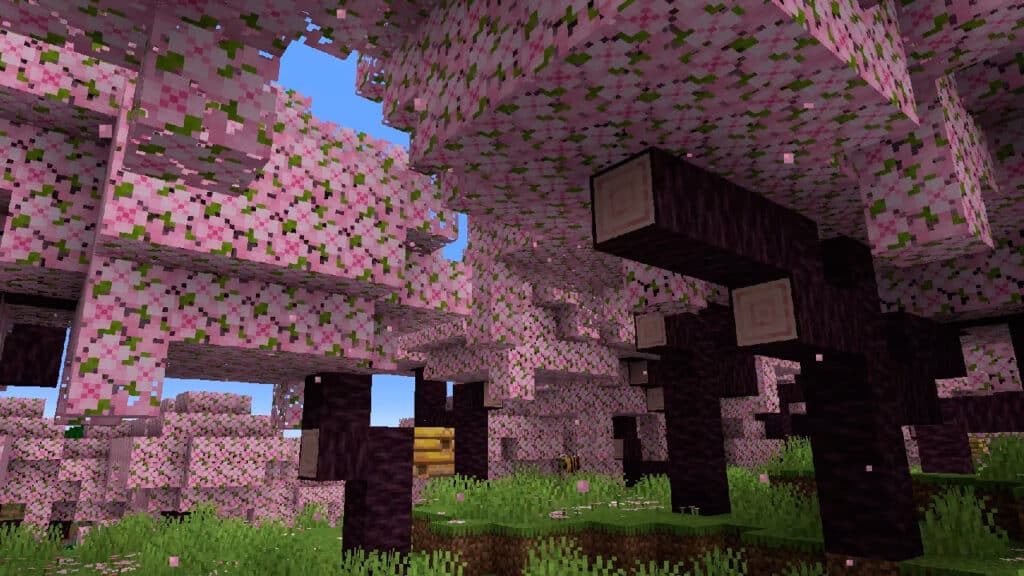
Minecraft 1.20 update will include a lot of brand new stuff for you to play around with, including a new biome known as the Cherry Blossom biome. As the name suggests, this biome is characterized by its stunning cherry blossom trees with iconic pink leaves. It also introduces a new cherry wood set featuring light pink blocks and items. If you want to get the Cherry Blossoms early before the official Minecraft 1.20 update launch, here’s how to do it.

How to Get Minecraft 1.20 Snapshot

How to Get Armor Trims in Minecraft 1.20 Snapshot

Make sure you’re in the correct Minecraft version. Otherwise, the new Cherry Blossom biome won’t show up in the game. Here’s how you can boot up the experimental Minecraft 1.20 snapshot before the full update is released:

  1. Open the Minecraft Launcher.
  2. Select the Installations tab (in either Java Edition or Minecraft for Windows/Bedrock), and choose the Snapshots checkbox.
    • If there is no option to check the Snapshot, create a new Installation by pressing the green Install button first.
  3. Click on the Latest Snapshot and press Play.
  4. Now, after creating a new World, go to Data Packs then move the update_1_20 and bundle files to Selected.

How to Get Cherry Blossoms in Minecraft 1.20 Snapshot Early

How to Get Cherry Blossoms in Minecraft Early

According to various social media posts and other sources, the Cherry Blossoms biome can be found in mountainous areas, similar to Grove biomes. However, it won’t appear on top of snowy mountains. In Creative Mode, you should be able to easily spot the pink trees within the green and/or white mountains while flying. Usually, bees, black rabbits, cows, pigs, and sheep can spawn in the Cherry Blossoms biome.

Aside from finding one manually, you can also use the locate command to find them. Simply type the “/locate biome cherry_grove” (without quotation marks) command, and the game should let you know where is the nearest one from your spot.

Lastly, Minecraft 1.20 Snapshot also lets you create a single biome World when you’re creating one, which means you can instantly make a Cherry Blossom-filled World. Open the Create New World menu, turn on the Update 1.20 option, go into the World tab, change the World Type to Single Biome, and select the Customize option. From there, you can choose Cherry Grove to make a World full of cherry blossom trees.

Minecraft is available on PC, Android, iOS, Xbox One, Xbox Series X|S, Nintendo Switch, and PlayStation platforms.

Related Topics
Guide Minecraft
Share. Facebook Twitter LinkedIn Reddit Email
Sidharta F. Rasidi
  • Website

Since middle school, Sidharta has used his video game blog as a handy excuse to avoid studying. After graduating with a degree in Management Information Systems from Bina Nusantara University, he spent years honing his skills as a games journalist, working as an editor for a local gaming site and freelancing elsewhere. Nowadays, when he’s not busy crafting outrageous plots for his serialized comic, Sidharta covers niche games on his personal blog, StoPlayinGame.com. His favorite game series includes Monster Hunter, Earth Defense Force, THE iDOLM@STER, Road Trip Adventure, and KOEI Tecmo's Warriors.

SUGGESTED READS

How to find Pure Quartz in Palworld 1.0
Gaming

Where To Find Pure Quartz in Palworld

Sicario Writer's Call of Duty Movie To Adapt 'Modern Warfare' Universe, Confirmed Paramount
Gaming

Sicario Writer’s Call of Duty Movie To Adapt ‘Modern Warfare’ Universe, Confirmed Paramount

Fatal Fury City of the Wolves Rick Strowd Hands-on Impressions
Gaming

Fatal Fury: City of the Wolves Rick Strowd Hands-On Impressions – A Strong Start

Zenless Zone Zero Version 3.1 Anniversary
Gaming

Zenless Zone Zero Celebrates Its 2-Year Milestone With Free S-Rank Agents and a Crossover Announcement

All Black Marketeer Locations in Palworld
Gaming

All Black Marketeer Locations in Palworld

Gaming

A New Wolverine Trailer Playing in Front of the Odyssey is Getting Obliterated by PlayStation Fans: ‘Can’t wait for my PHYSICAL COPY’

The Nerd Stash
Facebook X (Twitter) Instagram YouTube LinkedIn
  • About Us
  • Join Our Team
  • Meet the Team
  • Privacy Policy
  • DMCA Policy
  • Contact Us
  • Terms of Use
  • Sitemap
  • Editorial Guidelines
  • Advertising Policy
© 2026 The Nerd Stash. All Rights Reserved.

Type above and press Enter to search. Press Esc to cancel.