Close Menu
  • Gaming
    • Game Guides
    • Codes
    • Game News
    • Game Previews
    • Game Reviews
    • Game Features
    • Game Lists
    • Platforms
      • Nintendo
      • PC
      • PlayStation
      • Xbox
      • Mobile
  • Entertainment
    • Movies
    • Movie Features
    • Movie Reviews
    • TV
    • Reality TV
    • Royals
  • Celebrity
    • Hollywood
  • Human Interest
  • Astrology
  • Videos
  • More
    • Anime
    • Lists
    • Podcasts
    • Reviews
Facebook X (Twitter) Instagram LinkedIn YouTube
  • About Us
  • Join Our Team
  • Meet the Team
  • Privacy Policy
  • DMCA Policy
  • Contact Us
  • Terms of Use
  • Sitemap
  • Editorial Guidelines
  • Advertising Policy
The Nerd Stash
  • Gaming
  • Celebrity
    • Hollywood
  • Human Interest
  • Videos
The Nerd Stash
Home»Game Guides»How to Change Hair Strands in Resident Evil 4 Remake

How to Change Hair Strands in Resident Evil 4 Remake

We all care about Leon’s appearance a little too much. So here’s how to change hair strands in Resident Evil 4 Remake. Throughout the annals of…

Cande MaldonadoBy Cande MaldonadoMarch 16, 20232 Mins Read
How to Change Hair Strands in Resident Evil 4 Remake
This article is over 2 years old and may contain outdated information.

We all care about Leon’s appearance a little too much. So here’s how to change hair strands in Resident Evil 4 Remake.

Throughout the annals of video game history, developers have struggled to master the art of creating lifelike hair animation. Whether it’s hair that appears rigid and inflexible or locks that move in a way that defies the laws of physics, nailing the perfect hair animation has been difficult. 

However, we’ve come a long way from the days of getting distracted by Lara Croft’s polygonal mane. Today, games like Final Fantasy, The Last of Us, and Resident Evil have made impressive strides in improving hair animation. In this guide, you’ll learn how to change hair strands in Resident Evil 4 Remake. As the overall visual quality of video games continues to evolve with advancements in lighting, shadows, and environmental design, Resident Evil 4 Remake is no exception. So while the grass and rain may not be up to par, players can now tweak the look of hair strands in the game. Here’s how to do it.

How to Change Hair Strands in Resident Evil 4 Remake
How to Change Hair Strands in Resident Evil 4 Remake

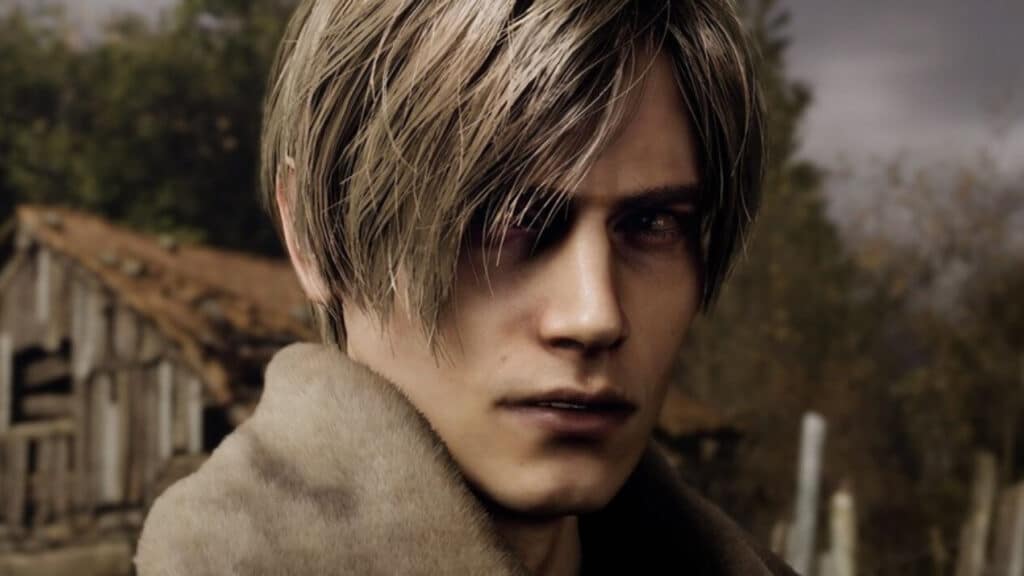
Refrain from feeling a little finicky about Leon Kennedy’s hair in the Resident Evil 4 Remake Chainsaw Demo! You can adjust the hair strands by navigating to the Options menu, then to Display, and finally to the Hair Strands option. This feature is designed to enhance the depth and texture of Kennedy’s hair, giving it a more luxurious and realistic appearance.

By default, Kennedy’s hair has a solid structure with limited movement. However, by enabling Hair Strands, you’ll notice a significant improvement in the movement and realism of his hair. Now that you change hair strands in Resident Evil 4 Remake, each strand is given more detail, and the lighting and shadows are adjusted to make his locks stand out. 

While this option isn’t necessary, it’s a nice touch for those who want to enhance the game’s visuals further. Whether his hair is default or modified, Kennedy still rocks the K-Pop Idol look like a boss.

The remake of Resident Evil 4 will launch March 24, 2023.

Related Topics
Guide Resident Evil 4
Share. Facebook Twitter LinkedIn Reddit Email
Cande Maldonado
  • Website

Pot-smasher, NPC-annoyer, side quest-completionist. Oh, there's that writing gig, too.

SUGGESTED READS

Minecraft Accused of Mocking Lonely Kids, Sparking Mental Health Backlash: 'One of the Ickiest Things I've Seen'
Features

Minecraft Accused of Mocking Lonely Kids, Sparking Mental Health Backlash: ‘One of the Ickiest Things I’ve Seen’

Destiny 2 Renegades PS5 Review
8.5
Features

Destiny 2: Renegades Review – The Shooter Strikes Back

Clair Obscur: Expedition 33 Loses GOTY, Other Award from Indie Game Awards Over Generative AI: 'Some Weird Performative BS'
Game News

GOTY Stripped Over AI?: Clair Obscur: Expedition 33 Loses Awards at Indie Game Awards, ‘Some Weird Performative BS’

Sony Patents Real-time AI Game Censorship Tech That Could Even Make GTA 6 Kid-Friendly
Game News

Sony Patents Real-Time AI Game Censorship Tech That Could Even Make GTA 6 Kid-Friendly

Zenless Zone Zero Version 2.5 Announcement
Game News

Zenless Zone Zero Version 2.5 Is Ready To Wrap Up the Year With Two New Agents and a Free Outfit

PC Gamers Can't Catch a Break as Nvidia Plans 40% GeForce GPU Production Cuts, Report: 'Who Needs a PC Anyways'
Game News

PC Gamers Can’t Catch a Break as Nvidia Reportedly Plans 40% GeForce GPU Production Cuts: ‘Who Needs a PC Anyways’

Trending
Minecraft Accused of Mocking Lonely Kids, Sparking Mental Health Backlash: 'One of the Ickiest Things I've Seen'

Minecraft Accused of Mocking Lonely Kids, Sparking Mental Health Backlash: ‘One of the Ickiest Things I’ve Seen’

Destiny 2 Renegades PS5 Review
8.5

Destiny 2: Renegades Review – The Shooter Strikes Back

Clair Obscur: Expedition 33 Loses GOTY, Other Award from Indie Game Awards Over Generative AI: 'Some Weird Performative BS'

GOTY Stripped Over AI?: Clair Obscur: Expedition 33 Loses Awards at Indie Game Awards, ‘Some Weird Performative BS’

Sony Patents Real-time AI Game Censorship Tech That Could Even Make GTA 6 Kid-Friendly

Sony Patents Real-Time AI Game Censorship Tech That Could Even Make GTA 6 Kid-Friendly

The Nerd Stash
Facebook X (Twitter) Instagram YouTube LinkedIn
  • About Us
  • Join Our Team
  • Meet the Team
  • Privacy Policy
  • DMCA Policy
  • Contact Us
  • Terms of Use
  • Sitemap
  • Editorial Guidelines
  • Advertising Policy
© 2025 The Nerd Stash. All Rights Reserved.

Type above and press Enter to search. Press Esc to cancel.