Close Menu
  • Gaming
    • Platforms
      • Nintendo
      • PC
      • PlayStation
      • Xbox
  • Entertainment
    • Movies
    • TV
    • Royals
  • Celebrity
    • Hollywood
  • Human Interest
  • Astrology
  • More
    • Reviews
Facebook X (Twitter) Instagram LinkedIn YouTube
  • About Us
  • Join Our Team
  • Meet the Team
  • Privacy Policy
  • DMCA Policy
  • Contact Us
  • Terms of Use
  • Sitemap
  • Editorial Guidelines
  • Advertising Policy
The Nerd Stash
  • Gaming
  • Celebrity
  • Hollywood
  • Human Interest
The Nerd Stash
Home»Gaming»How to Change Difficulty Settings in Wartales

How to Change Difficulty Settings in Wartales

Want to know how to change Difficulty Settings in Wartales? Wartales is an RPG with an open medieval world. In other words, this is far…

Alina NovichenkoBy Alina NovichenkoApril 22, 20233 Mins Read
How-to-Change-Difficulty-Settings-in-Wartales
Image via Shiro Games
This article is over 3 years old and may contain outdated information.

Want to know how to change Difficulty Settings in Wartales? Wartales is an RPG with an open medieval world. In other words, this is far from a friendly world, and most of its inhabitants will gladly kill you for treasures or other resources. Therefore, you should choose Difficulty Settings depending on your experience in games of this genre. Fortunately, if Wartales seems too easy or difficult for you, you can change the Difficulty during the game. So, read on to learn how to change Difficulty Settings in Wartales.

How to Change Wartales Difficulty Settings

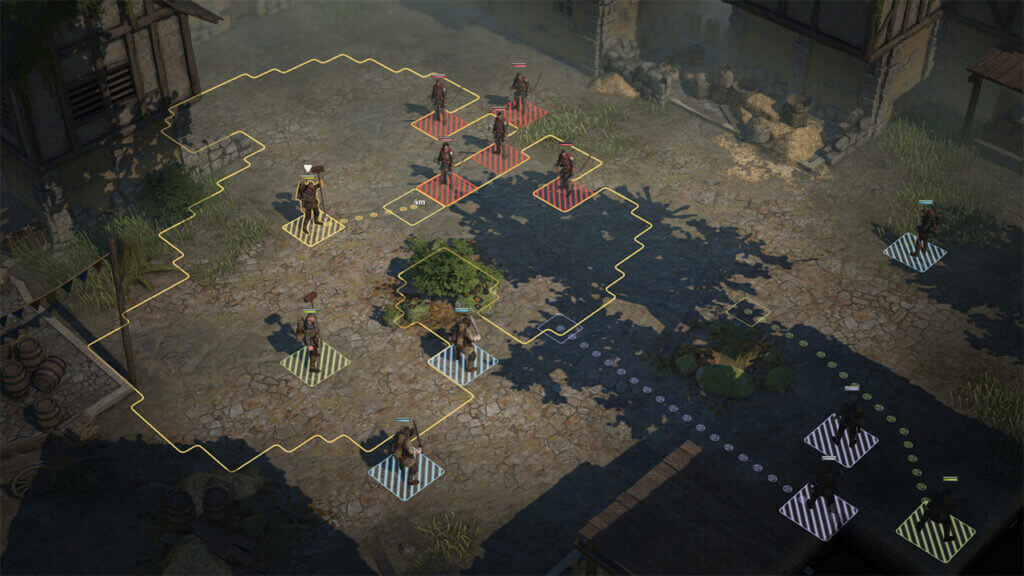
Change-Wartales-Difficulty-Settings
Image via Shiro Games

When starting a game in Wartales, you must choose one of 4 Difficulties. The game explicitly says that you can change it later, so we recommend you first choose Easy or Normal Difficulty to familiarize yourself with the game mechanics. After that, you can change the Difficulty in just a few clicks.

So, to change Wartales Difficulty Settings, you need to open the settings menu and go to your saves. Then click on the gear icon at the top right of the screen. But it is worth noting that you need to be out of combat, or you will change the Difficulty Settings in Wartales.

All Wartales Difficulty Levels

As we said, Wartales has four levels of Difficulty. Each of them will be able to give you a unique gaming experience. But the last two levels are real challenges.

  • Easy Difficulty – This is the easiest experience you can get in Wartales. Your enemies will be very weak, and it will be easy to get good equipment.
  • Normal Difficulty – This is the standard difficulty level that balances the game. It is also suitable for new players.
  • Hard Difficulty – If you find Normal Difficulty challenging, you can try this level. It is much more difficult, so the battles with enemies will become even more dangerous.
  • Expert Difficulty – This is the highest Difficulty in Wartales. It is suitable for players who want to challenge themselves in a brutal medieval world. And trust us, at Expert Difficulty, the game does not forgive your mistakes.

That’s all you need to know about how to change Difficulty Settings in Wartales. All four levels of Difficulty in the game can give you an unforgettable gaming experience. Therefore, we recommend that you try each of them. At the same time, do you know how to get an Animal Companion in Wartales?

Wartales is available for PC.

Related Topics
Guide
Share. Facebook Twitter LinkedIn Reddit Email
Alina Novichenko
  • Website

Alina is a professional freelance game guides writer, with 2 years experience in this industry. She joined TheNerdStash in 2022 and is glad to be part of a friendly team of writers.

SUGGESTED READS

Konami is Rebooting Metal Gear, Castlevania, Other Existing IPs: 'Important Initiatives as Pillars of Our Business'
Gaming

Konami is Rebooting Metal Gear, Castlevania, Other Existing IPs: ‘Important Initiatives as Pillars of Our Business’

Gaming

GTA 6 Leaker Hunt Goes Nuclear as Take-Two Demands Discord and Microsoft Hand Over Private Data

Raid Shadow Legends new players
Gaming

7 New-Player Mistakes That Cost You Free Rewards in Raid: Shadow Legends (August 2026)

PlayStation's Phantom Blade Zero Preorders Have 'Far Exceeded Expectations' Despite Disc-less Release Concerns
Gaming

PlayStation’s Phantom Blade Zero Preorders Have ‘Far Exceeded Expectations’ Despite Disc-less Release Concerns

Gaming

Interview: Dawn of War 4 Voice Actor Toby Longworth Discusses Space Marine Voices and How RoboCop Inspired His Dreadnought Performance

Mortal Shell 2 Sester Genessa Unlock
Gaming

How to Unlock Sester Genessa in Mortal Shell 2

The Nerd Stash
Facebook X (Twitter) Instagram YouTube LinkedIn
  • About Us
  • Join Our Team
  • Meet the Team
  • Privacy Policy
  • DMCA Policy
  • Contact Us
  • Terms of Use
  • Sitemap
  • Editorial Guidelines
  • Advertising Policy
© 2026 The Nerd Stash. All Rights Reserved.

Type above and press Enter to search. Press Esc to cancel.