Close Menu
  • Gaming
    • Game Guides
    • Codes
    • Game News
    • Game Previews
    • Game Reviews
    • Game Features
    • Game Lists
    • Platforms
      • Nintendo
      • PC
      • PlayStation
      • Xbox
      • Mobile
  • Entertainment
    • Movies
    • Movie Features
    • Movie Reviews
    • TV
    • Reality TV
    • Royals
  • Celebrity
    • Hollywood
  • Human Interest
  • Astrology
  • Videos
  • More
    • Anime
    • Lists
    • Podcasts
    • Reviews
Facebook X (Twitter) Instagram LinkedIn YouTube
  • About Us
  • Join Our Team
  • Meet the Team
  • Privacy Policy
  • DMCA Policy
  • Contact Us
  • Terms of Use
  • Sitemap
  • Editorial Guidelines
  • Advertising Policy
The Nerd Stash
  • Gaming
  • Celebrity
    • Hollywood
  • Human Interest
  • Videos
The Nerd Stash
Home»Game Guides»Remnant 2 Controls Guide

Remnant 2 Controls Guide

Learning any new game can be difficult, especially for Remnant 2, which has loads of controls to remember for both the keyboard & mouse, and controller.…

Jordan MoyerBy Jordan MoyerJuly 20, 20233 Mins Read
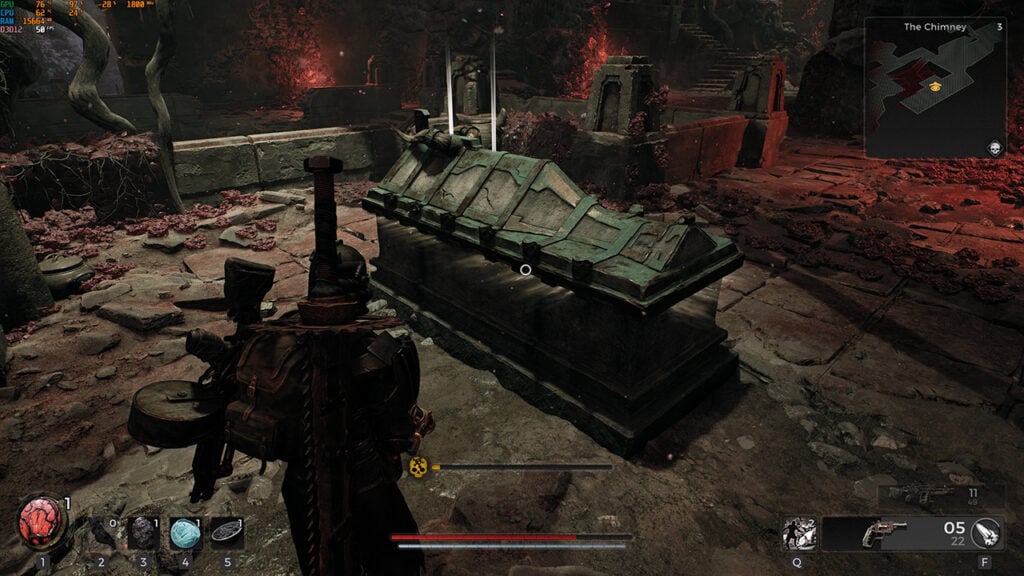
Remnant 2 Controls Guide
Image Source: Gunfire Games via The Nerd Stash
This article is over 2 years old and may contain outdated information.

Learning any new game can be difficult, especially for Remnant 2, which has loads of controls to remember for both the keyboard & mouse, and controller. It always helps to have a control guide you can look back on to ensure you know exactly how to access everything the game offers. While you can always change your key binds to work better for you, it’s nice to at least learn how it’s meant to be played first to see if you like how it flows. Keep reading for our full depth controls guide for Remnant 2.

Remnant 2 Controller
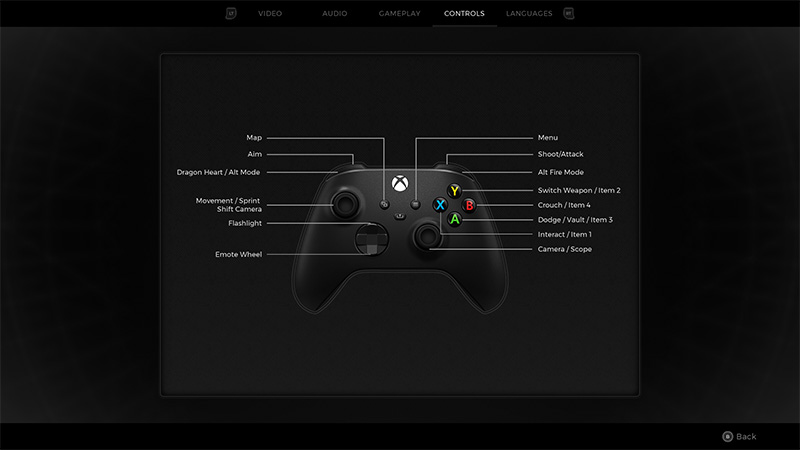
Image Source: Gunfire Games via The Nerd Stash

The key binds for the controller are relatively simple since there are only so many buttons to work with. You can find the full list below:

  • Select: Map
  • Menu: Menu
  • Left Bumper: Dragon Heart/ Alt Mode
  • Right Bumper: Alt Fire Mode
  • Left Trigger: Aim
  • Right Trigger: Shoot/ Attack
  • Left Stick: Movement/ Sprint/ Shift Camera
  • Right Stick: Camera/ Scope
  • D-Pad Up: Flashlight
  • D-Pad Down: Emote Wheel
  • Y: Switch Weapon/ Item 2
  • X: Interact/ Item 1
  • B: Crouch/ Item 4
  • A: Dodge/ Vault/ Item 3

Remnant 2 Keyboard & Mouse Controls

The key binds for the keyboard and mouse are a bit more complicated for PC controls in Remnant 2. You can find all key binds for the keyboard and mouse below:

  • Movement
    • W: Forward
    • S: Backward
    • A: Left
    • D: Right
    • Left Mouse Swipe: Turn Left
    • Right Mouse Swipe: Turn Right
    • Space Bar: Dodge/ Vault
    • Left Alt: Crouch
    • Left Shift: Sprint
  • Combat
    • Q: Ability 1
    • C: Ability 2
    • Left Mouse Button: Melee Attack/ Shoot
    • Right Mouse Button: Aim
    • X: Switch Weapon
    • Mouse Wheel: Switch Weapon
    • F: Weapon Mod
    • R: Reload
    • Z: Scope
    • Left Shift: Camera Shift
  • Interaction
    • E: Interact
    • 1: Relic
    • 2: Item Slot 1
    • 3: Item Slot 2
    • 4: Item Slot 3
    • 5: Item Slot 4
    • G: Ping
    • L: Flashlight
  • Menu
    • Tab: Menu
    • O: Options
    • P: Archetype
    • J: Character
    • I: Inventory
    • T: Traits
    • R: Advanced Stats
    • M: Map
  • UI
    • Space Bar: Select
    • E: Item Interact
    • F: Dialogue Select
    • Space Bar: Dialogue Skip
    • Right Mouse Button: Inspect
    • Right Shift: Next Spectator
    • E: Tab Right
    • Q: Tab Left
    • W: Map Camera Forward
    • S: Map Camera Backward
    • D: Map Camera Right
    • A: Map Camera Left

Related:
Are There Cheats in Remnant 2? Answered

This has been a full guide to the controls in Remnant 2 for both keyboard and mouse and controller. Hopefully this guide was able to help you! Check back in at The Nerd Stash for more useful guides.

Remnant 2 is now available on PC, Xbox Series X|S, and PlayStation 5.

Related Topics
Guide Remnant 2
Share. Facebook Twitter LinkedIn Reddit Email
Jordan Moyer
  • Website
  • X (Twitter)

Jordan is an experienced fantasy writer who spends hours behind her laptop, and lost in the pages of a book. She strives to be a successful gaming blogger, and has no complaint about the hours of game time she used to increase her knowledge of all things “geek”. She primarily writes gaming articles and fantasy novels. Ark: Survival Evolved is a favorite, along with Diablo 3, Warframe and Minecraft lately, though you can’t forget the good old Magic the Gathering card game! Writing about games truly gives her joy as it gives her another perspective to look at games from, a reason to really look into the mechanics of the game.

SUGGESTED READS

Crimson Desert PC Review
9.5
Features

Crimson Desert Review – It’s Real, All of it

Death Stranding 2 PC Launch Adds Fuel to DLSS 5 AI Slop Backlash: 'It Is a Disgrace'
Game News

Death Stranding 2 PC Launch Adds Fuel to DLSS 5 AI Slop Backlash: ‘It Is a Disgrace’

Starfield Free Lanes & Terran Armada DLC
Game Previews

Starfield Free Lanes & Terran Armada Hands-Off Preview – Revitalizing This Spacefaring Adventure

Resident Evil 9 DLSS5
Game Features

DLSS 5 Isn’t the Future of Graphics; It’s a Filter Over Them

What is Honey Candy in Adopt Me? How to Get It and What It's For
Game Guides

What is Honey Candy in Adopt Me on Roblox? How to Get It and What It’s For

Honkai Star Rail Version 4.1
Game News

The Phantasmoon Games Continue in Honkai: Star Rail Version 4.1

The Nerd Stash
Facebook X (Twitter) Instagram YouTube LinkedIn
  • About Us
  • Join Our Team
  • Meet the Team
  • Privacy Policy
  • DMCA Policy
  • Contact Us
  • Terms of Use
  • Sitemap
  • Editorial Guidelines
  • Advertising Policy
© 2026 The Nerd Stash. All Rights Reserved.

Type above and press Enter to search. Press Esc to cancel.