Close Menu
  • Gaming
    • Game Guides
    • Codes
    • Game News
    • Game Previews
    • Game Reviews
    • Game Features
    • Game Lists
    • Platforms
      • Nintendo
      • PC
      • PlayStation
      • Xbox
      • Mobile
  • Entertainment
    • Movies
    • Movie Features
    • Movie Reviews
    • TV
    • Reality TV
    • Royals
  • Celebrity
    • Hollywood
  • Human Interest
  • Astrology
  • Videos
  • More
    • Anime
    • Lists
    • Podcasts
    • Reviews
Facebook X (Twitter) Instagram LinkedIn YouTube
  • About Us
  • Join Our Team
  • Meet the Team
  • Privacy Policy
  • DMCA Policy
  • Contact Us
  • Terms of Use
  • Sitemap
  • Editorial Guidelines
  • Advertising Policy
The Nerd Stash
  • Gaming
  • Celebrity
    • Hollywood
  • Human Interest
  • Videos
The Nerd Stash
Home»Game Guides»How to Catch & User Catch in Madden 24

How to Catch & User Catch in Madden 24

Want to know how to catch and user catch in Madden 24? The NFL fans are eagerly awaiting the official release of their favorite franchise.…

Nikola PajticBy Nikola PajticAugust 16, 20233 Mins Read
How To Catch and User Catch in Madden 24
Image Source: EA Sports
This article is over 2 years old and may contain outdated information.

Want to know how to catch and user catch in Madden 24? The NFL fans are eagerly awaiting the official release of their favorite franchise. If you are not in the early beta access, you will need to wait a couple of days more for the full release. In Madden 24, catching a ball is an essential mechanic, just like in all previous iterations of the popular franchise. Well, if you are a returning player or completely new to the franchise, you will learn here how to catch and user catch in Madden 24 if you follow our guide.

Madden 24 Catching Mechanic

(Updated on October 7, 2024 – updated links and format)
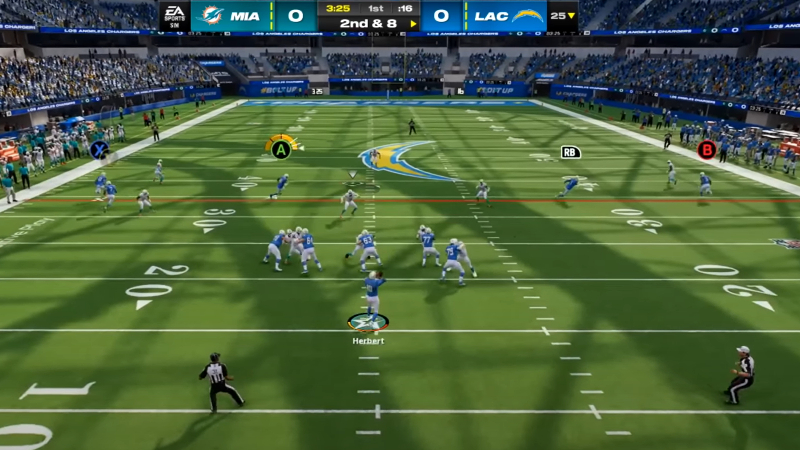
Catch Madden 24
Image Source: EA Sports via YouTube Eric Rayweather

There are three different types of catches in Madden NFL 24:

  • Aggressive Catch
  • Run After Catch
  • Possessions Catch

Each of these catching mechanics is used in a corresponding situation on the field.

The Aggressive Catch option in Madden 24 is used when the defense surrounds your receiver. Your receiver will make a move toward the ball and catch it before he gets tackled by the defenders. To perform this action hold Triangle (PS), Y (Xbox), or R (PC) key depending on the platform you are on.

Run After Catch (RAC) is a useful feature that allows your receiver to continue his run immediately after catching the ball. This gives your team a few extra yards up the field. To perform this action, hold Square (PS), X (Xbox), and X (PC).

The third option is Possession Catch. This catching mechanic is used when you want to securely hold on to the ball as your receiver will come at it and hold it with both hands firmly. This comes in handy when you are just a few yards away from the end zone. Also, you can use it when you have just one try to make the yards. To perform this type of catch in Madden NFL 24 hold X (PS), A (Xbox), and E (PC).

Related:

How To Stop the Run in Madden 24

The User Catch feature in the Madden franchise has troubled players over the years. However, with an improved gameplay experience and with new AI implemented into the game, this is an easy one. All you need to do is switch the player once you throw the ball with your quarterback. Select the desired receiver to control it and catch the ball. Press one of the buttons to catch in Madden NFL 24 and you will perform the User Catch.

Related Topics
Guide Madden 24
Share. Facebook Twitter LinkedIn Reddit Email
Nikola Pajtic
  • Website

Nikola has been a gamer his whole life, and you can find him playing AAA titles but also unknown indie games.

SUGGESTED READS

Dynasty Warriors Origins Visions of Four Heroes Review
9
Game Features

Dynasty Warriors: Origins – Visions of Four Heroes Review – Old Foes, New Allies

Marvel Rivals Season 6 Hands-On Preview
Game Features

Marvel Rivals Season 6 Hands-On Preview: The Merc With a Mouth Has Arrived

Amazon's Tomb Raider Reveals Sophie Turner's Accurate Lara Croft Looks, But Fans Still Have One Major Concern
Game News

Amazon’s Tomb Raider Reveals Sophie Turner’s Classic-Inspired Lara Croft Looks, But Fans Still Have One Major Concern

Monster Hunter Wilds DLC FPS
Game News

More DLC Equals More FPS: Monster Hunter Wilds Player Discovers an Unintentional Flaw In the Game’s Performance

Marathon Raid Map
Features

Marathon Will Break Extraction Shooter Conventions by Bringing Destiny-like Raids Into the Mix

Hytale Reddit Moderator Clarifies 2.8 Million Player Count: 'How the Table Turns…'
Game News

Hytale Reddit Moderator Clarifies the Mindboggling 2.8 Million Player Count Situation: ‘How the Table Turns…’

Trending
Dynasty Warriors Origins Visions of Four Heroes Review
9

Dynasty Warriors: Origins – Visions of Four Heroes Review – Old Foes, New Allies

Marvel Rivals Season 6 Hands-On Preview

Marvel Rivals Season 6 Hands-On Preview: The Merc With a Mouth Has Arrived

Amazon's Tomb Raider Reveals Sophie Turner's Accurate Lara Croft Looks, But Fans Still Have One Major Concern

Amazon’s Tomb Raider Reveals Sophie Turner’s Classic-Inspired Lara Croft Looks, But Fans Still Have One Major Concern

Monster Hunter Wilds DLC FPS

More DLC Equals More FPS: Monster Hunter Wilds Player Discovers an Unintentional Flaw In the Game’s Performance

The Nerd Stash
Facebook X (Twitter) Instagram YouTube LinkedIn
  • About Us
  • Join Our Team
  • Meet the Team
  • Privacy Policy
  • DMCA Policy
  • Contact Us
  • Terms of Use
  • Sitemap
  • Editorial Guidelines
  • Advertising Policy
© 2026 The Nerd Stash. All Rights Reserved.

Type above and press Enter to search. Press Esc to cancel.