Close Menu
  • Gaming
    • Game Guides
    • Codes
    • Game News
    • Game Previews
    • Game Reviews
    • Game Features
    • Game Lists
    • Platforms
      • Nintendo
      • PC
      • PlayStation
      • Xbox
      • Mobile
  • Entertainment
    • Movies
    • Movie Features
    • Movie Reviews
    • TV
    • Reality TV
    • Royals
  • Celebrity
    • Hollywood
  • Human Interest
  • Astrology
  • Videos
  • More
    • Anime
    • Lists
    • Podcasts
    • Reviews
Facebook X (Twitter) Instagram LinkedIn YouTube
  • About Us
  • Join Our Team
  • Meet the Team
  • Privacy Policy
  • DMCA Policy
  • Contact Us
  • Terms of Use
  • Sitemap
  • Editorial Guidelines
  • Advertising Policy
The Nerd Stash
  • Gaming
  • Celebrity
    • Hollywood
  • Human Interest
  • Videos
The Nerd Stash
Home»Game Guides»Sea of Stars: How to Solve The Jungle Path Puzzle

Sea of Stars: How to Solve The Jungle Path Puzzle

Sea of Stars will remind you of a retro RPG, which is not surprising since the developers were inspired by classic titles. However, the team…

Alina NovichenkoBy Alina NovichenkoSeptember 2, 20233 Mins Read
Sea of Stars: How to Solve Jungle Path Puzzle
Image Source: Sabotage Studio via Zackain'tfair Screenshot
This article is over 2 years old and may contain outdated information.

Sea of Stars will remind you of a retro RPG, which is not surprising since the developers were inspired by classic titles. However, the team added many modern features to the game. Therefore, exciting battles, cute characters, customizable difficulty, and, of course, puzzles await you, some of which are quite intricate. For example, you can find a mysterious puzzle with a beam of light and mirrors in the Jungle Path. So, read on to find out how to solve the Jungle Path Puzzle in Sea of Stars.

Sea of Stars Jungle Path Puzzle Explained
Sea of Stars Jungle Path Puzzle Explained
Image Source: Sabotage Studio via Zackain’tfair Screenshot

Sea of Stars has quite a few puzzles related to beams of light. And although they are all different, each of them can be rather confusing. One of the most confusing is the Jungle Path Puzzle because when you find it for the first time, you don’t have the required item. We are talking about the Solstice Amulet, which can change the time between day and night as you wish. However, you need to progress in Sea of Stars until you find it. Only after that, you can start solving the Jungle Path Puzzle.

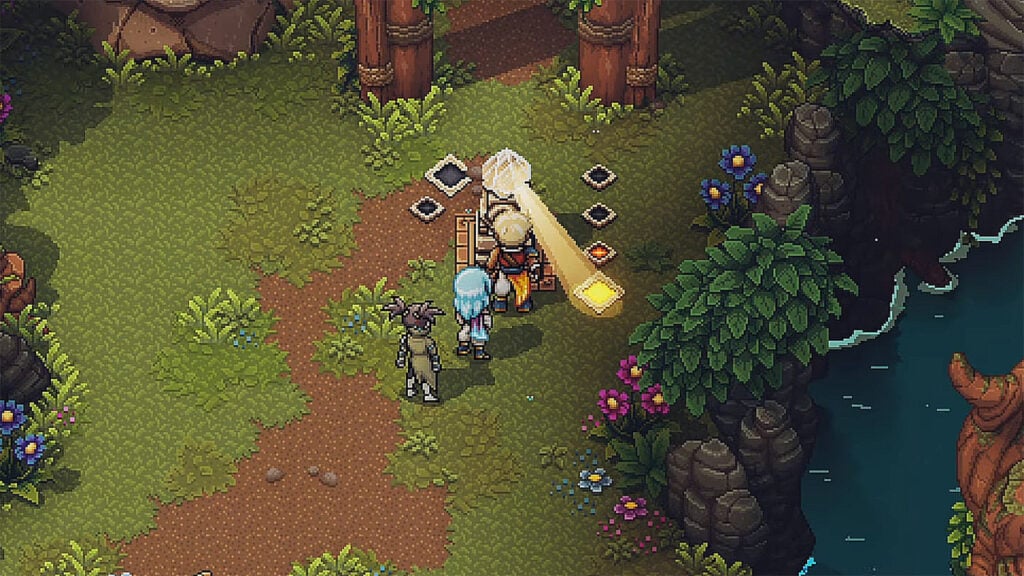
This puzzle consists of three mirrors and a beam of light that only appears at night. And you have to direct this beam into the crystal on the head of the stone head. It may seem like a challenge, but it’s actually quite simple.

So, to solve the Jungle Path Puzzle in Sea of Stars, you must use the Solstice Amulet and switch the night so that the moonlight passes through the crystal near the stone head to the left diamond. Then start rotating the mirrors with the wind gust ability:

  • Turn the mirror under the beam of light to the northeast.
  • Turn the mirror that is above the first one to the southeast.
  • Turn the third remaining mirror to the northwest.

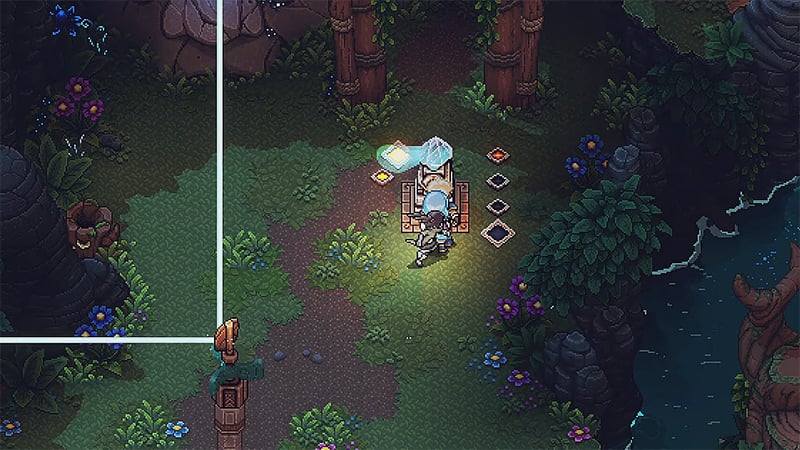
But since the mirrors only go up during the day, you can get a little confused. Use the Solstice Amulet again and direct the sunbeam through the crystal into the right diamond. Then, wait until the smaller diamonds light up. Finally, switch to night and aim the beam again at the diamond on the left. If you do everything right, the mirrors will not have time to go down before the beam of light appears, and you will solve the Jungle Path Puzzle in Sea of Stars and open the passage to the cave. Inside, players will find several chests, including the Rainbow Conch chest.

That’s all you need to know about how to solve the Jungle Path Puzzle in Sea of Stars. This puzzle may seem quite complicated, but following our tips, you will have no problem opening the treasure cave. And while you are here, take a look at our Sea of Stars achievements and trophy guide.

Related:

Is Sea of Stars Multiplayer?

Sea of Stars is available for the PlayStation, Xbox, Nintendo Switch, and PC.

Related Topics
Guide Sea of Stars
Share. Facebook Twitter LinkedIn Reddit Email
Alina Novichenko
  • Website

Alina is a professional freelance game guides writer, with 2 years experience in this industry. She joined TheNerdStash in 2022 and is glad to be part of a friendly team of writers.

SUGGESTED READS

Hytale Reddit Moderator Clarifies 2.8 Million Player Count: 'How the Table Turns…'
Game News

Hytale Reddit Moderator Clarifies the Mindboggling 2.8 Million Player Count Situation: ‘How the Table Turns…’

Hytale Reaches 2.8 Million Active Players on Release Day, Says Developer: 'Eat Your Heart Out'
Game News

Hytale Reaches 2.8 Million Active Players on Release Day, Says Developer: ‘Eat Your Heart Out’

All Hytale Creative Mode and Server Console Commands
Game Guides

All Hytale Creative Mode and Server Console Commands

Hytale Email Not Sending error
Game Guides

How To Fix the ‘Email Not Sending’ Error in Hytale

Hytale How To Install Mods
Game Guides

How To Install Mods in Hytale

Is Hytale Free to Play? Editions and Available Platforms, Explained
Game Guides

Is Hytale Free to Play? Editions and Available Platforms, Explained

Trending
Hytale Reddit Moderator Clarifies 2.8 Million Player Count: 'How the Table Turns…'

Hytale Reddit Moderator Clarifies the Mindboggling 2.8 Million Player Count Situation: ‘How the Table Turns…’

Hytale Reaches 2.8 Million Active Players on Release Day, Says Developer: 'Eat Your Heart Out'

Hytale Reaches 2.8 Million Active Players on Release Day, Says Developer: ‘Eat Your Heart Out’

All Hytale Creative Mode and Server Console Commands

All Hytale Creative Mode and Server Console Commands

Hytale Email Not Sending error

How To Fix the ‘Email Not Sending’ Error in Hytale

The Nerd Stash
Facebook X (Twitter) Instagram YouTube LinkedIn
  • About Us
  • Join Our Team
  • Meet the Team
  • Privacy Policy
  • DMCA Policy
  • Contact Us
  • Terms of Use
  • Sitemap
  • Editorial Guidelines
  • Advertising Policy
© 2026 The Nerd Stash. All Rights Reserved.

Type above and press Enter to search. Press Esc to cancel.