


Close Menu
  • Gaming
    • Platforms
      • Nintendo
      • PC
      • PlayStation
      • Xbox
  • Entertainment
    • Movies
    • TV
    • Royals
  • Celebrity
    • Hollywood
  • Human Interest
  • Astrology
  • More
    • Anime
    • Reviews
Facebook X (Twitter) Instagram LinkedIn YouTube
  • About Us
  • Join Our Team
  • Meet the Team
  • Privacy Policy
  • DMCA Policy
  • Contact Us
  • Terms of Use
  • Sitemap
  • Editorial Guidelines
  • Advertising Policy
The Nerd Stash
  • Gaming
  • Celebrity
  • Hollywood
  • Human Interest
The Nerd Stash
Home»Gaming»How To Join the FFXIV Cloud Server Stress Test

How To Join the FFXIV Cloud Server Stress Test

Warriors of Light, assemble!

Julio La PineBy Julio La PineNovember 21, 20232 Mins Read
FFXIV Cloud Server Stress Test November
Image Source: Square Enix via The Nerd Stash
This article is over 2 years old and may contain outdated information.

If you didn’t know, FFXIV is hosting a stress test for the Cloud server. This new data center for the East Coast is coming sometime in the future. While many tests have been done in the past by the developers, they are asking players to help by joining and seeing how well the server runs with more gamers around. While there are no rewards you can take to your main character, there are some incentives to join in this week-long event, from a huge amount of gil to all jobs at level 80; it is a good excuse to play the game’s latest expansion.

How To Participate in the FFXIV Cloud Server Stress Test

As far as we know, participating in this event is easy and doesn’t require an active subscription. All you have to do is launch your game and follow these steps:

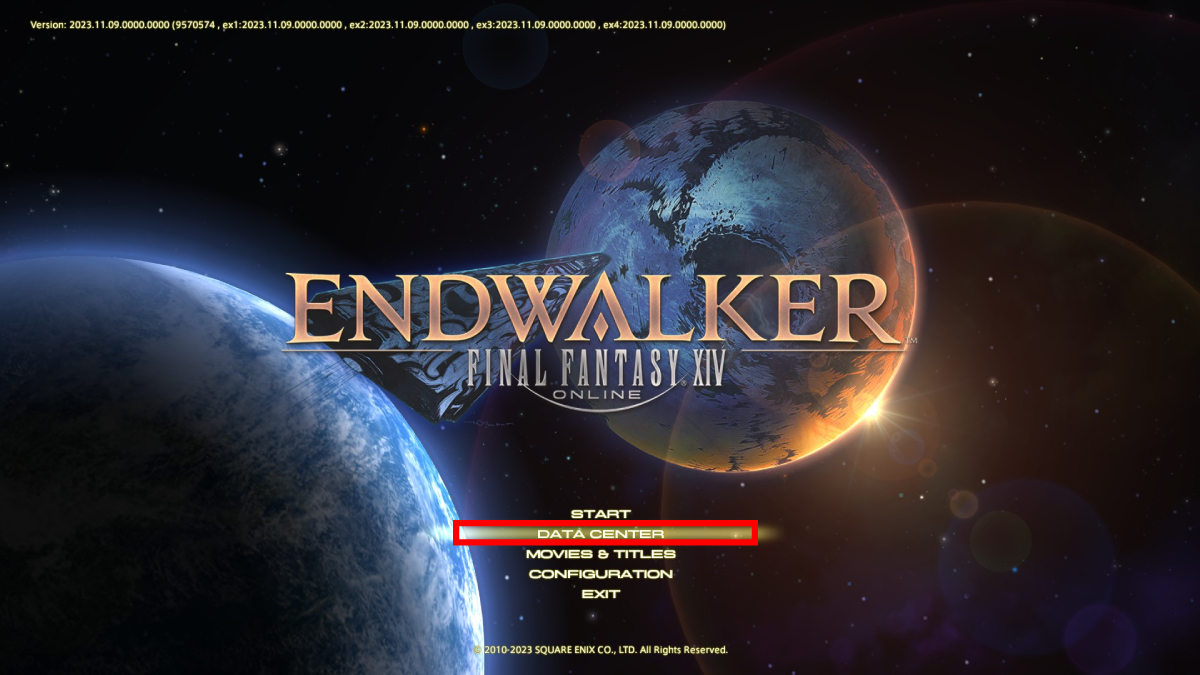
  1. 1. Select “Data Center” from the main menu.

    When you fire up the game, select “Data Center” from the main menu to access the server stress test.
    Data Center Selection

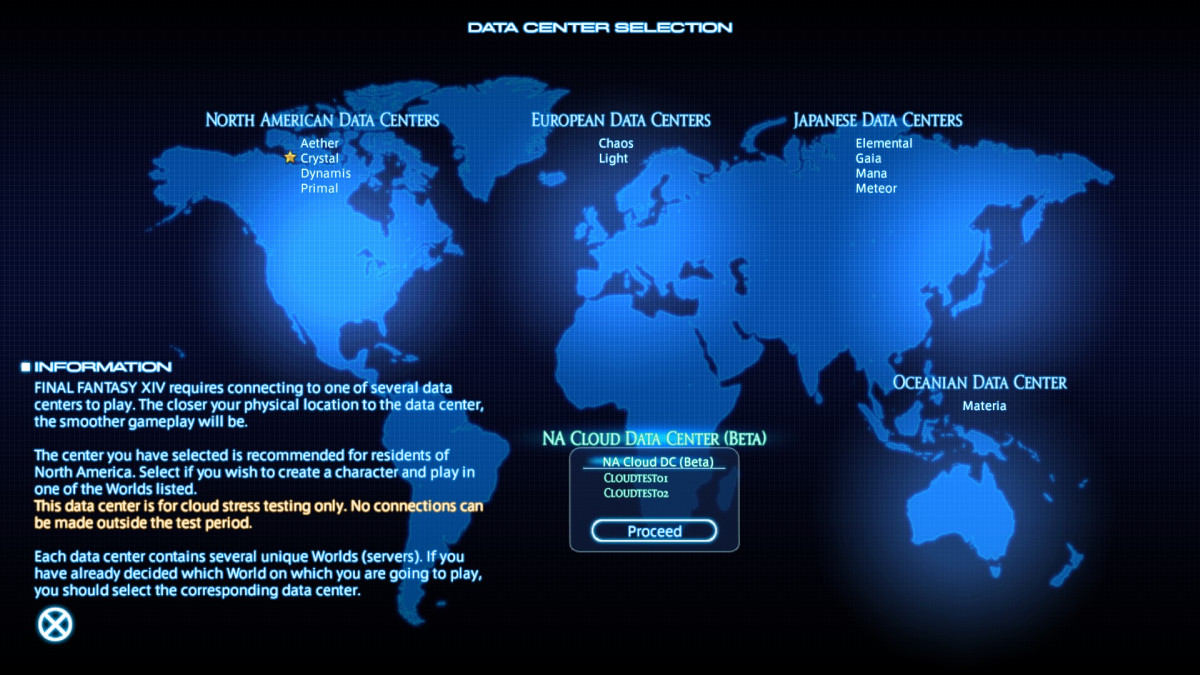
  2. 2. Select the “Cloud Data Center (Beta)” option.

    Once inside the Data Center menu, select the one at the bottom. From there, click on “Proceed.”
    Cloud DC

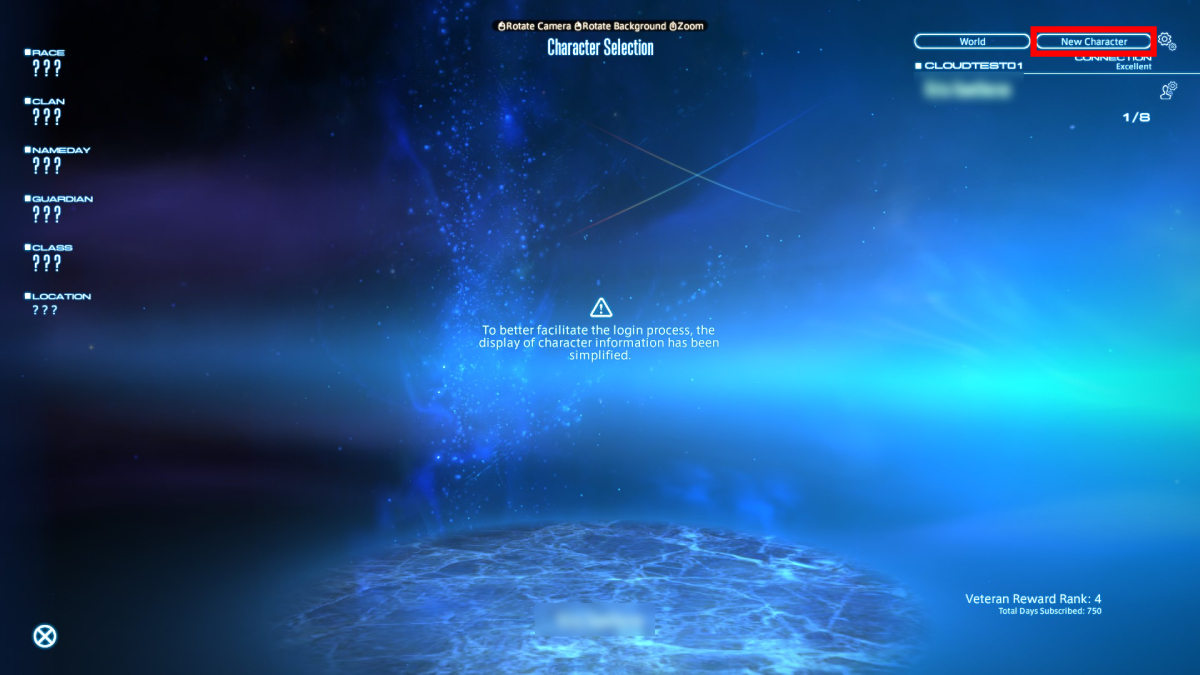
  3. 3. Create a character.

    You must create a new character to access the server. The process is the same as the one for the live servers.
    Character Creation FFXIV

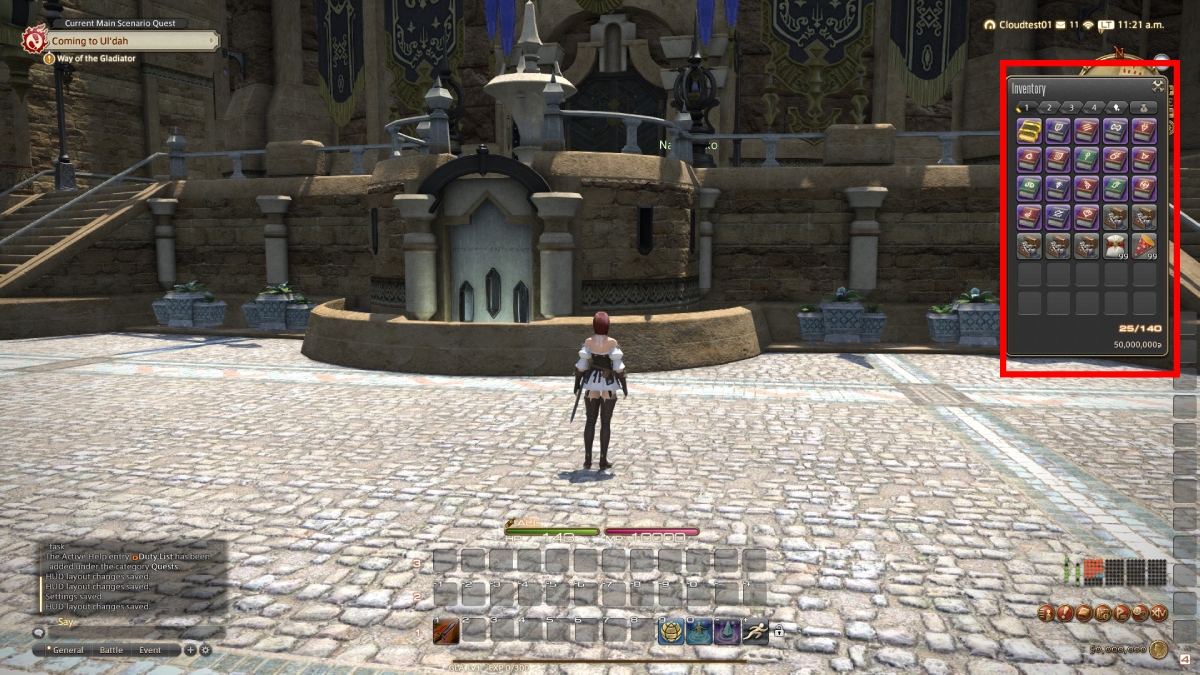
  4. 4. Use the free items to jump into Endwalker.

    This is an optional step, but we recommend using the free items in your inventory to head straight into Endwalker and obtain most jobs at level 80.
    Ul'dah Spawn

Related:

FFXIV x Fall Guys Event: Everything We Know

If you’re inside the Cloud server stress test of FFXIV, there are a few things you must remember:

  • The event lasts until November 27.
  • Characters will be deleted once the event is over.
  • You can’t transfer characters from the stress test to live servers.

While this might seem like a futile event, it isn’t. Anyone in it is helping the developers test their new servers, which will surely help many people on the East Coast of the USA, providing better ping and connection when playing. Besides, it is a good way to play Endwalker for a week without going through all other expansions. So, if you have the time, jump into this test and enjoy your journey in Eorzea and beyond.


Related Topics
FFXIV Guide
Share. Facebook Twitter LinkedIn Reddit Email
Julio La Pine
  • Website

Been gaming since '99! I am a huge JRPG fan and my favorite franchise is Final Fantasy. I love writing about games and I hope I can do it for the rest of my days!

SUGGESTED READS

MindsEye Layoffs 2026
Gaming

Studio Behind GTA-like Game, MindsEye, Hit With More Layoffs, and Nobody is Surprised: ‘Shocked There’s Even a Janitor Working There’

Princess Peach Spin-Off Movie May Already Be in Development, Job Listing Suggests
Gaming

Princess Peach Spin-Off Movie May Already Be in Development, Job Listing Suggests

Xbox's New CEO Wants to Reconnect With the 'Community,' Yet Brings In More CoreAI Leaders
Gaming

Xbox’s New CEO Wants to Reconnect With the ‘Community,’ Yet Brings In More CoreAI Leaders

Diablo 4 Season 13 Tier List
Gaming

Class Tier List for Diablo 4 Season 13 (Best Classes for Endgame & Leveling)

Take-Two Boss Finally Explains Why GTA 6 Is Skipping PC at Launch: 'We'll See How It Works Out'
Gaming

Take-Two Boss Finally Explains Why GTA 6 Is Skipping PC at Launch: ‘We’ll See How It Works Out’

Rockstar Employee Review Claims 'Unrealistic' Crunch as GTA 6 Development Intensifies: 'Had to Work Till 3AM'
Gaming

Rockstar Employee Review Claims ‘Unrealistic’ Crunch as GTA 6 Development Intensifies: ‘Had to Work Till 3AM’

The Nerd Stash
Facebook X (Twitter) Instagram YouTube LinkedIn
  • About Us
  • Join Our Team
  • Meet the Team
  • Privacy Policy
  • DMCA Policy
  • Contact Us
  • Terms of Use
  • Sitemap
  • Editorial Guidelines
  • Advertising Policy
© 2026 The Nerd Stash. All Rights Reserved.

Type above and press Enter to search. Press Esc to cancel.



