Close Menu
  • Gaming
    • Game Guides
    • Codes
    • Game News
    • Game Previews
    • Game Reviews
    • Game Features
    • Game Lists
    • Platforms
      • Nintendo
      • PC
      • PlayStation
      • Xbox
      • Mobile
  • Entertainment
    • Movies
    • Movie Features
    • Movie Reviews
    • TV
    • Reality TV
    • Royals
  • Celebrity
    • Hollywood
  • Human Interest
  • Astrology
  • Videos
  • More
    • Anime
    • Lists
    • Podcasts
    • Reviews
Facebook X (Twitter) Instagram LinkedIn YouTube
  • About Us
  • Join Our Team
  • Meet the Team
  • Privacy Policy
  • DMCA Policy
  • Contact Us
  • Terms of Use
  • Sitemap
  • Editorial Guidelines
  • Advertising Policy
The Nerd Stash
  • Gaming
  • Celebrity
    • Hollywood
  • Human Interest
  • Videos
The Nerd Stash
Home»Game Guides»How To Play With Friends in Once Human (Multiplayer Co-op Guide)

How To Play With Friends in Once Human (Multiplayer Co-op Guide)

Everything is more fun with friends.

Taylor MansfieldBy Taylor MansfieldApril 5, 20243 Mins Read
Once Human multiplayer
Image Source: Starry Studio / NetEase Inc

Skip To...

  • How To Play With Friends in Once Human
  • How To Change Worlds To Find Your Team in Once Human
This article is over 1 years old and may contain outdated information.

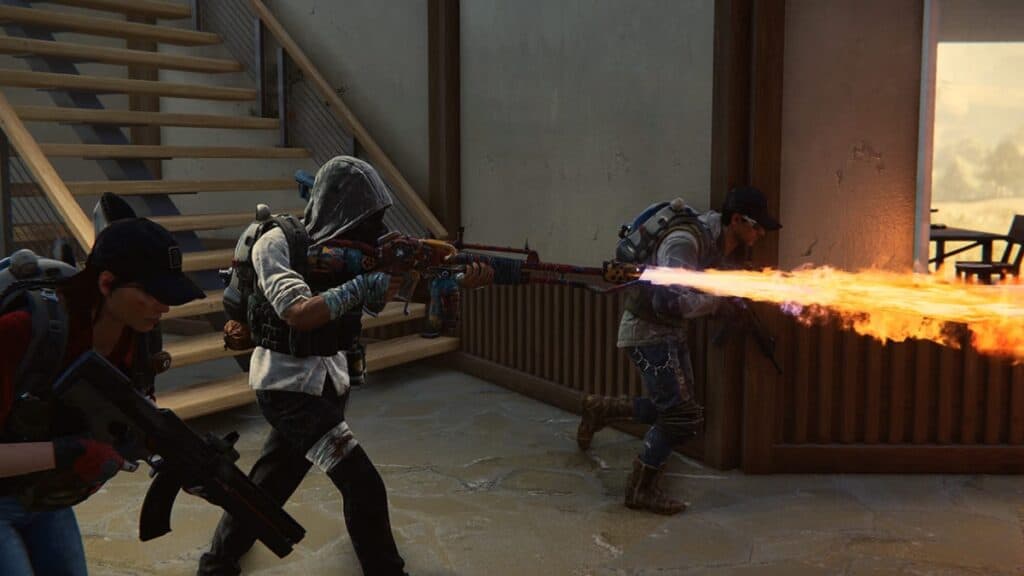
As the competition for multiplayer survival horrors stiffens, Once Human hopes to become the next Dead By Daylight or Texas Chain Saw Massacre. The game is set in a post-apocalyptic world and pits a group of friends against monstrous enemies. To survive the horrors of an unfamiliar environment, humans must unite into uniquely named Factions, which can build their own territory to weather the onslaught of monsters.

How To Play With Friends in Once Human

Image Source: Starry Studio / NetEase Inc

But trying to survive Once Human alone isn’t just lonely, it simply isn’t fun. So how can your friends come along for the ride? Well, in order to gain access to the ‘Social’ menu, you must first complete the tutorial to unlock the open world.

Once the tutorial is complete, you will find yourself on an open map. You will also have access to the ‘Social’ menu, among other privileges. Friends can join and fight alongside you, granted they’re in the same game and on the same server.

When scouting out members of your team, bear in mind that they have to be on the same server as you. Once Human allows you to switch between worlds on a server, but to play on another server you’ll need to start a new character. It would save you a lot of time and effort to communicate beforehand with your prospective teammates about which server you’ll be playing on.

You can form a group in Once Human by searching for each other in the ‘Social’ menu, by creating a Hive (maximum four players), and eventually forming a Warband which includes six teams of four, or six Hives.

Related:

Give Blight Hatchets & Other Dead by Daylight Balance Suggestions

You can search for your friend’s username and add them to a team. From there, you can create a group, form a Hive, and eventually create a Warband when you’ve earned enough Ciphers.

How To Change Worlds To Find Your Team in Once Human

Image Source: Starry Studio / NetEase Inc

So let’s say you and your friends are on the same server but in different worlds. You can switch to other worlds using Teleporters on your map. Hint: They look like little radio stations.

Alternatively, if you create a Hive, all players will automatically spawn into that world.

Note: Once you’ve created a character on a PvE server, the character is bound to the PvE server and the worlds within that server, so select your servers carefully so you don’t have to start over with a new character each time.

Related Topics
Guide Once Human
Share. Facebook Twitter LinkedIn Reddit Email
Taylor Mansfield
  • Website

An experienced Creative Writer and self-proclaimed horror fanatic, Taylor has been in the writing world for over 10 years now. She considers herself to be an avid fan of movies and television shows and has written for all forms of media.

SUGGESTED READS

Metroid Prime Producer Retires After MP4, 40 Years at Nintendo: 'A Sequel Remains Uncertain'
Features

Metroid Prime Producer Retires After MP4, 40 Years at Nintendo: ‘A Sequel is Still Uncertain’

Prince of Persia The Sands of Time Remake Canceled
Game News

Say Goodbye to the Prince of Persia: The Sands of Time Remake, Because Ubisoft Has Officially Canceled It

Crimson Desert Goes Gold
Features

Crimson Desert Has Gone Gold, Bringing Us Closer to One of the Biggest Open-World Experiences of Recent Memory

Final Fantasy 7 Remake Xbox Series X|S & Switch 2 Review
9.5
Features

Final Fantasy 7 Remake Xbox Series X|S/Nintendo Switch 2 Review – Classic Tale, New Platforms

Fatal Fury City of the Wolves Kim Jae Hoon Preview
Features

Fatal Fury City of the Wolves Kim Jae Hoon Hands-On Impressions – Fiery Kicks, Fast Combos

Steam's New AI Policy Separates AI-Generated Content From 'AI Powered Tools' Used for 'Efficiency Gains'
Features

Steam’s New AI Policy Separates AI-Generated Content From ‘AI Powered Tools’ Used for ‘Efficiency Gains’

The Nerd Stash
Facebook X (Twitter) Instagram YouTube LinkedIn
  • About Us
  • Join Our Team
  • Meet the Team
  • Privacy Policy
  • DMCA Policy
  • Contact Us
  • Terms of Use
  • Sitemap
  • Editorial Guidelines
  • Advertising Policy
© 2026 The Nerd Stash. All Rights Reserved.

Type above and press Enter to search. Press Esc to cancel.