

Many of us think that obtaining loot in Borderlands 4 happens exclusively in-game, but the truth is that there’s also another way to get some powerful guns by doing some things outside of the looter shooter. If you don’t know what we’re talking about, we’re referring to the SHiFT Codes, which are now available on Borderlands 4. Some of these codes will grant you exclusive rewards, but most of them will give you Golden Keys, which you can use inside Kairos to open some of the most rewarding chests on the planet. Below is all the information you need on how you can obtain and redeem SHiFT Codes in Borderlands 4.
What Are SHiFT Codes?
SHiFT Codes are one-time use codes with almost always an expiry date that you can use to obtain loot or Golden Keys to use inside Borderlands 4. Since most of these codes will expire, it is important that you exchange them as soon as possible in any of the two ways that are available for Borderlands 4 right now. Before telling you how to redeem them, below is a list of all active SHiFT codes.
All Active SHiFT Codes in Borderlands 4
| Code | Reward/Loot | Expiry Date | Additional Information |
|---|---|---|---|
| T9RJB-BFKRR-3RBTW-B33TB-KCZB9 | Golden Key x1 | Permanent | Available for everyone in the game. |
| THRBT-WW6CB-56TB5-3B3BJ-XBW3X | Golden Key x1 | September 30, 2025 | |
| WHWJB-XH3SX-39CZW-H3BBB-BTF55 | Golden Key x1 | Permanent | You must link your SHiFT account to your 2K Account. |
| B9XT3-HX6TT-W6BBW-TTJT3-JTFKX | Golden Key x1 | September 16, 2025 | N/A |
| 39RTT-3ZR3T-5FJBK-3J3J3-C5CRT | Golden Key x1 | September 16, 2025 | N/A |
| Discord Quest Code | Golden Key x1 | September 25, 2025 | Personal Code for every Discord user. |
How To Redeem SHiFT Codes
There are two ways to redeem SHiFT Codes for Borderlands 4.
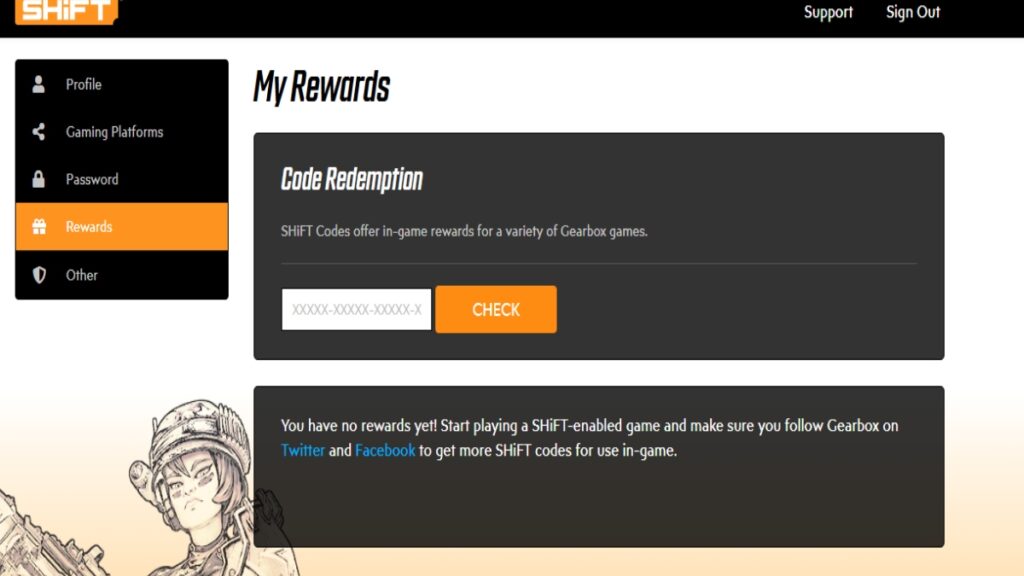
For the first method, you need to create an account on the SHiFT website, which you can visit by following this link. Once there, you must create an account by following these steps:
- Create an account with an email and a password.
- Alternatively, create an account with any of the gaming platforms you use.
- If you do it like this, you’ll need to set your email and password before using the account.
Once you create the account, head to the rewards tab and input the code. You’ll get the option to redeem it in any of the available platforms.
While you’re at it, you can also link your 2K account by going to the Gaming Platforms tab and logging in with your 2K account.
If you don’t have a 2K account, you can create one by following this link.
To create an account, you can either use an email and password or use any of your platforms to create one. You can then link it to the SHiFT website.
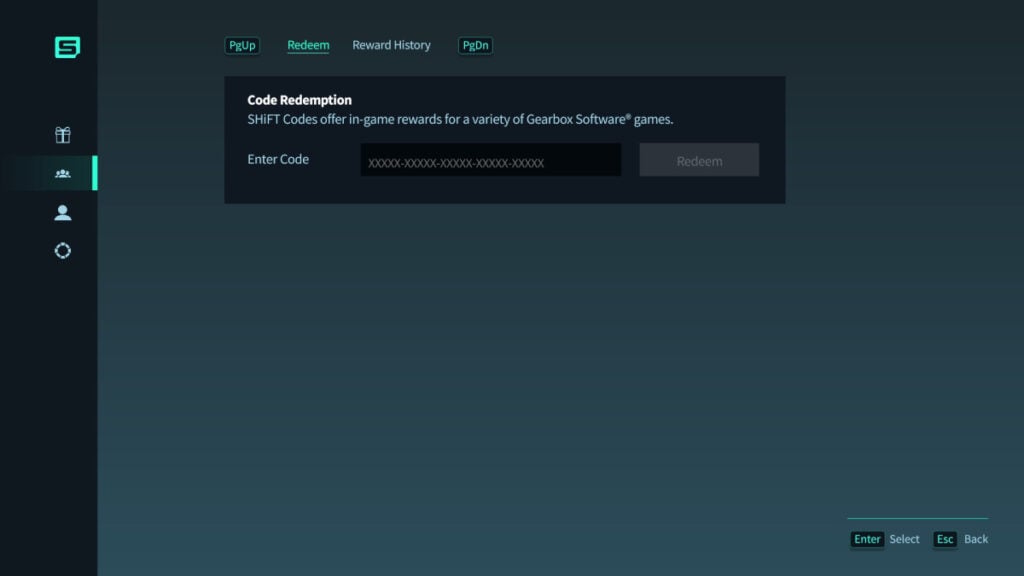
Alternatively, you can redeem your SHiFT codes inside Borderlands 4. To do so, head to the SHiFT option on the main menu and input the code on the Rewards tab.
If the code is working, you can claim your rewards from your inventory and use them in-game. Before redeeming any code, however, remember to check the expiry date and make sure to link any necessary accounts to grab the rewards.





