Close Menu
  • Gaming
    • Platforms
      • Nintendo
      • PC
      • PlayStation
      • Xbox
  • Entertainment
    • Movies
    • TV
    • Royals
  • Celebrity
    • Hollywood
  • Human Interest
  • Astrology
  • More
    • Reviews
Facebook X (Twitter) Instagram LinkedIn YouTube
  • About Us
  • Join Our Team
  • Meet the Team
  • Privacy Policy
  • DMCA Policy
  • Contact Us
  • Terms of Use
  • Sitemap
  • Editorial Guidelines
  • Advertising Policy
The Nerd Stash
  • Gaming
  • Celebrity
  • Hollywood
  • Human Interest
The Nerd Stash
Home»Gaming»How to Equip Two Pets in Roblox Adopt Me!

How to Equip Two Pets in Roblox Adopt Me!

Double the Pets, double the fun

Sidharta F. RasidiBy Sidharta F. RasidiFebruary 14, 20263 Mins Read
How to Equip Two Pets in Roblox Adopt Me!
Image source: Uplift Games, Roblox via The Nerd Stash

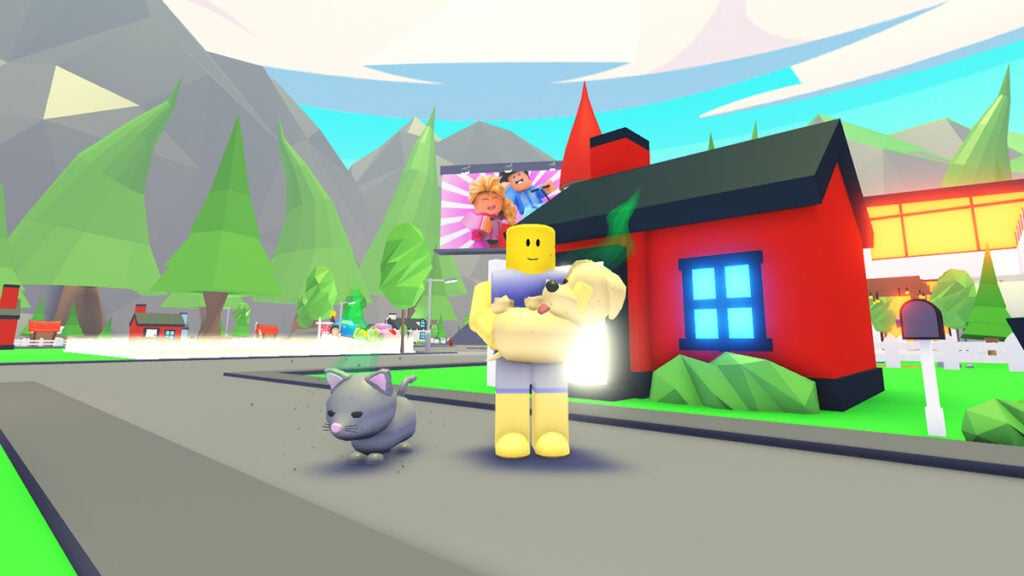
Aging up Pets quickly turns into a waiting game once you start having Neons and Megas. One set of tasks, one growth bar, repeat for hours. So it’s no surprise many players wonder whether they can speed things up. Fortunately, Roblox Adopt Me! actually allows players to equip and bring two Pets along at the same time.

Can You Equip Two Pets in Roblox Adopt Me!?
Can You Equip Two Pets in Roblox Adopt Me!?
Image source: Uplift Games, Roblox via The Nerd Stash

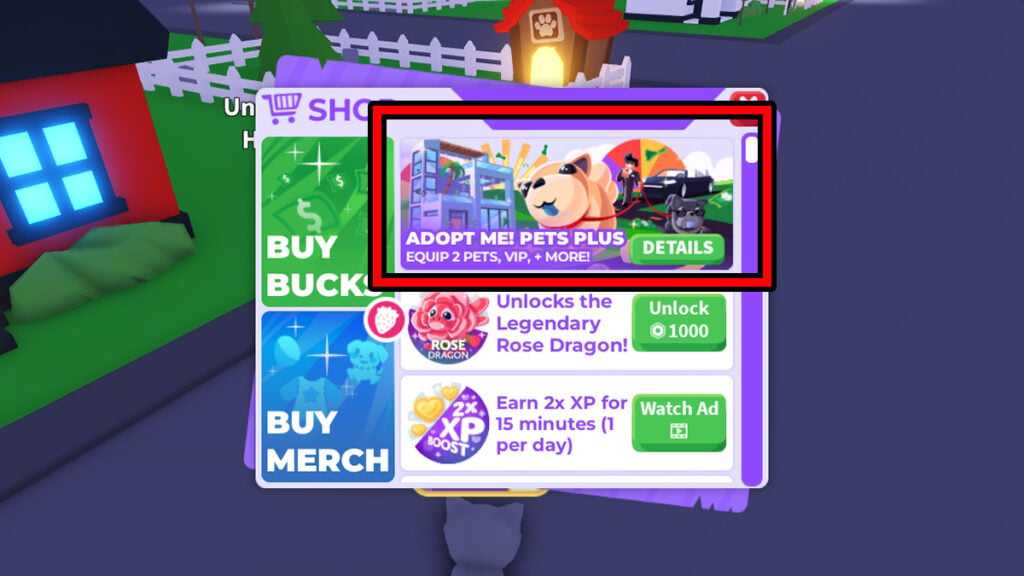
Yes, you can — with a caveat. Currently, the only way to equip two Pets is by subscribing to the $3.99 Plus VIP Game Pass. Aside from the ability to bring two Pets, being a VIP member also entitles you to these benefits:

  • Increased Bucks earning cap.
  • Daily login Bucks reward.
  • VIP chat tag and name color.
  • Exclusive A Very Very Important Person’s House.
  • Six-seater Limo car.
  • Access to the VIP lounge area in the Nursery.
  • Access to purchase the Retired Egg (Bucks 600) and the Golden Bone (209 Robux).
  • Priority queue when servers are full.
Best Ways To Earn Money Fast in Adopt Me
Related: Best Ways To Earn Money Fast in Adopt Me

Once done, you can equip both Pets through the ‘Backpack’ menu like usual. Do note that VIP perks remain active only while you’re subscribed to the membership. Canceling the subscription removes the extra Pet slot and other bonuses.

That said, there is a workaround that lets two Pets follow you around without paying. Sort of. Here’s how to do it.

Trick to Equip Two Pets for Free (Works in 2026)
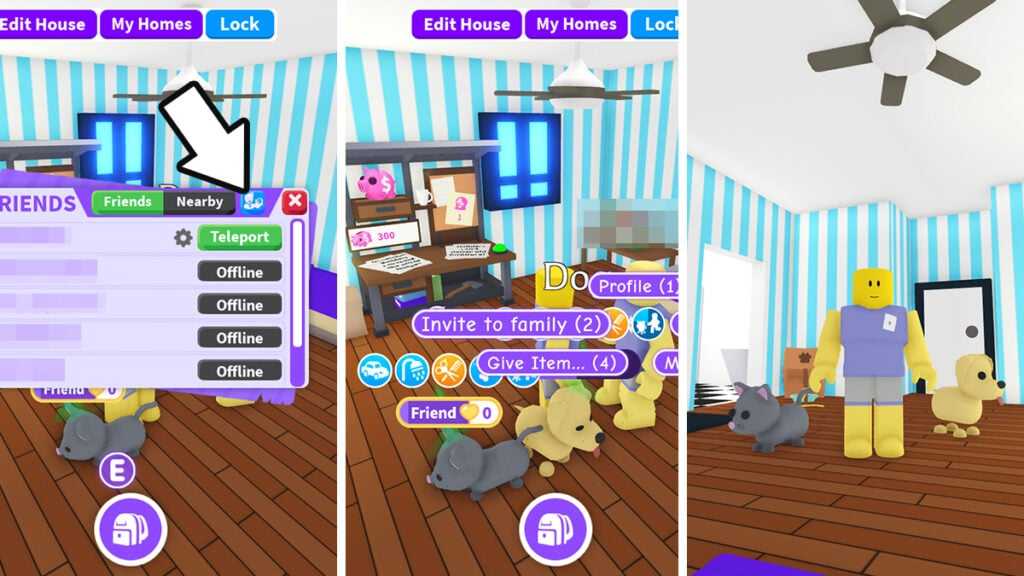
Double Pets trick
Image source: Uplift Games, Roblox via The Nerd Stash
  1. Create a Family.
    • Uplift Games has since changed the ‘Family’ menu in 2026. Now, instead of clicking a big orange icon, it can be done by clicking the small blue icon next to the ‘Friends/Nearby’ tab in the ‘Friends’ menu.
  2. Invite another player or your alt into your Family. Do that by clicking their character and selecting ‘Invite to family.’
  3. Make sure the other player or your alt accepts the invitation.
  4. Invite or make the other character teleport into your main’s House. Then pick up the other player/alt’s Pet.
  5. Get the other character away from your House by clicking the ‘Leave House’ button or walking out.
  6. Drop the Pet down, and now it will follow your main character around!

Of course, this means equipping two Pets for free in Adopt Me! only works inside your House. The moment you step outside, the Pet will follow its original owner back. If your alt leaves the server, the Pet disappears as well.

Related Topics
Guide Roblox
Share. Facebook Twitter LinkedIn Reddit Email
Sidharta F. Rasidi
  • Website

Since middle school, Sidharta has used his video game blog as a handy excuse to avoid studying. After graduating with a degree in Management Information Systems from Bina Nusantara University, he spent years honing his skills as a games journalist, working as an editor for a local gaming site and freelancing elsewhere. Nowadays, when he’s not busy crafting outrageous plots for his serialized comic, Sidharta covers niche games on his personal blog, StoPlayinGame.com. His favorite game series includes Monster Hunter, Earth Defense Force, THE iDOLM@STER, Road Trip Adventure, and KOEI Tecmo's Warriors.

SUGGESTED READS

Konami is Rebooting Metal Gear, Castlevania, Other Existing IPs: 'Important Initiatives as Pillars of Our Business'
Gaming

Konami is Rebooting Metal Gear, Castlevania, Other Existing IPs: ‘Important Initiatives as Pillars of Our Business’

Gaming

GTA 6 Leaker Hunt Goes Nuclear as Take-Two Demands Discord and Microsoft Hand Over Private Data

Raid Shadow Legends new players
Gaming

7 New-Player Mistakes That Cost You Free Rewards in Raid: Shadow Legends (August 2026)

PlayStation's Phantom Blade Zero Preorders Have 'Far Exceeded Expectations' Despite Disc-less Release Concerns
Gaming

PlayStation’s Phantom Blade Zero Preorders Have ‘Far Exceeded Expectations’ Despite Disc-less Release Concerns

Gaming

Interview: Dawn of War 4 Voice Actor Toby Longworth Discusses Space Marine Voices and How RoboCop Inspired His Dreadnought Performance

Mortal Shell 2 Sester Genessa Unlock
Gaming

How to Unlock Sester Genessa in Mortal Shell 2

The Nerd Stash
Facebook X (Twitter) Instagram YouTube LinkedIn
  • About Us
  • Join Our Team
  • Meet the Team
  • Privacy Policy
  • DMCA Policy
  • Contact Us
  • Terms of Use
  • Sitemap
  • Editorial Guidelines
  • Advertising Policy
© 2026 The Nerd Stash. All Rights Reserved.

Type above and press Enter to search. Press Esc to cancel.