

Close Menu
  • Gaming
    • Game Guides
    • Codes
    • Game News
    • Game Previews
    • Game Reviews
    • Game Features
    • Game Lists
    • Platforms
      • Nintendo
      • PC
      • PlayStation
      • Xbox
      • Mobile
  • Entertainment
    • Movies
    • Movie Features
    • Movie Reviews
    • TV
    • Reality TV
    • Royals
  • Celebrity
    • Hollywood
  • Human Interest
  • Astrology
  • Videos
  • More
    • Anime
    • Lists
    • Podcasts
    • Reviews
Facebook X (Twitter) Instagram LinkedIn YouTube
  • About Us
  • Join Our Team
  • Meet the Team
  • Privacy Policy
  • DMCA Policy
  • Contact Us
  • Terms of Use
  • Sitemap
  • Editorial Guidelines
  • Advertising Policy
The Nerd Stash
  • Gaming
  • Celebrity
    • Hollywood
  • Human Interest
  • Videos
The Nerd Stash
Home»Game Guides»Best Settings for Oblivion Remastered

Best Settings for Oblivion Remastered

Time to actually play the game

Nat CollazoBy Nat CollazoApril 23, 20252 Mins Read
Best Settings for Oblivion Remastered
Image Source: Bethesda Game Studios

After nearly 20 years (yes, you are that old) Bethesda has finally launched a remaster of their critically acclaimed The Elder Scrolls IV: Oblivion. Now in Unreal Engine 5, the game looks better than it ever has before. The best way to breathe new life into the game is to adjust the optional settingsto perfectly balance performance and visuals. Fortunately, even if you don’t have an absolutely unsane graphics card, you can still experience Oblivion Remastered better than ever before with the following settings.

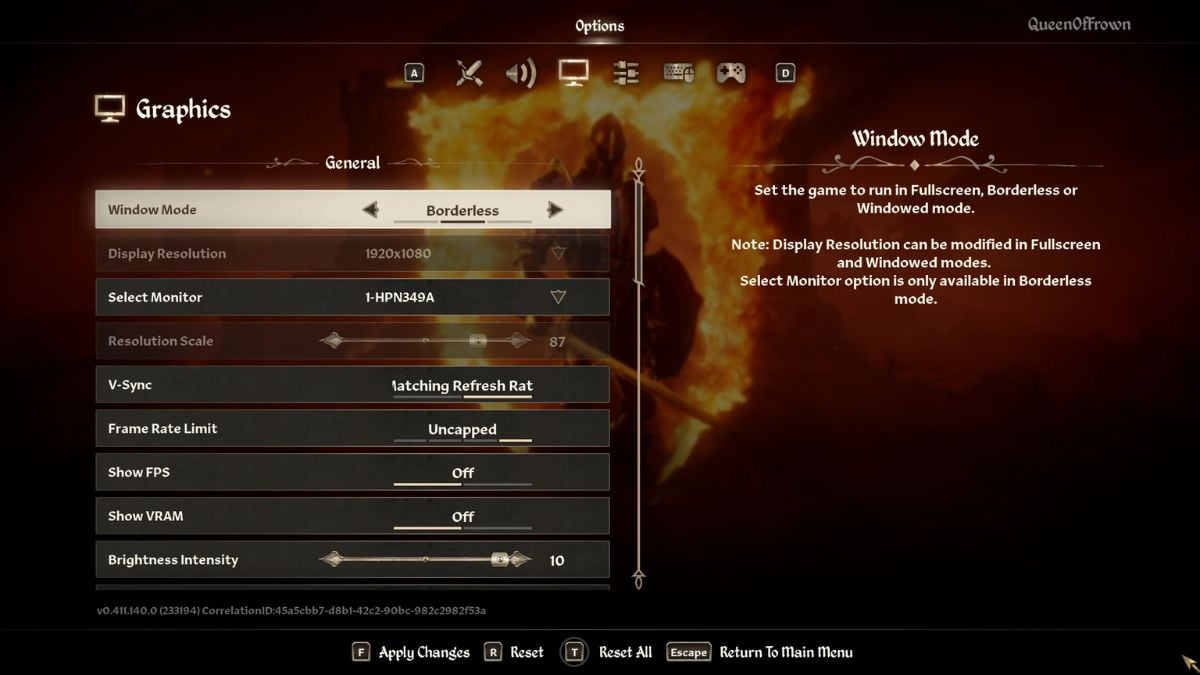
Best General, Quality, and Advanced Oblivion Remastered Settings
Best Settings for Oblivion Remastered
Image Source: Bethesda Game Studios via The Nerd Stash

Depending on your graphics card and general PC build, you’ll need to go through each of these options to find which one best suits you. So that you are aware, The Elder Scrolls IV: Oblivion Remastered isn’t completely optimized with the new engine, so I’ve experienced various frame drops in largely populated areas.

SettingPreset
Window ModeBorderless
Display ResolutionNative
Resolution Scale100%
V-SyncOff
Frame Rate LimitedUncapped
Motion BlurOff (you’re insane if you leave this on)
SSROn
Quality LevelDo not adjust (We will be making custom changes below)
Distance QualityHigh
EffectsUltra
FoliageMedium
ShadowMedium
Global IluminationHigh
TextureIf you have more than 8 GB of RAM, switch to High. Less than 8 GB of RAM should be set to low.
ReflectionMedium
HairHigh
ClothHigh
Lumen Hardware RTOff
Lumen Hardware RT Lighting ModeHigh
Lumen Software Rt QualityLow
UpscalingChoose depending on your GPU hardware.
DLSS/ FSRBalanced
Frame GenerationOn
Nvidia ReflectIf you have it, turn On.

There are various settings that are based on your personal preference, such as difficult options. So, ensure that you are choosing settings also based on your gameplay experience with other The Elder Scrolls titles!
Can you Become a Werewolf in Oblivion Remastered? Answered
Related: Can you Become a Werewolf in Oblivion Remastered? Answered

The Elder Scrolls IV: Oblivion Remastered is available on PlayStation, Xbox, and PC.

Related Topics
Guide Oblivion Remastered
Share. Facebook Twitter LinkedIn Reddit Email
Nat Collazo
  • Website
  • X (Twitter)
  • Instagram

I am a game journalist and guide writer with ten years of experience as well as the CEO/ Founder of Frowns Marketing, a marketing company that caters to indie games, tabletop games, and board games to help developers get more wishlists, backers, and players!

SUGGESTED READS

Stellar Blade Studio CEO Says AI Is Necessary to Compete With China's Ever-Growing Gaming Industry: 'One Person Can Do the Work of 100'
Features

Stellar Blade Studio CEO Says AI Is Necessary to Compete With China’s Ever-Growing Gaming Industry: ‘One Person Should Do the Work of 100’

The Expanse Osiris Reborn Romance
Game News

The Expanse: Osiris Reborn Is Not Forgetting Its Sci-Fi Drama Roots With Romance and Tough Choices

Avowed, Grounded 2, and Towerborne Updates
Game News

Xbox Kicks Off 2026 By Announcing Huge Updates to 3 Of Its Games

The Blood of the Dawnwalker New Game Plus Show
Game News

The Blood of Dawnwalker Unveils More Gameplay and Lore Details

Warner Bros. Games Lays Off Team Behind Free-to-Play Projects Amid Netflix Acquisition
Game News

Warner Bros Games Lays Off Team Behind Free-to-Play Projects Amid Netflix Acquisition

Persona 4 Revival Announcements
Game News

Persona Producer Just Confirmed Persona 4 Revival Is Progressing Steadily, and Teased New Announcements for The Series’ 30th Anniversary

Trending
Stellar Blade Studio CEO Says AI Is Necessary to Compete With China's Ever-Growing Gaming Industry: 'One Person Can Do the Work of 100'

Stellar Blade Studio CEO Says AI Is Necessary to Compete With China’s Ever-Growing Gaming Industry: ‘One Person Should Do the Work of 100’

The Expanse Osiris Reborn Romance

The Expanse: Osiris Reborn Is Not Forgetting Its Sci-Fi Drama Roots With Romance and Tough Choices

Avowed, Grounded 2, and Towerborne Updates

Xbox Kicks Off 2026 By Announcing Huge Updates to 3 Of Its Games

The Blood of the Dawnwalker New Game Plus Show

The Blood of Dawnwalker Unveils More Gameplay and Lore Details

The Nerd Stash
Facebook X (Twitter) Instagram YouTube LinkedIn
  • About Us
  • Join Our Team
  • Meet the Team
  • Privacy Policy
  • DMCA Policy
  • Contact Us
  • Terms of Use
  • Sitemap
  • Editorial Guidelines
  • Advertising Policy
© 2026 The Nerd Stash. All Rights Reserved.

Type above and press Enter to search. Press Esc to cancel.




