


Close Menu
  • Gaming
    • Game Guides
    • Codes
    • Game News
    • Game Previews
    • Game Reviews
    • Game Features
    • Game Lists
    • Platforms
      • Nintendo
      • PC
      • PlayStation
      • Xbox
      • Mobile
  • Entertainment
    • Movies
    • Movie Features
    • Movie Reviews
    • TV
    • Reality TV
    • Royals
  • Celebrity
  • Human Interest
  • Astrology
  • Videos
  • More
    • Anime
    • Lists
    • Podcasts
    • Reviews
Facebook X (Twitter) Instagram LinkedIn YouTube
  • About Us
  • Join Our Team
  • Meet the Team
  • Privacy Policy
  • DMCA Policy
  • Contact Us
  • Terms of Use
  • Sitemap
  • Editorial Guidelines
  • Advertising Policy
The Nerd Stash
  • Gaming
  • Celebrity
  • Human Interest
  • Videos
The Nerd Stash
Home»Game Guides»How To Claim Daily Log-in Rewards in Genshin Impact

How To Claim Daily Log-in Rewards in Genshin Impact

More and more Primogems

Giovanna De ItaAugustBy Giovanna De Ita and AugustMay 22, 20243 Mins Read
Genshin Impact Daily Log-in Rewards
Image Source: HoYoverse via The Nerd Stash
This article is over 1 years old and may contain outdated information.

With all the waifus and husbands that appear update after update, we players must find healthier ways to cope with our obsessions. It’s all “free” fun until you start using real money, and there’s no going back from that. So, with fans’ financial health in mind, Genshin Impact 1.6 introduced its Daily Log-in Rewards program. That’s right; not only do you earn some Primogems to buy Fates in-game with Daily Commission. You can also get other kinds of rewards with the help of HoYoLAB.

Claiming Daily Log-in Rewards In Genshin Impact

(Updated on May 22, 2024 – Clarified information and replaced images)
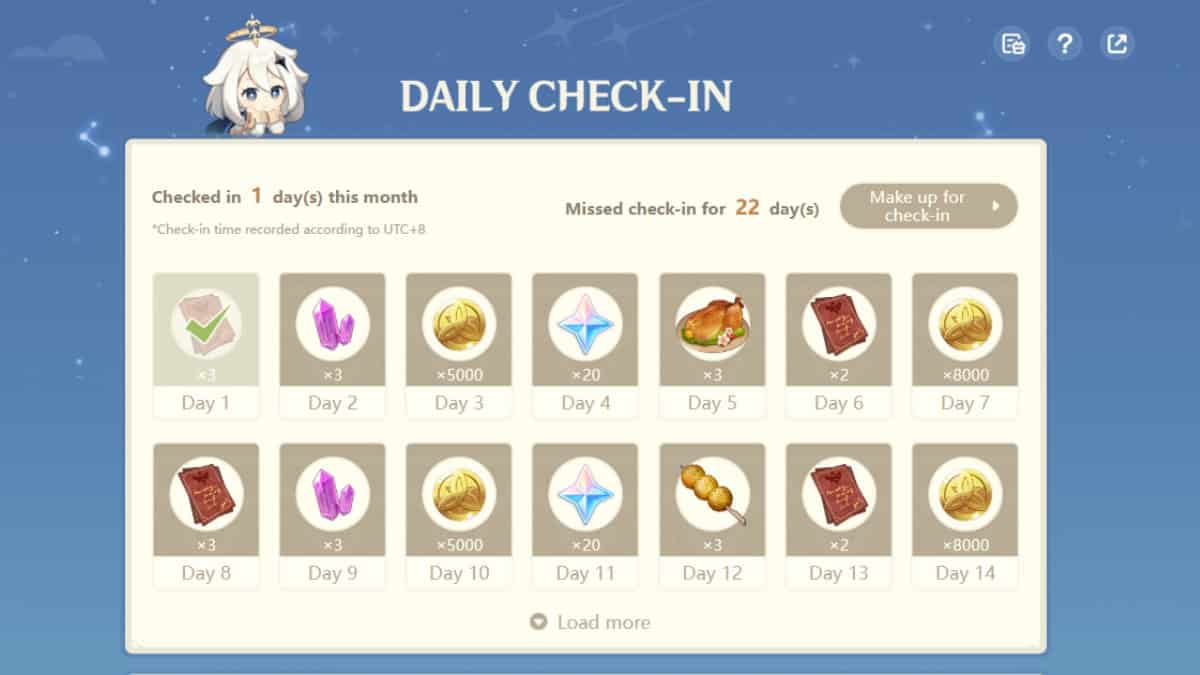
Genshin Impact Daily Log-in
Image Source: HoYoLAB

These rewards are not available in-game; to access them, you must use the official webpage hosted by HoYoAB, the official gaming community forum for HoYoverse games. The Genshin Impact Daily Log-in Rewards will differ each day, as they can vary. Some prices are Adventurer’s Experience, Hero’s Wit, Mora, Primogems, and occasionally a cooked 2-star meal. However, to get them, you must first follow these steps:

  1. First, go to the HoYoLab webpage or app, verify that you are in the Genshin Impact section, and then look under All Tools for the Check-In option. You can also go directly to the rewards webpage if you have already set up your HoYoLAB account. 
  2. The Check-In will take you to a new page. There, you will see a dashboard with all the rewards you will unlock each day, the day you are on, which days you have and haven’t checked in, and which days you have and haven’t checked in.
  3. Select the day you will Check-in; your reward will appear highlighted in red/orange.
  4. Once claimed, the item’s icon will white out and have a green check mark.
  5. Then, you should open Genshin Impact. Rewards could appear instantaneously or take longer, like up to 10 minutes.
  6. Pause Genshin Impact to open Paimon’s menu.
  7. Open the e-mails, the envelope icon on the side of the menu; the last message should be your reward.

Related:

The 5 Best Teams for Arlecchino in Genshin Impact

The Genshin Impact‘s Daily Log-in rewards are usually repeated every week, but the day that players look forward to the most is the Primogems. Sadly, Primogems Days appear only in the first three weeks of the month of rewards; the rest are more material. Although the items may seem like little, they are a great help because they are free and only take a maximum of two minutes to get. Anything to save up resources for the next 5-star promotional banner character.


Related Topics
Genshin Impact Guide
Share. Facebook Twitter LinkedIn Reddit Email
Giovanna De Ita, August
  • Website

Giovanna is a fan of every single game HoYoverse has launched. When she's not covering videogames, she writes her daily horoscopes and tarot readings for the astrology vertical in The Nerd Stash.

Giovanna De Ita, August
  • Website

Giovanna is a fan of every single game HoYoverse has launched. When she's not covering videogames, she writes her daily horoscopes and tarot readings for the astrology vertical in The Nerd Stash.

SUGGESTED READS

Astra Malorum Zombies easter egg song
Game Guides

Where To Find Astra Malorum Easter Egg Song In Black Ops 7 Zombies

Path of Exile 2 The Last of the Druids Update Preview
Features

One Of the Most Unique Druid Archetypes Is Ready to Land on Path of Exile 2: The Last of the Druids

Avatar TLA Fans Are Finally Getting the Open-World Game They've Been Waiting For: 'We Got Avatar's Creed Before GTA 6'
Game News

Avatar TLA Fans Are Finally Getting the Open-World Game They’ve Been Waiting For: ‘We Got Avatar’s Creed Before GTA 6’

Best Augments in Black Ops 7 Zombies
Game Guides

Best Augments You Need To Fully Research In Call of Duty: Black Ops 7 Zombies

All Steps in the Destiny 2 Renegades Campaign
Game Guides

How To Complete the Renegades Campaign in Destiny 2

Octopath Traveler 0 PS5 Review
9
Features

Octopath Traveler 0 Review – A Tale of Revenge and Restoration

Trending
Astra Malorum Zombies easter egg song

Where To Find Astra Malorum Easter Egg Song In Black Ops 7 Zombies

Path of Exile 2 The Last of the Druids Update Preview

One Of the Most Unique Druid Archetypes Is Ready to Land on Path of Exile 2: The Last of the Druids

Avatar TLA Fans Are Finally Getting the Open-World Game They've Been Waiting For: 'We Got Avatar's Creed Before GTA 6'

Avatar TLA Fans Are Finally Getting the Open-World Game They’ve Been Waiting For: ‘We Got Avatar’s Creed Before GTA 6’

Best Augments in Black Ops 7 Zombies

Best Augments You Need To Fully Research In Call of Duty: Black Ops 7 Zombies

The Nerd Stash
Facebook X (Twitter) Instagram YouTube LinkedIn
  • About Us
  • Join Our Team
  • Meet the Team
  • Privacy Policy
  • DMCA Policy
  • Contact Us
  • Terms of Use
  • Sitemap
  • Editorial Guidelines
  • Advertising Policy
© 2025 The Nerd Stash. All Rights Reserved.

Type above and press Enter to search. Press Esc to cancel.




