Close Menu
  • Gaming
    • Platforms
      • Nintendo
      • PC
      • PlayStation
      • Xbox
  • Entertainment
    • Movies
    • TV
    • Royals
  • Celebrity
    • Hollywood
  • Human Interest
  • Astrology
  • More
    • Anime
    • Reviews
Facebook X (Twitter) Instagram LinkedIn YouTube
  • About Us
  • Join Our Team
  • Meet the Team
  • Privacy Policy
  • DMCA Policy
  • Contact Us
  • Terms of Use
  • Sitemap
  • Editorial Guidelines
  • Advertising Policy
The Nerd Stash
  • Gaming
  • Celebrity
  • Hollywood
  • Human Interest
The Nerd Stash
Home»Gaming»How To Change and Edit Your Avatar in Street Fighter 6

How To Change and Edit Your Avatar in Street Fighter 6

Change those looks

Asanga WijeratneBy Asanga WijeratneJune 6, 20232 Mins Read
How To Change and Edit Your Avatar in Street Fighter 6
Image Source: Capcom Via The Nerd Stash
This article is over 2 years old and may contain outdated information.

You can change and edit your avatar in Street Fighter 6 from Style Lab Beauty Salon in Beat Square or Dr. L’s Beauty Salon in Old Nayshall in World Tour. You can customize your avatar in Battle Hub by talking to the receptionist at the Body Shop.
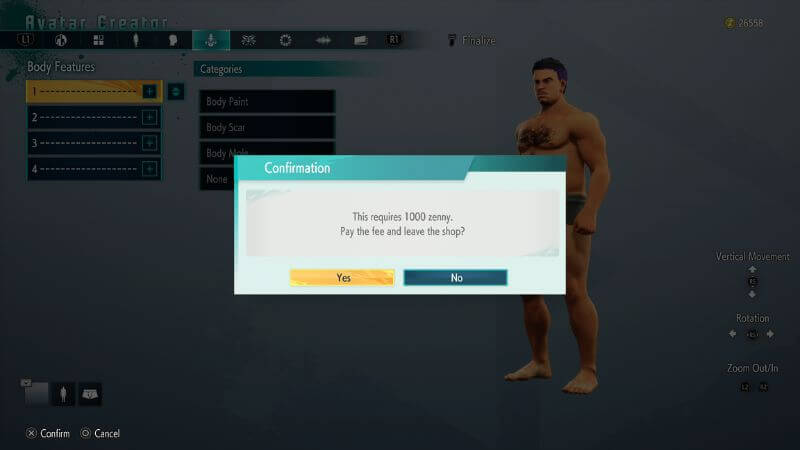
Street Fighter How to Edit Avatar
Image Source: Capcom via The Nerd Stash

Editing Avatar in World Tour

This will cost you 1,000 Zenny; you can customize your gender, face, body, height, and others. You can customize these features at both mentioned locations above.

However, heading to the apparel stores in Metro would be best to change and edit your avatar’s clothing in Street Fighter 6. There are some apparel stores like Drippin’ Style in Beat Square, and the other one you can access during the early part of the game is Nayshall’s Wear near the Haggar Stadium. Remember, not only do these clothes give you a look, but they also impact your fighting stats.

Also, there is an option for you to change the color of your clothing. But you need to find a dye for this purpose. Dye is a collectible item in the game, and you can acquire them by looting crates and defeating particular enemies.

Editing Your Avatar in Battle Hub

At the Battle Hub, you can change and edit the avatar appearance at the Bodyshop by speaking to the receptionist. You have to pay her 50 Drive Tickets to access this option. These Drive Tickets are earned by playing and winning rounds in the Battle Hub.

You can save any customized avatar in the Recipe menu. First, go to the character customization section in the Recipe menu and save the avatar. Then, when you want to load any of them, you can do it from any Bodyshop.

Changing and editing your avatar in Street Fighter 6 allows you to express your unique style and stand out among the players. Also, it is not too difficult to do, and you can quickly obtain new looks for your avatar.


Related Topics
Guide Street Fighter 6
Share. Facebook Twitter LinkedIn Reddit Email
Asanga Wijeratne
  • Website

SUGGESTED READS

MindsEye Layoffs 2026
Gaming

Studio Behind GTA-like Game, MindsEye, Hit With More Layoffs, and Nobody is Surprised: ‘Shocked There’s Even a Janitor Working There’

Princess Peach Spin-Off Movie May Already Be in Development, Job Listing Suggests
Gaming

Princess Peach Spin-Off Movie May Already Be in Development, Job Listing Suggests

Xbox's New CEO Wants to Reconnect With the 'Community,' Yet Brings In More CoreAI Leaders
Gaming

Xbox’s New CEO Wants to Reconnect With the ‘Community,’ Yet Brings In More CoreAI Leaders

Diablo 4 Season 13 Tier List
Gaming

Class Tier List for Diablo 4 Season 13 (Best Classes for Endgame & Leveling)

Take-Two Boss Finally Explains Why GTA 6 Is Skipping PC at Launch: 'We'll See How It Works Out'
Gaming

Take-Two Boss Finally Explains Why GTA 6 Is Skipping PC at Launch: ‘We’ll See How It Works Out’

Rockstar Employee Review Claims 'Unrealistic' Crunch as GTA 6 Development Intensifies: 'Had to Work Till 3AM'
Gaming

Rockstar Employee Review Claims ‘Unrealistic’ Crunch as GTA 6 Development Intensifies: ‘Had to Work Till 3AM’

The Nerd Stash
Facebook X (Twitter) Instagram YouTube LinkedIn
  • About Us
  • Join Our Team
  • Meet the Team
  • Privacy Policy
  • DMCA Policy
  • Contact Us
  • Terms of Use
  • Sitemap
  • Editorial Guidelines
  • Advertising Policy
© 2026 The Nerd Stash. All Rights Reserved.

Type above and press Enter to search. Press Esc to cancel.