Close Menu
  • Gaming
    • Platforms
      • Nintendo
      • PC
      • PlayStation
      • Xbox
  • Entertainment
    • Movies
    • TV
    • Royals
  • Celebrity
    • Hollywood
  • Human Interest
  • Astrology
  • More
    • Anime
    • Reviews
Facebook X (Twitter) Instagram LinkedIn YouTube
  • About Us
  • Join Our Team
  • Meet the Team
  • Privacy Policy
  • DMCA Policy
  • Contact Us
  • Terms of Use
  • Sitemap
  • Editorial Guidelines
  • Advertising Policy
The Nerd Stash
  • Gaming
  • Celebrity
  • Hollywood
  • Human Interest
The Nerd Stash
Home»Gaming»How to Change Camera Angle in Hogwarts Legacy

How to Change Camera Angle in Hogwarts Legacy

Finding the right angle.

Nerd Stash StaffArtur NovichenkoBy Nerd Stash Staff and Artur NovichenkoNovember 23, 20232 Mins Read
how-to-change-camera-angle-in-hogwarts-legacy
This article is over 2 years old and may contain outdated information.

WB Games’ Hogwarts Legacy is a technical marvel, offering a Harry Potter gameplay experience that honestly far exceeded expectations. It isn’t without little issues, though, including its awkward camera angle, which most players find isn’t set up ideally. If you want to change the camera angle in Hogwarts Legacy on any platform then here’s a step-by-step.

How to Change Camera Angle on a PC

(Updated on September 24, 2024 – updated links and format)
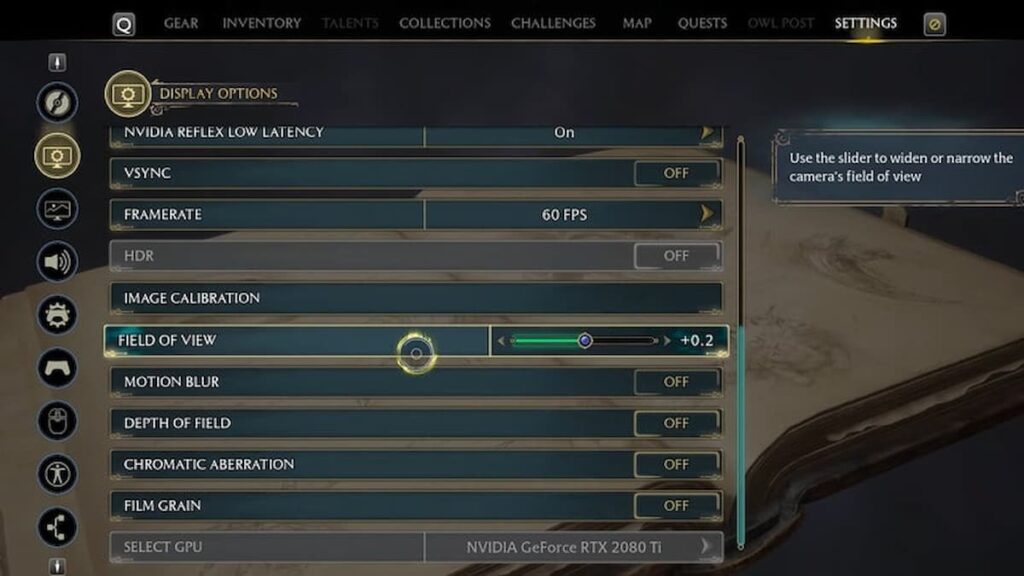
changing the hogwarts legacy camera angle on PC
Image source: WB Games via The Nerd Stash

If you’re playing on a PC, you can easily change the camera angle in Hogwarts Legacy. To do this, you only need to go to the Settings Menu and select the Display Options tab. Find the Field of View configuration and pull the slider to get the ideal camera angle.

Initially, the Field of View is 0, and it is worth noting that this camera angle is optimal. But by pulling the slider for this configuration, you can set the value from -20 to +20. Your character’s line of sight becomes wider by increasing the Field of View value. You will be able to see more of the beauty around you, and this is a good choice when fighting opponents surrounding you. But remember that the higher the camera angle value, the greater the load on your PC. The zero value of Field of View is optimal for finding the middle between performance and beauty. But on the other hand, you can reduce the load on your PC by lowering the Field of View value, which can be helpful.

Can You Change the Camera Angle on Nintendo Switch, PS & Xbox?

No, unfortunately, you cannot. The Camera Angle setting on consoles is permanent, and there is no way you can change it. The corresponding function is simply missing, so you must put up with it and play as it is. Perhaps in future updates, the developers will add such a function, but now there is no information confirming this. But for this to happen, the gaming community must draw the attention of developers to this shortcoming.


Related Topics
Guide Hogwarts Legacy
Share. Facebook Twitter LinkedIn Reddit Email
Nerd Stash Staff, Artur Novichenko
  • Website

Nerd Stash Staff, Artur Novichenko
  • Website

SUGGESTED READS

LEGO Batman Legacy of the Dark Knight PC Review
9
Gaming

LEGO Batman: Legacy of the Dark Knight Review – A Hero Rises

Call of Duty: Modern Warfare 4 Launching This October on Next-Gen Consoles & Switch 2, But Not Game Pass
Gaming

Call of Duty: Modern Warfare 4 Launching This October on Next-Gen Consoles & Switch 2, But Not Game Pass

Hideo Kojima Teams Up With Prada for an AI Film, And Fans Aren't Happy: 'Beyond Incredibly Disappointing'
Gaming

Hideo Kojima Teams Up With Prada for an AI Film, And Fans Aren’t Happy: ‘Beyond Incredibly Disappointing’

The Witcher 3 Songs of the Past expansion
Gaming

A Witcher 3 Leak Just Forced CD Projekt Red to Announce a Brand-New Expansion: Songs of the Past

CDPR Announces The Witcher 3 'Special Anniversary Stream' Amid New Massive DLC Rumor
Gaming

CDPR Announces The Witcher 3 ‘Special Anniversary Stream’ Amid New Massive DLC Expansion Rumor

007 First Light All Challenges
Gaming

All Challenges in 007 First Light

The Nerd Stash
Facebook X (Twitter) Instagram YouTube LinkedIn
  • About Us
  • Join Our Team
  • Meet the Team
  • Privacy Policy
  • DMCA Policy
  • Contact Us
  • Terms of Use
  • Sitemap
  • Editorial Guidelines
  • Advertising Policy
© 2026 The Nerd Stash. All Rights Reserved.

Type above and press Enter to search. Press Esc to cancel.