Close Menu
  • Gaming
    • Game Guides
    • Codes
    • Game News
    • Game Previews
    • Game Reviews
    • Game Features
    • Game Lists
    • Platforms
      • Nintendo
      • PC
      • PlayStation
      • Xbox
      • Mobile
  • Entertainment
    • Movies
    • Movie Features
    • Movie Reviews
    • TV
    • Reality TV
    • Royals
  • Celebrity
    • Hollywood
  • Human Interest
  • Astrology
  • Videos
  • More
    • Anime
    • Lists
    • Podcasts
    • Reviews
Facebook X (Twitter) Instagram LinkedIn YouTube
  • About Us
  • Join Our Team
  • Meet the Team
  • Privacy Policy
  • DMCA Policy
  • Contact Us
  • Terms of Use
  • Sitemap
  • Editorial Guidelines
  • Advertising Policy
The Nerd Stash
  • Gaming
  • Celebrity
    • Hollywood
  • Human Interest
  • Videos
The Nerd Stash
Home»Game Guides»How To Complete Go for A Drive DMZ Mission in Season 4

How To Complete Go for A Drive DMZ Mission in Season 4

The Go for A Drive DMZ mission is a Tier-3 story objective in Season 4, and by completing it, you’ll gain access to the Tier-4 Phalanx…

Amir NaseriBy Amir NaseriJune 24, 20233 Mins Read
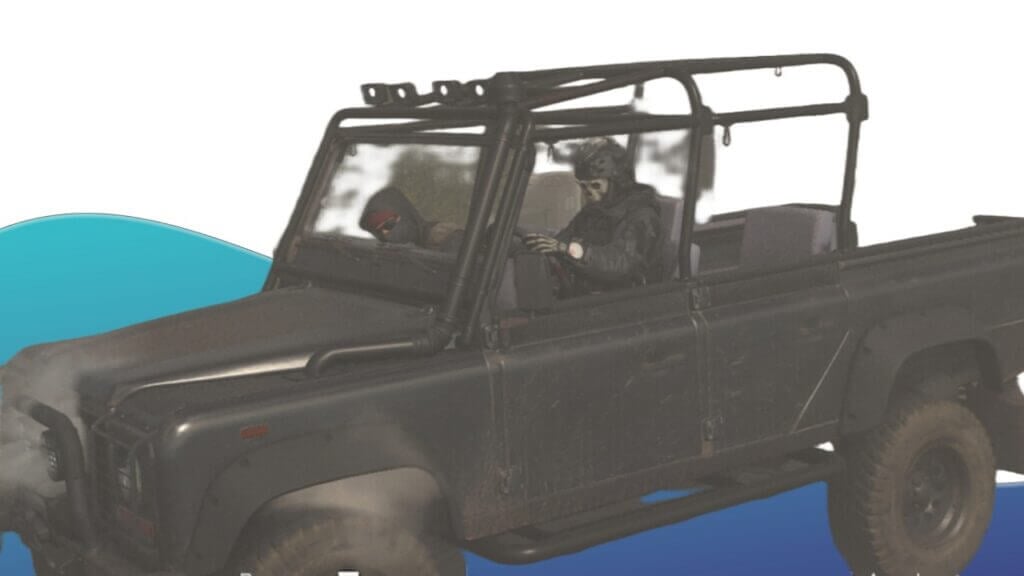
Go For A Drive DMZ Mission Season 4
Image Source: Activision via The Nerd Stash
This article is over 2 years old and may contain outdated information.

The Go for A Drive DMZ mission is a Tier-3 story objective in Season 4, and by completing it, you’ll gain access to the Tier-4 Phalanx faction assignments. Phalanx faction has another assignment for you to hack a hard drive while driving. This mission takes place in Vondel, and you need to do the challenging task of driving a car for a few minutes with an Encrypted Hard Drive in DMZ. This is while you also have to find the Zoo Dead Drop! Let’s get started.

What Are The Objectives of The Go For A Drive DMZ Mission?
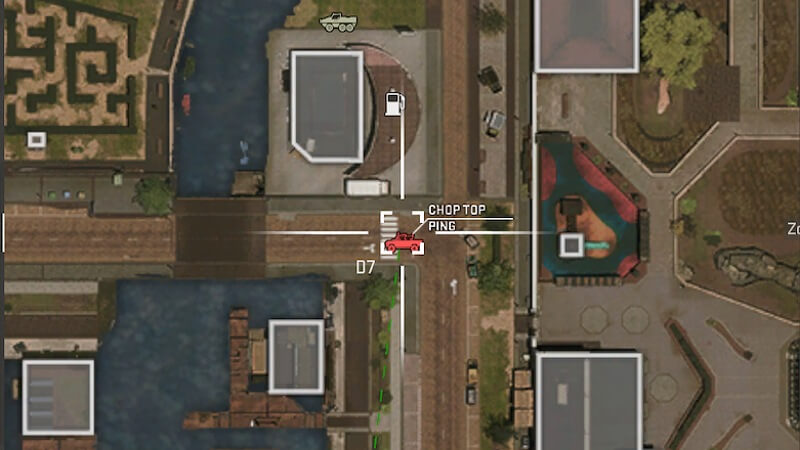
Chop Top Vehicle - Go For A Drive DMZ Map Location
Image Source: Activision via The Nerd Stash
  • Acquire a Decrypted Hard Drive
  • Drive a Chop Top car for 2 minutes while carrying the Encrypted Hard Drive.
  • Deliver the drive to the Zoo Dead Drop.

For the first objective of the Go for A Drive DMZ mission, you need to find an Encrypted Hard Drive. You’ve probably seen many of these items while playing the DMZ mode, but there are certain locations you can find them. The first place to look for these is the Strongholds. Find yourself a Stronghold Key by killing the enemy AIs, and loot these places to find an Encrypted Hard Drive. You can also find these inside the computer cases in buildings or by making a Weapon Stash contract.

Once you’re in a position of the hard drive, all you need to do is drive. It will help a lot if you’re a Fast and The Furious fan, because you need to drive for 2 minutes straight in the Vondel map, without leaving the car. You should also note that you have to drive a Chop Top vehicle. This car will randomly spawn in the area, and you can spot some enemy targets riding it.

This objective of the Go for A Drive DMZ mission seems to be very easy, but as soon as you enter the car, you’ll be marked on the other operators’ tac map. That’s why you’ll need to find a safe place, purchase and activate UAVs, and be very careful with your driving.

Related:
How To Complete Chemist’s Sources DMZ Mission in Season 4
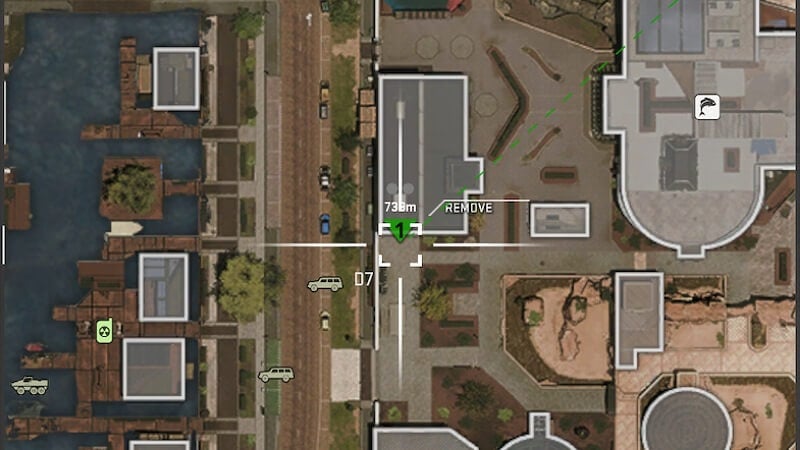
Zoo Dead Drop for the Encrypted Hard Drive Map Location
Image Source: Activision via The Nerd Stash

After the progress bar on the screen is filled, you can proceed to your third objective. Keep the hard drive in your backpack, and drive to the Zoo Dead Drop on the map. This Dead Drop’s location is in the image above. Once you arrive, drop the drive inside of it. This will mark the Go for A Drive DMZ mission as complete.

Remember that completing this mission requires you to do the second and third objectives in the same deployment. The first objective, however, will remain checked even if you get eliminated after completing it. If you lost the hard drive during this mission, you will then need to find another one in your next deployment.

Call of Duty: Warzone 2 and Modern Warfare 2 are available to play on PlayStation 5, PlayStation 4, Xbox Series X|S, Xbox One, and PC via Steam and Battle.Net.
Related Topics
Guide Warzone
Share. Facebook Twitter LinkedIn Reddit Email
Amir Naseri
  • Website

Amir is an absolute Call of Duty nerd, preferring shooter games more than everything. However, he does like to do uppercuts in Mortal Kombat and feel the NOS going through the engines in Need For Speed games.

SUGGESTED READS

Metroid Prime Producer Retires After MP4, 40 Years at Nintendo: 'A Sequel Remains Uncertain'
Features

Metroid Prime Producer Retires After MP4, 40 Years at Nintendo: ‘A Sequel is Still Uncertain’

Prince of Persia The Sands of Time Remake Canceled
Game News

Say Goodbye to the Prince of Persia: The Sands of Time Remake, Because Ubisoft Has Officially Canceled It

Crimson Desert Goes Gold
Features

Crimson Desert Has Gone Gold, Bringing Us Closer to One of the Biggest Open-World Experiences of Recent Memory

Final Fantasy 7 Remake Xbox Series X|S & Switch 2 Review
9.5
Features

Final Fantasy 7 Remake Xbox Series X|S/Nintendo Switch 2 Review – Classic Tale, New Platforms

Fatal Fury City of the Wolves Kim Jae Hoon Preview
Features

Fatal Fury City of the Wolves Kim Jae Hoon Hands-On Impressions – Fiery Kicks, Fast Combos

Steam's New AI Policy Separates AI-Generated Content From 'AI Powered Tools' Used for 'Efficiency Gains'
Features

Steam’s New AI Policy Separates AI-Generated Content From ‘AI Powered Tools’ Used for ‘Efficiency Gains’

The Nerd Stash
Facebook X (Twitter) Instagram YouTube LinkedIn
  • About Us
  • Join Our Team
  • Meet the Team
  • Privacy Policy
  • DMCA Policy
  • Contact Us
  • Terms of Use
  • Sitemap
  • Editorial Guidelines
  • Advertising Policy
© 2026 The Nerd Stash. All Rights Reserved.

Type above and press Enter to search. Press Esc to cancel.