Close Menu
  • Gaming
    • Game Guides
    • Codes
    • Game News
    • Game Previews
    • Game Reviews
    • Game Features
    • Game Lists
    • Platforms
      • Nintendo
      • PC
      • PlayStation
      • Xbox
      • Mobile
  • Entertainment
    • Movies
    • Movie Features
    • Movie Reviews
    • TV
    • Reality TV
    • Royals
  • Celebrity
    • Hollywood
  • Human Interest
  • Astrology
  • Videos
  • More
    • Anime
    • Lists
    • Podcasts
    • Reviews
Facebook X (Twitter) Instagram LinkedIn YouTube
  • About Us
  • Join Our Team
  • Meet the Team
  • Privacy Policy
  • DMCA Policy
  • Contact Us
  • Terms of Use
  • Sitemap
  • Editorial Guidelines
  • Advertising Policy
The Nerd Stash
  • Gaming
  • Celebrity
    • Hollywood
  • Human Interest
  • Videos
The Nerd Stash
Home»Game Guides»How To Fix High Price To Pay Bug in Starfield

How To Fix High Price To Pay Bug in Starfield

Even though Starfield claims to be the game of the year, this game was developed by Bethesda, so bugs and problems are inevitable. And while…

Artur NovichenkoBy Artur NovichenkoSeptember 12, 20233 Mins Read
High Price To Pay Starfield Bug
Image Source: Bethesda via YouTube PerfectParadox
This article is over 2 years old and may contain outdated information.

Even though Starfield claims to be the game of the year, this game was developed by Bethesda, so bugs and problems are inevitable. And while we are all accustomed to typical bugs and crashes, it is much worse to encounter a bug while moving through the game plot. One of these problems is the inability to land on a planet during the High Price To Pay quest. Fortunately, this bug is not so serious if you compare this problem with endless loading during the Eye of the Storm quest. So, we are here to help you and tell you how to fix the High Price To Pay bug in Starfield.

Starfield: Fixing High Price To Pay Bug
How To Fix High Price To Pay Bug in Starfield
Image Source: Bethesda via YouTube PerfectParadox

First of all, it is worth understanding the problem. As you progress through the High Price To Pay quest and reach Jemison planet, you will notice that all landing points in New Atlantis, including The Lodge (quest landing point), are highlighted in gray. You can not interact with them and continue the quest accordingly.

Luckily, you can fix the High Price To Pay bug in Starfield in just a minute by following these steps:

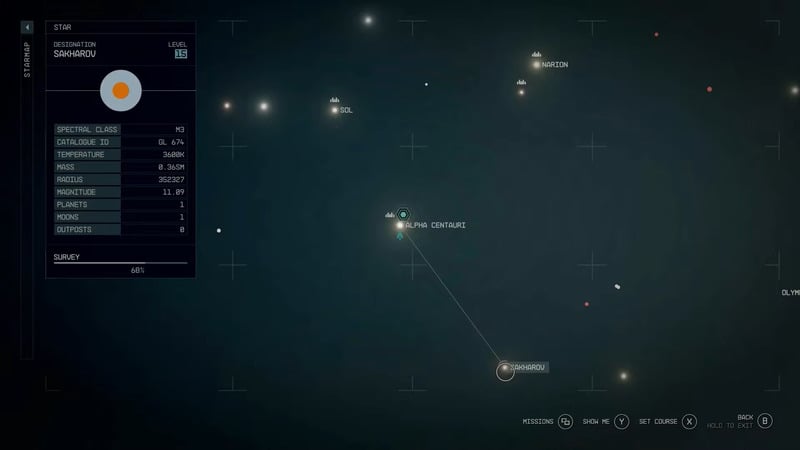
  • Open the space map and make a gravity jump to any neighboring system. Go to Sol System, Sakharov System, or another nearby location based on your fuel capacity.
  • After that, wait a few seconds and return to Alpha Centauri to Jemison planet.
  • Try landing at The Lodge landing point again. Most likely, you will not have any problems with it.

If the above method did not help and you still cannot land on Jemison Planet, try restarting the game. It is relatively trivial advice, but as all players know, restarting the game solves 99% of all problems. In addition, you can take a break from completing this quest for a while. You won’t get bored as Starfield offers tons of side activities. Explore a couple of new planets or complete a side quest, then return to the High Price To Pay mission, and you will land at the next quest point without any problems.

That’s all you need to know about how to fix the High Price To Pay bug in Starfield. Unfortunately, problems with loading locations during quests are a typical problem for Starfield. So you might be interested in learning how to fix Into the Unknown bug.

Related:

Should You Kill or Persuade Brogan in Starfield? Answered

Starfield is available on Xbox Series X|S and PC.

Related Topics
Guide Starfield
Share. Facebook Twitter LinkedIn Reddit Email
Artur Novichenko
  • Website

Artur is a copywriter and SEO specialist, as well as a small business owner. In his free time, he loves to play computer games and is glad that he was able to connect his professional career with his hobby.

SUGGESTED READS

AI That Plays Games for You? Sony and Other Gaming Giants Filed 49 Gen AI-Related Patents in the Last Three Months
Game News

AI That Plays Games for You? Sony and Other Gaming Giants Filed 49 Gen AI-Related Patents in the Last Three Months

Clair Obscur: Expedition 33 Becomes Second Most Awarded Game Ever With 330+ GOTY Wins, But Which One Is Still No. 1?
Features

Clair Obscur: Expedition 33 Becomes Second Most Awarded Game Ever With 330+ Industry Awards, But Which Game Still Holds the No. 1 Spot?

StarRupture How to Distribute Power
Game Guides

How to Manage and Distribute Power in StarRupture

StarRupture Unlock Recipes
Game Guides

How To Unlock New Recipes in StarRupture

StarRupture Data Points Farm
Game Guides

How To Earn Data Points in StarRupture

StarRupture Corporation Leveling Guide
Game Guides

Best Corporation to Level Up First in StarRupture

Trending
AI That Plays Games for You? Sony and Other Gaming Giants Filed 49 Gen AI-Related Patents in the Last Three Months

AI That Plays Games for You? Sony and Other Gaming Giants Filed 49 Gen AI-Related Patents in the Last Three Months

Clair Obscur: Expedition 33 Becomes Second Most Awarded Game Ever With 330+ GOTY Wins, But Which One Is Still No. 1?

Clair Obscur: Expedition 33 Becomes Second Most Awarded Game Ever With 330+ Industry Awards, But Which Game Still Holds the No. 1 Spot?

StarRupture How to Distribute Power

How to Manage and Distribute Power in StarRupture

StarRupture Unlock Recipes

How To Unlock New Recipes in StarRupture

The Nerd Stash
Facebook X (Twitter) Instagram YouTube LinkedIn
  • About Us
  • Join Our Team
  • Meet the Team
  • Privacy Policy
  • DMCA Policy
  • Contact Us
  • Terms of Use
  • Sitemap
  • Editorial Guidelines
  • Advertising Policy
© 2026 The Nerd Stash. All Rights Reserved.

Type above and press Enter to search. Press Esc to cancel.