
Close Menu
  • Gaming
    • Game Guides
    • Codes
    • Game News
    • Game Previews
    • Game Reviews
    • Game Features
    • Game Lists
    • Platforms
      • Nintendo
      • PC
      • PlayStation
      • Xbox
      • Mobile
  • Entertainment
    • Movies
    • Movie Features
    • Movie Reviews
    • TV
    • Reality TV
    • Royals
  • Celebrity
    • Hollywood
  • Human Interest
  • Astrology
  • More
    • Anime
    • Lists
    • Podcasts
    • Reviews
Facebook X (Twitter) Instagram LinkedIn YouTube
  • About Us
  • Join Our Team
  • Meet the Team
  • Privacy Policy
  • DMCA Policy
  • Contact Us
  • Terms of Use
  • Sitemap
  • Editorial Guidelines
  • Advertising Policy
The Nerd Stash
  • Gaming
  • Celebrity
  • Hollywood
  • Human Interest
The Nerd Stash
Home»Game Guides»How To Get a Trading License in Adopt Me

How To Get a Trading License in Adopt Me

Safety and fairness.

Patrick ArmstrongBy Patrick ArmstrongJanuary 3, 20243 Mins Read
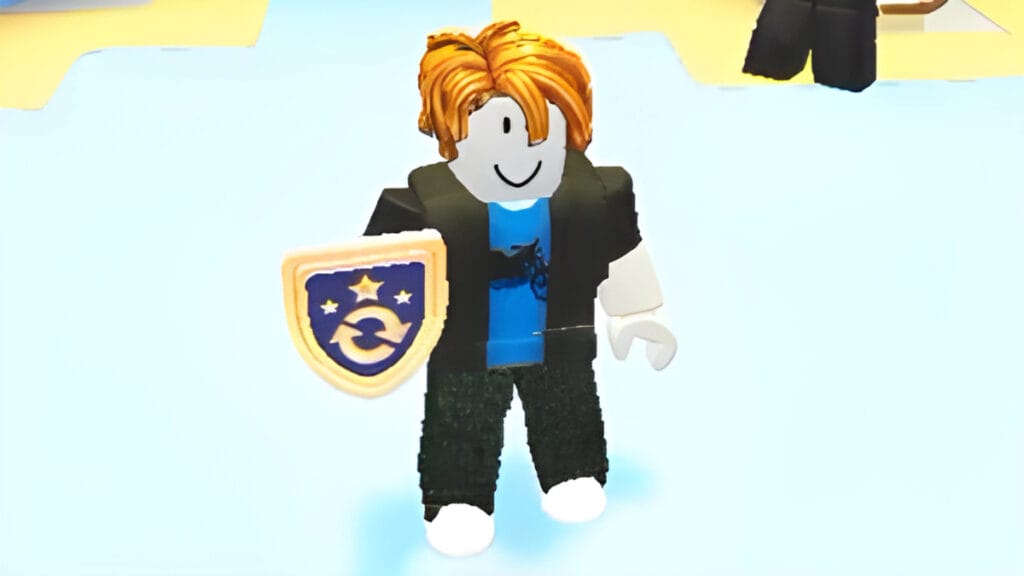
A character in Adopt Me poses with their Trading License
Image Source: DarkSoul YouTube via The Nerd Stash
This article is over 2 years old and may contain outdated information.

Adopt Me is full of rare and valuable creatures, but if you want to trade them to other players, you’ll need to get a Trade License (aka Trading License) first. These licenses are more than just a cute mechanic: they’re a way of protecting players from scammers. Like Blox Fruits and other Roblox games, Adopt Me unfortunately has its share of bad apples. Once you’ve gotten a license, it’ll be easier to keep yourself safe in the game. It also makes keeping track of your trades easier, which is a great QoL feature. Here’s how to get a Trading License in Adopt Me.

Adopt Me Trade License Test

A player takes the Trading License test in Adopt Me
Image Source: Artemis&Ivory YouTube

To get a Trading License in Adopt Me, you need to visit the Safety Hub. You can find this location between the Potion Shop and Farm Shop. At the bottom of the stairs, you’ll find a door leading to the license exam. The exam itself consists of three scenarios depicting common trade situations, whether you’re trading turkeys or unicorns. If you believe the situation is safe, jump on the green button. If the situation is a scam, jump on the red button. For example, one situation involves a player asking you for a rare pet now in exchange for the promise of giving you a pet later.

Related:

Where Is the Farm Shop in Adopt Me? Answered

If you get all three questions right, you will pass the test and get a Trading License. If you get a question wrong, you will have to retake the test. You can retake it an unlimited number of times, however, so there’s no real danger to getting it wrong. Once you have passed the test, you can proceed through the door to claim your Trading License. With this license, you can review your history of trades, allowing you to keep track of which pets you’ve received or given away. Even more importantly, the Trading License allows you to report scammers in Adopt Me. It even allows you to tag scammers based on the type of scam, such as Trust Trading or Giveaway Scams.

In summary, here are the steps you need to follow to get a Trading License in Adopt Me:

  • Visit the Safety Hub
  • Go through the door at the bottom of the stairs
  • Answer all three questions of the license quiz correctly (pressing “Green” for safe trades and “Red” for scams)
  • Proceed through the door and collect your Trading License

Roblox is available for PC, PlayStation 4, Xbox One, iOS, and Android.

Related Topics
Guide Roblox
Share. Facebook Twitter LinkedIn Reddit Email
Patrick Armstrong
  • Website

Artist and writer with a lifelong love of video games. Their favorite games include Dead by Daylight, Meet Your Maker, and Project Zomboid.

SUGGESTED READS

How to Subscribe & Cancel Adopt Me Pet Plus Subscription
Game Guides

How to Subscribe & Cancel Adopt Me Pet Plus Subscription

Saros Outlets Previews
Game Features

Saros Previews Round-Up: Refining What Was Already Flawless

Crimson Desert Community Tips and Tricks
Game Guides

I Played Crimson Desert for 90 Hours and STILL Learned These 10 Tricks From Social Media

Doom Co-creator and Wife Say The Current Game Industry Is 'Crashier' Than the '80s Crash: 'It Can't Stay Like This Forever'
Game News

Doom Co-Creator and Wife Say the Current Game Industry Is ‘Crashier’ Than the ’80s Crash: ‘It Can’t Stay Like This Forever’

Marathon PC Review
9.5
Game Features

Marathon Review – Bungie’s Finest

XBox Partner Preview November 2025 Announcements
Game Features

Every Major Announcement at the Xbox Partner Preview (March 2026)

The Nerd Stash
Facebook X (Twitter) Instagram YouTube LinkedIn
  • About Us
  • Join Our Team
  • Meet the Team
  • Privacy Policy
  • DMCA Policy
  • Contact Us
  • Terms of Use
  • Sitemap
  • Editorial Guidelines
  • Advertising Policy
© 2026 The Nerd Stash. All Rights Reserved.

Type above and press Enter to search. Press Esc to cancel.





