Close Menu
  • Gaming
    • Game Guides
    • Codes
    • Game News
    • Game Previews
    • Game Reviews
    • Game Features
    • Game Lists
    • Platforms
      • Nintendo
      • PC
      • PlayStation
      • Xbox
      • Mobile
  • Entertainment
    • Movies
    • Movie Features
    • Movie Reviews
    • TV
    • Reality TV
    • Royals
  • Celebrity
    • Hollywood
  • Human Interest
  • Astrology
  • Videos
  • More
    • Anime
    • Lists
    • Podcasts
    • Reviews
Facebook X (Twitter) Instagram LinkedIn YouTube
  • About Us
  • Join Our Team
  • Meet the Team
  • Privacy Policy
  • DMCA Policy
  • Contact Us
  • Terms of Use
  • Sitemap
  • Editorial Guidelines
  • Advertising Policy
The Nerd Stash
  • Gaming
  • Celebrity
    • Hollywood
  • Human Interest
  • Videos
The Nerd Stash
Home»Game Guides»How to Get and Use the Coin Bag in Pokemon GO

How to Get and Use the Coin Bag in Pokemon GO

Keep the gold coins coming.

Nat CollazoBy Nat CollazoOctober 16, 20232 Mins Read
How to Get and Use the Coin Bag in Pokemon GO
Image Source: Niantic via The Nerd Stash
This article is over 2 years old and may contain outdated information.

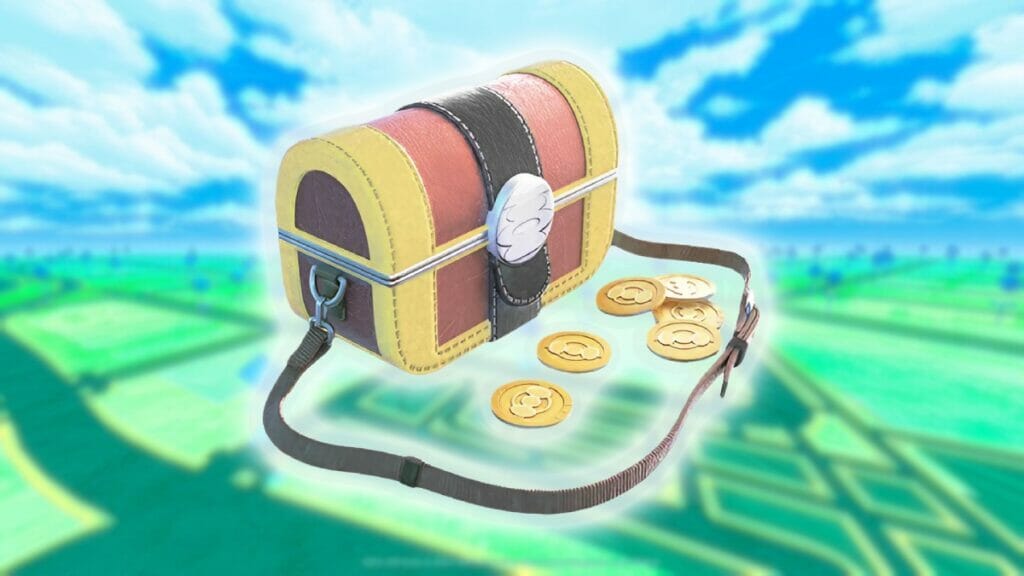
Gholdengo reigns across the Pokemon universe as the 1000th Pokemon, evolved from the strange, Gimmighoul. Even though they were introduced in the Pokemon Scarlet and Violet games, their popularity pushed them over to the famous mobile game Pokemon Go. In order to actually do this, you’ll need an item known as the Coin Bag in your Pokemon Go game. Fortunately, the only thing you need to have is both the mobile game and one of the Switch titles before you can learn how to get and use the Coin Bag in Pokemon Go.

How To Get The Coin Bag In Pokemon Go

How to Get and Use the Coin Bag in Pokemon GO
Image Source: Niantic via The Nerd Stash

You can only get the Coin Bag in Pokemon Go one way:

  • Go to a Pokemon Center in either Pokemon Scarlet or Pokemon Violet and open the Poke Portal menu.
  • Go to the Settings option within Pokemon Go.
  • Connect the mobile game to the Nintendo Switch game when you see your trainer’s name.
  • Go to your Trainer Profile Page in Pokemon Go and send a Postcard to your Switch game.
  • Receive the Coin Bag.

The very first time you send a Postcard, you’ll receive the Coin Bag in your inventory. The second time you send one, you’ll receive a Golden Lure Module. Every other time you send a Postcard, they’ll just remain in the Postcard Book for you to look at later.

How To Get Arboliva in Pokemon Go
Related: How To Get Arboliva in Pokemon Go

How To Use The Coin Bag In Pokemon Go

There really isn’t anything that you need to do with the Coin Bag once you have it. Now that it’s in your inventory, you’ll be able to do a variety of things including, and most importantly, catching Roaming Form Gimmighoul so that you can have enough Gimmighoul Coins to evolve it into Gholdengo. When you use the bag, you’ll see that these Gimmighoul start roaming the area for thirty minutes.

You’ll need to have 999 coins to successfully evolve Gimmighoul. They can be obtained by spinning Golden PokeStops, sending postcards, and participating in other in-game events and rewards. Golden PokeStops are a result of having the Golden Lure Module that we mentioned earlier. Once you have one in your inventory, you can go to your local PokeStops and change them to be Golden so that you can spin them and get rewards.

Top 10 Best Pokemon in Pokemon Go, Ranked
Related: Top 10 Best Pokemon in Pokemon Go, Ranked

Pokemon Go is available on Android and iOS.

Related Topics
Guide Pokemon Go
Share. Facebook Twitter LinkedIn Reddit Email
Nat Collazo
  • Website
  • X (Twitter)
  • Instagram

I am a game journalist and guide writer with ten years of experience as well as the CEO/ Founder of Frowns Marketing, a marketing company that caters to indie games, tabletop games, and board games to help developers get more wishlists, backers, and players!

SUGGESTED READS

Minecraft Accused of Mocking Lonely Kids, Sparking Mental Health Backlash: 'One of the Ickiest Things I've Seen'
Features

Minecraft Accused of Mocking Lonely Kids, Sparking Mental Health Backlash: ‘One of the Ickiest Things I’ve Seen’

Destiny 2 Renegades PS5 Review
8.5
Features

Destiny 2: Renegades Review – The Shooter Strikes Back

Clair Obscur: Expedition 33 Loses GOTY, Other Award from Indie Game Awards Over Generative AI: 'Some Weird Performative BS'
Game News

GOTY Stripped Over AI?: Clair Obscur: Expedition 33 Loses Awards at Indie Game Awards, ‘Some Weird Performative BS’

Sony Patents Real-time AI Game Censorship Tech That Could Even Make GTA 6 Kid-Friendly
Game News

Sony Patents Real-Time AI Game Censorship Tech That Could Even Make GTA 6 Kid-Friendly

Zenless Zone Zero Version 2.5 Announcement
Game News

Zenless Zone Zero Version 2.5 Is Ready To Wrap Up the Year With Two New Agents and a Free Outfit

PC Gamers Can't Catch a Break as Nvidia Plans 40% GeForce GPU Production Cuts, Report: 'Who Needs a PC Anyways'
Game News

PC Gamers Can’t Catch a Break as Nvidia Reportedly Plans 40% GeForce GPU Production Cuts: ‘Who Needs a PC Anyways’

Trending
Minecraft Accused of Mocking Lonely Kids, Sparking Mental Health Backlash: 'One of the Ickiest Things I've Seen'

Minecraft Accused of Mocking Lonely Kids, Sparking Mental Health Backlash: ‘One of the Ickiest Things I’ve Seen’

Destiny 2 Renegades PS5 Review
8.5

Destiny 2: Renegades Review – The Shooter Strikes Back

Clair Obscur: Expedition 33 Loses GOTY, Other Award from Indie Game Awards Over Generative AI: 'Some Weird Performative BS'

GOTY Stripped Over AI?: Clair Obscur: Expedition 33 Loses Awards at Indie Game Awards, ‘Some Weird Performative BS’

Sony Patents Real-time AI Game Censorship Tech That Could Even Make GTA 6 Kid-Friendly

Sony Patents Real-Time AI Game Censorship Tech That Could Even Make GTA 6 Kid-Friendly

The Nerd Stash
Facebook X (Twitter) Instagram YouTube LinkedIn
  • About Us
  • Join Our Team
  • Meet the Team
  • Privacy Policy
  • DMCA Policy
  • Contact Us
  • Terms of Use
  • Sitemap
  • Editorial Guidelines
  • Advertising Policy
© 2025 The Nerd Stash. All Rights Reserved.

Type above and press Enter to search. Press Esc to cancel.