Close Menu
  • Gaming
    • Platforms
      • Nintendo
      • PC
      • PlayStation
      • Xbox
  • Entertainment
    • Movies
    • TV
    • Royals
  • Celebrity
    • Hollywood
  • Human Interest
  • Astrology
  • More
    • Reviews
Facebook X (Twitter) Instagram LinkedIn YouTube
  • About Us
  • Join Our Team
  • Meet the Team
  • Privacy Policy
  • DMCA Policy
  • Contact Us
  • Terms of Use
  • Sitemap
  • Editorial Guidelines
  • Advertising Policy
The Nerd Stash
  • Gaming
  • Celebrity
  • Hollywood
  • Human Interest
The Nerd Stash
Home»Gaming»How To Get Double Jump in Cyberpunk 2077 (2.0)

How To Get Double Jump in Cyberpunk 2077 (2.0)

You may not be able to fly, but you can jump high.

Artur NovichenkoBy Artur NovichenkoSeptember 30, 20232 Mins Read
Double Jump Cyberpunk 2077
Image Source: CD Projekt RED via YouTube PerfectParadox
This article is over 2 years old and may contain outdated information.

[Updated on October 4, 2024, to revise outdated formatting and improve readability.]

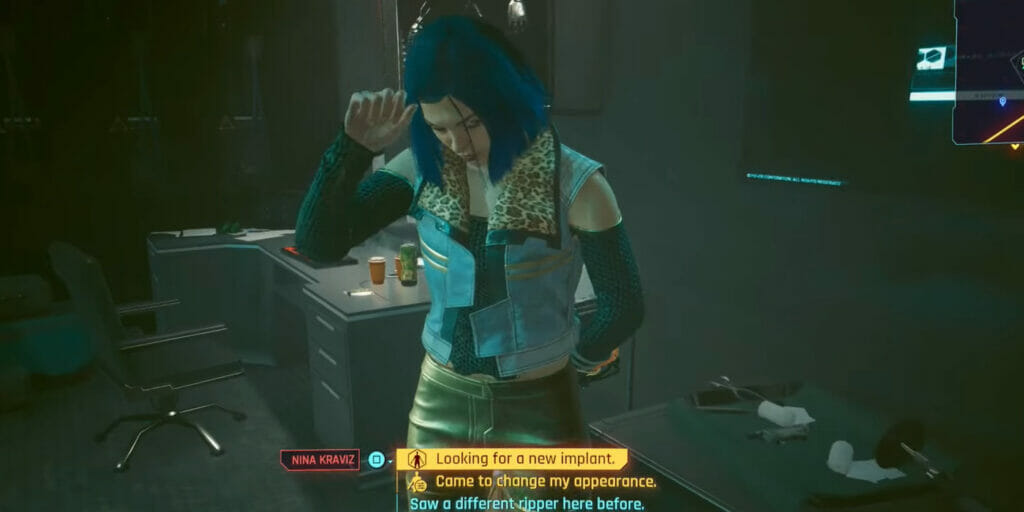
To unlock Double Jump in Cyberpunk 2077, you must reach character level 10. And when we talk about character level, we mean in-game level, not street cred. As we said earlier, despite all your services to the residents of Night City, Ripperdoc will not risk its license and will not offer high-level cybernetics while your body is too weak. Of course, you must spend some time to get to the desired level, especially if you have just started a new playthrough. But side quests and part-time jobs will help you relatively quickly jump over this mark.

How To Get Double Jump in Cyberpunk 2077
Image Source: CD Projekt RED via YouTube PerfectParadox

However, once you meet this requirement, you only need to visit any nearby Ripperdoc and ask about new implants. Next, go to the Legs Cyberware tab and buy Reinforced Tendons by paying the 30,000+ Eddies. It is worth noting that reaching level 10 will unlock other helpful implants like Gorilla Arms. So you might want to hold off on purchasing Double Jump until later.

After installing Reinforced Tendons, you can activate Double Jump by double pressing X/A on a controller or spacebar on a keyboard. This ability will help you quickly climb obstacles or easily evade pursuit by overcoming high fences. On the other hand, this implant works best when paired with other improvements. For example, you can install Sandevistan and a couple of increasing-speed implants. Use everything together, and you will feel like you can fly.

Related:

How To Complete Birds With Broken Wings in Cyberpunk 2077: Phantom Liberty

You can use this Cyberware in any speed and agility build like the Katana Build. But you should choose something else if you prefer to be a tank and absorb most of the incoming damage.


Related Topics
Cyberpunk 2077 Guide
Share. Facebook Twitter LinkedIn Reddit Email
Artur Novichenko
  • Website

Artur is a copywriter and SEO specialist, as well as a small business owner. In his free time, he loves to play computer games and is glad that he was able to connect his professional career with his hobby.

SUGGESTED READS

DC white house MAGA game
Gaming

Trump’s MAGA Video Games Feature Immigrant Hunts and Tetris Walls in Bold New Vision for DC: ‘It’s Like the White House is Being Run by Evil 12 Year Olds’

Can Blood of Dawnwalker Run on Steam Deck? Best Settings & Performance Guide
Gaming

Can Blood of Dawnwalker Run on Steam Deck? Best Settings & Performance Guide

The Blood of Dawnwalker Scouting Towers
Gaming

The Blood of Dawnwalker: How to Clear Scouting Towers and Reveal Map Locations

How to Fast Travel and Activate Shrines in Blood of Dawnwalker
Gaming

How to Fast Travel and Activate Shrines in Blood of Dawnwalker

State of Play September 2026 Announcements
Gaming

PlayStation State of Play (September 2026): All Major Announcements

CS2 float values
Gaming

How to Read Float Before Buying a Skin

The Nerd Stash
Facebook X (Twitter) Instagram YouTube LinkedIn
  • About Us
  • Join Our Team
  • Meet the Team
  • Privacy Policy
  • DMCA Policy
  • Contact Us
  • Terms of Use
  • Sitemap
  • Editorial Guidelines
  • Advertising Policy
© 2026 The Nerd Stash. All Rights Reserved.

Type above and press Enter to search. Press Esc to cancel.