Close Menu
  • Gaming
    • Game Guides
    • Codes
    • Game News
    • Game Previews
    • Game Reviews
    • Game Features
    • Game Lists
    • Platforms
      • Nintendo
      • PC
      • PlayStation
      • Xbox
      • Mobile
  • Entertainment
    • Movies
    • Movie Features
    • Movie Reviews
    • TV
    • Reality TV
    • Royals
  • Celebrity
    • Hollywood
  • Human Interest
  • Astrology
  • Videos
  • More
    • Anime
    • Lists
    • Podcasts
    • Reviews
Facebook X (Twitter) Instagram LinkedIn YouTube
  • About Us
  • Join Our Team
  • Meet the Team
  • Privacy Policy
  • DMCA Policy
  • Contact Us
  • Terms of Use
  • Sitemap
  • Editorial Guidelines
  • Advertising Policy
The Nerd Stash
  • Gaming
  • Celebrity
    • Hollywood
  • Human Interest
  • Videos
The Nerd Stash
Home»Game Guides»How To Get New Shields In Monopoly Go

How To Get New Shields In Monopoly Go

The better to shield yourself with.

Nat CollazoBy Nat CollazoOctober 9, 20233 Mins Read
How To Get New Shields In Monopoly Go
Image Source: Scopely via The Nerd Stash

Skip To...

  • How To Get Shield Skins In Monopoly Go
  • How Do You Switch Shield Skins
This article is over 2 years old and may contain outdated information.

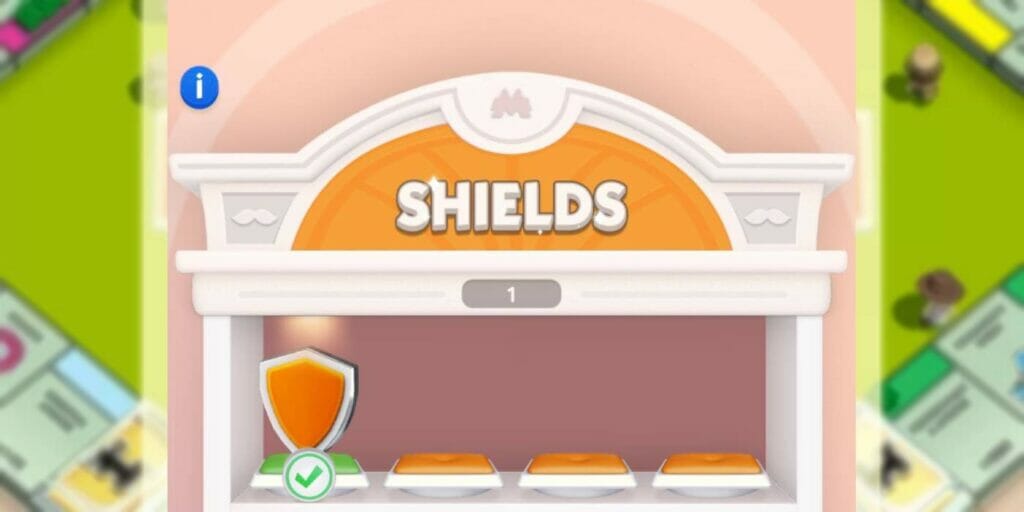
Monopoly Go is the newest and easiest way to lose friendships for the sake of making a billion in-game dollars. This mobile version of the classic game has a few new features that make it easier for you to play both online and offline, including the implementation of shields. These shields make it so that when you aren’t playing, people who try to knock down your buildings get blocked and can’t take as much money from you. Of course, you’re able to customize and get new shields as you play, making things that much more fun.

How To Get Shield Skins In Monopoly Go

How To Get New Shields In Monopoly Go
Image Source: Scopely via The Nerd Stash

The only thing you really need to do beforehand is:

  • Be at level 35
  • Unlock the Wins category.
  • Work towards shield skin rewards.

To better explain the Wins category, you can find a list of different objectives that you can complete with different prizes as rewards. Sometimes, you’ll have the chance to earn stickers and sometimes, you’ll see that there are added dice rewards. They won’t always be there, but check back in the Wins section frequently to see if there are any shield skins available for you to use. The button to get to that window is on the bottom left-hand of the main screen where it says Wins. Again, you have to be at level 35 to unlock that area.

While these shields don’t necessarily constitute an actual advantage over your enemies, it does make it look cooler when they try to knock down your buildings. In fact, they’ll be able to see the shield skin when they go to wreck your building and it appears instead. When you get these new skins, you’re able to switch them out when you please.

How Do You Switch Shield Skins

To switch between your different shields, you can click on the three horizontal lines at the top-right corner of the screen where the main menu will appear. Select the My Showroom selection and press the button at the center of the bottom of the screen. This will take you to the Shields showroom, where you can see all of your shields and are free to select which one you want to use. This is the area where you can switch out your game piece as well if you so choose.

Related:

All Gizmo Gourmet Rewards in Monopoly Go

Monopoly Go is available on Android and iOS.

Related Topics
Guide Monopoly Go
Share. Facebook Twitter LinkedIn Reddit Email
Nat Collazo
  • Website
  • X (Twitter)
  • Instagram

I am a game journalist and guide writer with ten years of experience as well as the CEO/ Founder of Frowns Marketing, a marketing company that caters to indie games, tabletop games, and board games to help developers get more wishlists, backers, and players!

SUGGESTED READS

Minecraft Accused of Mocking Lonely Kids, Sparking Mental Health Backlash: 'One of the Ickiest Things I've Seen'
Features

Minecraft Accused of Mocking Lonely Kids, Sparking Mental Health Backlash: ‘One of the Ickiest Things I’ve Seen’

Destiny 2 Renegades PS5 Review
8.5
Features

Destiny 2: Renegades Review – The Shooter Strikes Back

Clair Obscur: Expedition 33 Loses GOTY, Other Award from Indie Game Awards Over Generative AI: 'Some Weird Performative BS'
Game News

GOTY Stripped Over AI?: Clair Obscur: Expedition 33 Loses Awards at Indie Game Awards, ‘Some Weird Performative BS’

Sony Patents Real-time AI Game Censorship Tech That Could Even Make GTA 6 Kid-Friendly
Game News

Sony Patents Real-Time AI Game Censorship Tech That Could Even Make GTA 6 Kid-Friendly

Zenless Zone Zero Version 2.5 Announcement
Game News

Zenless Zone Zero Version 2.5 Is Ready To Wrap Up the Year With Two New Agents and a Free Outfit

PC Gamers Can't Catch a Break as Nvidia Plans 40% GeForce GPU Production Cuts, Report: 'Who Needs a PC Anyways'
Game News

PC Gamers Can’t Catch a Break as Nvidia Reportedly Plans 40% GeForce GPU Production Cuts: ‘Who Needs a PC Anyways’

Trending
Minecraft Accused of Mocking Lonely Kids, Sparking Mental Health Backlash: 'One of the Ickiest Things I've Seen'

Minecraft Accused of Mocking Lonely Kids, Sparking Mental Health Backlash: ‘One of the Ickiest Things I’ve Seen’

Destiny 2 Renegades PS5 Review
8.5

Destiny 2: Renegades Review – The Shooter Strikes Back

Clair Obscur: Expedition 33 Loses GOTY, Other Award from Indie Game Awards Over Generative AI: 'Some Weird Performative BS'

GOTY Stripped Over AI?: Clair Obscur: Expedition 33 Loses Awards at Indie Game Awards, ‘Some Weird Performative BS’

Sony Patents Real-time AI Game Censorship Tech That Could Even Make GTA 6 Kid-Friendly

Sony Patents Real-Time AI Game Censorship Tech That Could Even Make GTA 6 Kid-Friendly

The Nerd Stash
Facebook X (Twitter) Instagram YouTube LinkedIn
  • About Us
  • Join Our Team
  • Meet the Team
  • Privacy Policy
  • DMCA Policy
  • Contact Us
  • Terms of Use
  • Sitemap
  • Editorial Guidelines
  • Advertising Policy
© 2025 The Nerd Stash. All Rights Reserved.

Type above and press Enter to search. Press Esc to cancel.