
Close Menu
  • Gaming
    • Platforms
      • Nintendo
      • PC
      • PlayStation
      • Xbox
  • Entertainment
    • Movies
    • TV
    • Royals
  • Celebrity
    • Hollywood
  • Human Interest
  • Astrology
  • More
    • Anime
    • Reviews
Facebook X (Twitter) Instagram LinkedIn YouTube
  • About Us
  • Join Our Team
  • Meet the Team
  • Privacy Policy
  • DMCA Policy
  • Contact Us
  • Terms of Use
  • Sitemap
  • Editorial Guidelines
  • Advertising Policy
The Nerd Stash
  • Gaming
  • Celebrity
  • Hollywood
  • Human Interest
The Nerd Stash
Home»Gaming»How to Get Silhouette Icons in Overwatch 2

How to Get Silhouette Icons in Overwatch 2

[Updated on September 14, 2024, to revise outdated formatting and improve readability.] To get Silhouette icons in Overwatch 2 , you still need to play…

Artur NovichenkoBy Artur NovichenkoFebruary 8, 20232 Mins Read
how-to-get-silhouette-icons-in-overwatch-2
This article is over 3 years old and may contain outdated information.

[Updated on September 14, 2024, to revise outdated formatting and improve readability.]

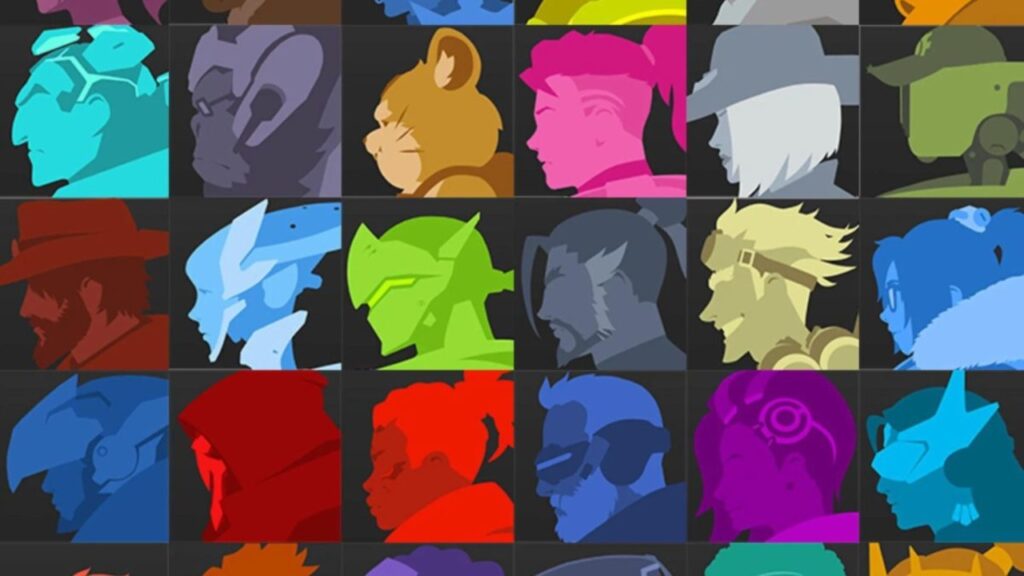
To get Silhouette icons in Overwatch 2 , you still need to play as a definite character and win 15 times. At the same time, only victories in Role Queue or Open Queue affect the progress. By playing and winning in Custom Games or Training, you will not replenish the win counter and will not receive Silhouette icons. It’s probably not difficult to get 15 for a couple of your favorite characters, and you will complete this task in one fun evening with friends. But those who want to collect the entire collection of cosmetic icons will have to work hard.

However, you can follow the progress for a more comfortable achievement of your goal of unlocking Silhouette icons. To do this, you only need to do the following:

  • Go to the Challenge menu and select the Hero tab.
  • Next, go to the Rewards tab.
  • Select Icons and see how far you are from the reward.

Related:

How To Make a Wiggenweld Potion in Hogwarts Legacy

As a reward, you will receive a simple but stylish character icon. The icon is made in the style of each character and depicts the head turned in profile. Well, it’s not the most valuable reward, but it looks relatively stylish.


Related Topics
Guide Overwatch 2
Share. Facebook Twitter LinkedIn Reddit Email
Artur Novichenko
  • Website

Artur is a copywriter and SEO specialist, as well as a small business owner. In his free time, he loves to play computer games and is glad that he was able to connect his professional career with his hobby.

SUGGESTED READS

World of Tanks HEAT Closed Beta Preview
Features

World of Tanks HEAT Hands-On Preview – Faster, Flashier, and Just as Tactical

Where to Find the Secret Fall Shop in Roblox Adopt Me
Gaming

Where to Find the Secret Fall Shop in Roblox Adopt Me

Diablo 4 Lord of Hatred Review
10
Features

Diablo 4: Lord of Hatred Review – Breaking the Cycle

Shuhei Yoshida Says He Was Fired From Playstation Studios for Saying 'No' to Jim Ryan: 'He Asked For Ridiculous Things'
Gaming

Shuhei Yoshida Says He Was Fired From Playstation Studios for Saying ‘No’ to Jim Ryan: ‘He Asked For Ridiculous Things’

Splinter Cell Remake Shows Signs of Life Despite Recent Layoffs at Ubisoft Toronto
Gaming

Splinter Cell Remake Shows Signs of Life Despite Recent Layoffs at Ubisoft Toronto

Fastest Ways to Get a Purrowl in Roblox Adopt Me
Gaming

Fastest Ways to Get a Purrowl & Trade Value in Roblox Adopt Me

The Nerd Stash
Facebook X (Twitter) Instagram YouTube LinkedIn
  • About Us
  • Join Our Team
  • Meet the Team
  • Privacy Policy
  • DMCA Policy
  • Contact Us
  • Terms of Use
  • Sitemap
  • Editorial Guidelines
  • Advertising Policy
© 2026 The Nerd Stash. All Rights Reserved.

Type above and press Enter to search. Press Esc to cancel.




