
Close Menu
  • Gaming
    • Game Guides
    • Codes
    • Game News
    • Game Previews
    • Game Reviews
    • Game Features
    • Game Lists
    • Platforms
      • Nintendo
      • PC
      • PlayStation
      • Xbox
      • Mobile
  • Entertainment
    • Movies
    • Movie Features
    • Movie Reviews
    • TV
    • Reality TV
    • Royals
  • Celebrity
    • Hollywood
  • Human Interest
  • Astrology
  • Videos
  • More
    • Anime
    • Lists
    • Podcasts
    • Reviews
Facebook X (Twitter) Instagram LinkedIn YouTube
  • About Us
  • Join Our Team
  • Meet the Team
  • Privacy Policy
  • DMCA Policy
  • Contact Us
  • Terms of Use
  • Sitemap
  • Editorial Guidelines
  • Advertising Policy
The Nerd Stash
  • Gaming
  • Celebrity
    • Hollywood
  • Human Interest
  • Videos
The Nerd Stash
Home»Game Guides»How To Get Solid Snake in Fortnite

How To Get Solid Snake in Fortnite

He’s just a man who’s good at what he does. Killing.

Akın BilginBy Akın BilginJanuary 23, 20242 Mins Read
fortnite metal gear solid solid snake
Image Source: Epic Games
This article is over 2 years old and may contain outdated information.

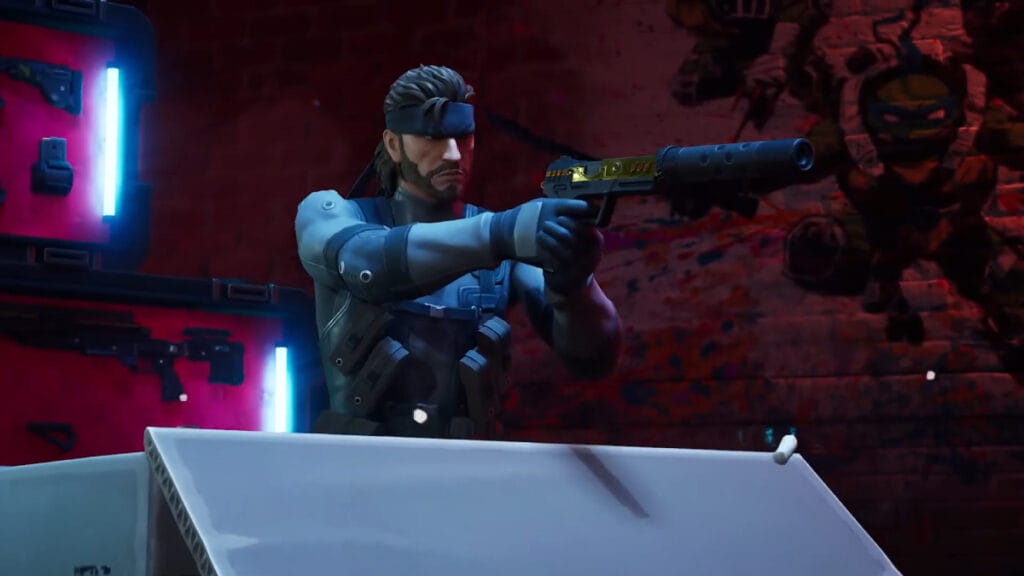
Solid Snake, familiar to any fan of the Metal Gear Solid game series, was unexpectedly added to Fortnite. This character has plenty of admirers and will undoubtedly be one of the most iconic video game characters in Fortnite. Many people will want to get this character, but of course, players who don’t know how to get it will miss out. This is because the skins added to the game with the Battle Pass in Fortnite will not appear in the Item Shop again. Even if they do, it will be a different version, not the first original version added to the game.

How To Unlock Solid Snake in Fortnite

fortnite solid snake
Image Source: Epic Games via The Nerd Stash

Solid Snake was added to Fortnite after the Big Bang event with Chapter 5 Season 1 Underground. First, you need to complete the Fortnite Chapter 5 Season 1 Battle Pass to get Solid Snake, one of the first game characters that comes to mind when you think of stealth. When we first jumped into Chapter 5, the Solid Snake was visible in the Bonus Rewards section, but it was not obtainable.

To unlock and use this legendary soldier, you need to complete Page 1 of all Solid Snake quests. After completing Page 1, Solid Snake’s Page 2 missions will be unlocked. Once you’ve completed Page 2 quests, you can access Solid Snake’s other skin. Completing these missions also gives you access to cool cosmetics like the Metal Gear MK. II, Stun Knife and Slider.

Related:

How To Get Peter Griffin in Fortnite

If you want to know everything that has been added to Fortnite with Chapter 5 Season 1, we recommend you to check out this video from the YouTube channel iFireMonkey:


EVERYTHING Added in Chapter 5 - Season 1
Related Topics
Fortnite Guide
Share. Facebook Twitter LinkedIn Reddit Email
Akın Bilgin
  • Website
  • X (Twitter)

Akın Bilgin loves colony simulators, survival, and souls-like games. He has been a freelance guide writer for two years and is studying English Language and Literature in Turkey.

SUGGESTED READS

Crimson Desert PC Review
9.5
Features

Crimson Desert Review – It’s Real, All of it

Death Stranding 2 PC Launch Adds Fuel to DLSS 5 AI Slop Backlash: 'It Is a Disgrace'
Game News

Death Stranding 2 PC Launch Adds Fuel to DLSS 5 AI Slop Backlash: ‘It Is a Disgrace’

Starfield Free Lanes & Terran Armada DLC
Game Previews

Starfield Free Lanes & Terran Armada Hands-Off Preview – Revitalizing This Spacefaring Adventure

Resident Evil 9 DLSS5
Game Features

DLSS 5 Isn’t the Future of Graphics; It’s a Filter Over Them

What is Honey Candy in Adopt Me? How to Get It and What It's For
Game Guides

What is Honey Candy in Adopt Me on Roblox? How to Get It and What It’s For

Honkai Star Rail Version 4.1
Game News

The Phantasmoon Games Continue in Honkai: Star Rail Version 4.1

The Nerd Stash
Facebook X (Twitter) Instagram YouTube LinkedIn
  • About Us
  • Join Our Team
  • Meet the Team
  • Privacy Policy
  • DMCA Policy
  • Contact Us
  • Terms of Use
  • Sitemap
  • Editorial Guidelines
  • Advertising Policy
© 2026 The Nerd Stash. All Rights Reserved.

Type above and press Enter to search. Press Esc to cancel.




