Close Menu
  • Gaming
    • Platforms
      • Nintendo
      • PC
      • PlayStation
      • Xbox
  • Entertainment
    • Movies
    • TV
    • Royals
  • Celebrity
    • Hollywood
  • Human Interest
  • Astrology
  • More
    • Reviews
Facebook X (Twitter) Instagram LinkedIn YouTube
  • About Us
  • Join Our Team
  • Meet the Team
  • Privacy Policy
  • DMCA Policy
  • Contact Us
  • Terms of Use
  • Sitemap
  • Editorial Guidelines
  • Advertising Policy
The Nerd Stash
  • Gaming
  • Celebrity
  • Hollywood
  • Human Interest
The Nerd Stash
Home»Gaming»How to get the Alternate Marker in Find the Markers

How to get the Alternate Marker in Find the Markers

The Alternate Marker is an Extreme-difficulty Marker in Roblox Find the Markers that is only challenging to find if you do not directly look up the solution…

AugustBy AugustMarch 1, 20232 Mins Read
Alternate Marker Secret Location in Roblox Find the Markers
This article is over 3 years old and may contain outdated information.

The Alternate Marker is an Extreme-difficulty Marker in Roblox Find the Markers that is only challenging to find if you do not directly look up the solution for its secret location. More specifically, this collectible is in a small compartment that can only be opened once you have decrypted the password for a Factory device you might have passed many times but not known existed. The password is a complex puzzle, requiring you to visit Roblox’s “markers epic memers” and crack the code using the 14 members of THE COUNCIL. For players less puzzle-savvy, solving this mystery can be a headache. Fortunately, community members have already solved this puzzle and publicly provided the password. 

Finding the Alternate Marker in Find the Markers

Secret Passcode Device on the Baseplate of Find the Markers

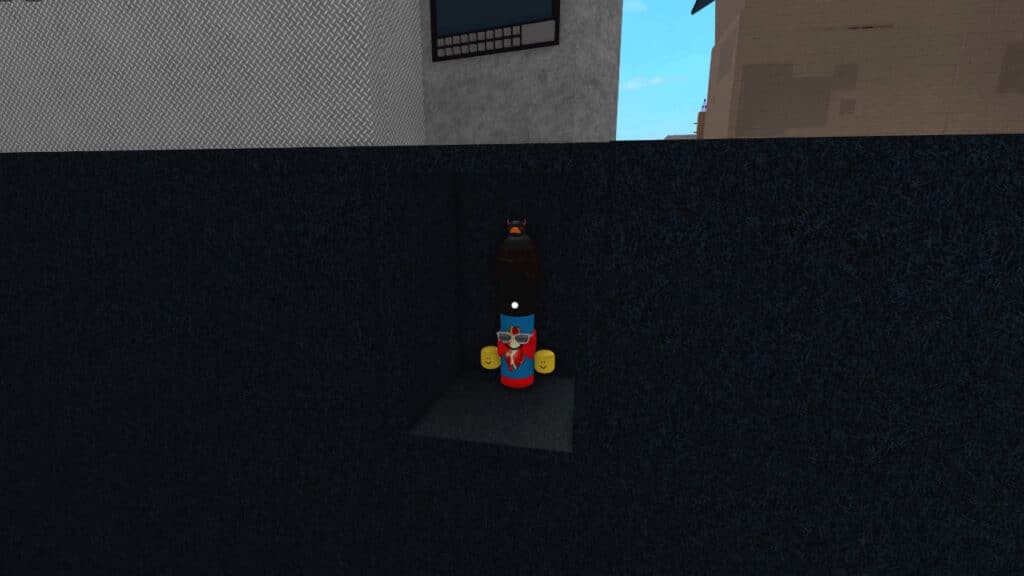
To find the Alternate Marker in Roblox Find the Markers, head to the Baseplate, the large asphalt-covered lot outside the Factory, the biome bordering Candyland. Go to the block near the edge with the words “They will decide your fate,” referring to the cone-headed meme with the phrase from Star Wars Episode III. 

Related: 

How to Get the Marker Stack in Find the Markers

Go behind this block while being careful not to fall off into the void. You will see a screen and keypad. Interact with it and enter the passcode “L5LPDNNN.” This password is not case-sensitive, so there is no need to consider typing in upper- or lowercase. Once you have input this passcode, the small entryway to the Alternate Marker’s hiding spot in Roblox Find the Markers will appear. The challenge now is to gingerly drop into the compartment to get the Marker. We recommend turning on Shift Lock in the game’s setting to enable you to face forward while walking back off the ledge.

Typing in the Passcode to Unlock the Alternate Marker in Find the Markers

If you are curious about the meaning behind the passcode for the Alternate Marker in Roblox Find the Markers, YouTuber Nulltutorials has an excellent video explaining how THE COUNCIL of the markers epic memers Roblox Group have pieces of the code in their About section. If you wanted to crack the code on your own, you would have to open every one of their profiles in search of clues. While this is fun for those who fancy such activities, most players likely just want to know the passcode directly to save time.

Roblox Find the Markers is available for PC, iOS, Android, and Xbox One.

Related Topics
Guide Roblox
Share. Facebook Twitter LinkedIn Reddit Email
August

August Webb is a Staff Writer and former Lead Guide Editor of TNS. When not working, she's playing a visual novel, fanning over an indie gem, or lost in the world of VR.

SUGGESTED READS

007 First Light Story Review
Gaming

007 First Light Launches Its Update #1 With New TacSim Content

XBOX Backward Compatibility on PC Could Support Xbox 360 Games Too, Dataminers Confirm
Gaming

XBOX Backward Compatibility on PC Could Support Xbox 360 Games Too, Dataminers Confirm

Aliens Fireteam Elite 2 Release Date
Gaming

Aliens: Fireteam Elite 2 Launches on August 25 With Movie-inspired DLC Packs

Sony Reportedly Knew the PlayStation Disc Shut Down Would 'Piss Everyone Off,' Warned Employees to Stay Silent
Gaming

Sony Reportedly Knew the PlayStation Disc Shut Down Would ‘Piss Everyone Off,’ Warned Employees to Stay Silent

How to play Halo: Campaign Evolved Co-Op
Gaming

Halo Campaign Evolved Co-Op Guide

Aliens Fireteam Elite 2 Horde Mode
Gaming

Aliens: Fireteam Elite 2 Has Revamped Its Horde Mode In the Best Possible Way

The Nerd Stash
Facebook X (Twitter) Instagram YouTube LinkedIn
  • About Us
  • Join Our Team
  • Meet the Team
  • Privacy Policy
  • DMCA Policy
  • Contact Us
  • Terms of Use
  • Sitemap
  • Editorial Guidelines
  • Advertising Policy
© 2026 The Nerd Stash. All Rights Reserved.

Type above and press Enter to search. Press Esc to cancel.