
Close Menu
  • Gaming
    • Game Guides
    • Codes
    • Game News
    • Game Previews
    • Game Reviews
    • Game Features
    • Game Lists
    • Platforms
      • Nintendo
      • PC
      • PlayStation
      • Xbox
      • Mobile
  • Entertainment
    • Movies
    • Movie Features
    • Movie Reviews
    • TV
    • Reality TV
    • Royals
  • Celebrity
    • Hollywood
  • Human Interest
  • Astrology
  • Videos
  • More
    • Anime
    • Lists
    • Podcasts
    • Reviews
Facebook X (Twitter) Instagram LinkedIn YouTube
  • About Us
  • Join Our Team
  • Meet the Team
  • Privacy Policy
  • DMCA Policy
  • Contact Us
  • Terms of Use
  • Sitemap
  • Editorial Guidelines
  • Advertising Policy
The Nerd Stash
  • Gaming
  • Celebrity
    • Hollywood
  • Human Interest
  • Videos
The Nerd Stash
Home»Game Guides»How To Get The Caustic Prestige Skin in Apex Legends

How To Get The Caustic Prestige Skin in Apex Legends

Following in the footsteps of Bangalore and Wraith, Caustic is the latest character in Apex Legends to earn an honorary Prestige skin. Like those before…

Ryan WillcoxBy Ryan WillcoxApril 21, 20233 Mins Read
Apex Legends Caustic Prestige Skin
Image via Respawn Entertainment
This article is over 2 years old and may contain outdated information.

Following in the footsteps of Bangalore and Wraith, Caustic is the latest character in Apex Legends to earn an honorary Prestige skin. Like those before it, Caustic’s Apex Contagion Prestige skin dawns three different forms that players can switch to between matches. Better yet, it even sports its own dedicated finishing move. However, the cosmetic is the Legend’s first-ever Mythic rarity skin, so unlocking it will require more than just leveling up. More importantly, each of the three forms cannot be earned all at once. Here’s how you can get your hands on the Caustic Prestige Skin and all of its forms in Apex Legends.

How to Unlock the Caustic Prestige Skin in Apex Legends
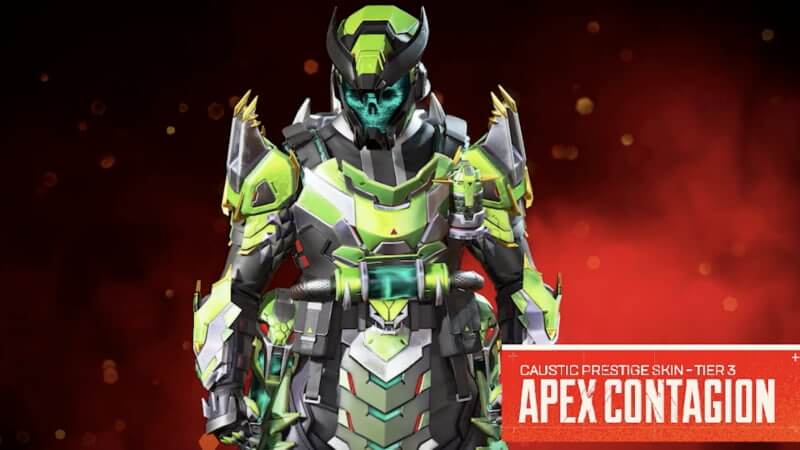
Apex Legends Caustic Tier 3 Contagion
Image via Respawn Entertainment

While it cannot be bought from the in-game store, the Caustic Prestige skin will initially be a part of the Veiled Collection Event, which is slated to run from April 25 to May 9. During this time, the Mythic cosmetic can be unlocked simply by collecting all 24 items in the Vieled Collection tab. This unlock method will surely be a grind for players of all calibers, but it is not the only way to earn Caustic’s Apex Contagion. Alternatively, you can also wait for the skin to become available in the game’s Mythic Store after the event ends. Be forewarned, all items in this store are priced at 150 Heirloom Shards—a currency only guaranteed to be rewarded once you have opened 500 Apex Packs.

Similar to Wraith’s Prestige skin, those able to secure this skin can then level it up to its Tier 3 form by completing various objectives. Its Tier 2 outfit can first be owned by dealing 30,000 damage with the character, while Tier 3 requires the Legend to do a mind-boggling 100,000 damage. Despite this tall order, Caustic fans will be rewarded generously. The Tier 3 outfit provides him with a spectacular set of lime green body armor and a horned skeleton helmet. This final Tier also comes bundled with the Toxic Scream Finisher, which is another item exclusive to Caustic.

Keep in mind, Apex Legends has much more planned for May than just the Veiled Collection Event. For one, the battle royale’s Season 17 is currently scheduled to begin on May 9. That means players can at least expect a new Battle Pass and map rotation. Although, numerous leaks have also pointed to it possibly debuting an alleged upcoming character known as Ballistic.

Apex Legends is available on PlayStation 4, PlayStation 5, Xbox One, Xbox Series X|S, PC, and Nintendo Switch.

Related Topics
Apex Legends Guide
Share. Facebook Twitter LinkedIn Reddit Email
Ryan Willcox
  • Website

Ryan is a freelance writer for The Nerd Stash who focuses on guides and news. Although he is well-versed in shooters and battle royales, his favorite video games are typically anything featuring Mario on the cover.

SUGGESTED READS

007 first light system requirements
Game News

Gamers Lose It After 007 First Light Demands Hardware That Doesn’t Exist in System Requirements: ‘Remember When Games Were Optimized?’

AI That Plays Games for You? Sony and Other Gaming Giants Filed 49 Gen AI-Related Patents in the Last Three Months
Game News

AI That Plays Games for You? Sony and Other Gaming Giants Filed 49 Gen AI-Related Patents in the Last Three Months

Clair Obscur: Expedition 33 Becomes Second Most Awarded Game Ever With 330+ GOTY Wins, But Which One Is Still No. 1?
Features

Clair Obscur: Expedition 33 Becomes Second Most Awarded Game Ever With 330+ Industry Awards, But Which Game Still Holds the No. 1 Spot?

StarRupture How to Distribute Power
Game Guides

How to Manage and Distribute Power in StarRupture

StarRupture Unlock Recipes
Game Guides

How To Unlock New Recipes in StarRupture

StarRupture Data Points Farm
Game Guides

How To Earn Data Points in StarRupture

Trending
007 first light system requirements

Gamers Lose It After 007 First Light Demands Hardware That Doesn’t Exist in System Requirements: ‘Remember When Games Were Optimized?’

AI That Plays Games for You? Sony and Other Gaming Giants Filed 49 Gen AI-Related Patents in the Last Three Months

AI That Plays Games for You? Sony and Other Gaming Giants Filed 49 Gen AI-Related Patents in the Last Three Months

Clair Obscur: Expedition 33 Becomes Second Most Awarded Game Ever With 330+ GOTY Wins, But Which One Is Still No. 1?

Clair Obscur: Expedition 33 Becomes Second Most Awarded Game Ever With 330+ Industry Awards, But Which Game Still Holds the No. 1 Spot?

StarRupture How to Distribute Power

How to Manage and Distribute Power in StarRupture

The Nerd Stash
Facebook X (Twitter) Instagram YouTube LinkedIn
  • About Us
  • Join Our Team
  • Meet the Team
  • Privacy Policy
  • DMCA Policy
  • Contact Us
  • Terms of Use
  • Sitemap
  • Editorial Guidelines
  • Advertising Policy
© 2026 The Nerd Stash. All Rights Reserved.

Type above and press Enter to search. Press Esc to cancel.