Close Menu
  • Gaming
    • Platforms
      • Nintendo
      • PC
      • PlayStation
      • Xbox
  • Entertainment
    • Movies
    • TV
    • Royals
  • Celebrity
    • Hollywood
  • Human Interest
  • Astrology
  • More
    • Reviews
Facebook X (Twitter) Instagram LinkedIn YouTube
  • About Us
  • Join Our Team
  • Meet the Team
  • Privacy Policy
  • DMCA Policy
  • Contact Us
  • Terms of Use
  • Sitemap
  • Editorial Guidelines
  • Advertising Policy
The Nerd Stash
  • Gaming
  • Celebrity
  • Hollywood
  • Human Interest
The Nerd Stash
Home»Gaming»How To Get (& Use) Flowberry Fizz in Fortnite

How To Get (& Use) Flowberry Fizz in Fortnite

Time to pop some champagne!

Akın BilginBy Akın BilginJanuary 3, 20242 Mins Read
fortnite flowberry fizz
Image Source: Epic Games via The Nerd Stash
This article is over 2 years old and may contain outdated information.

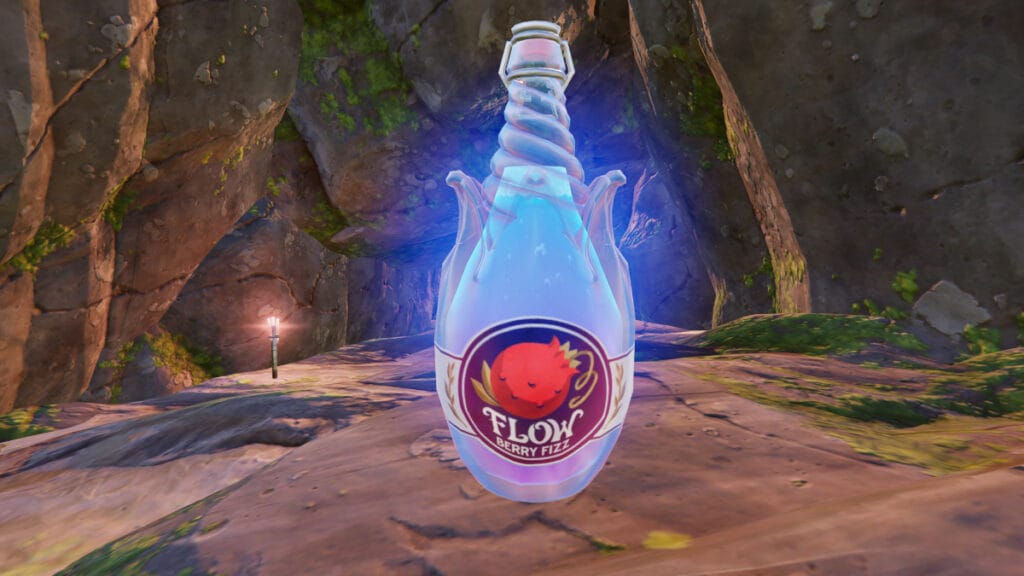
As many of us know, an item called Flowberry was added to Fortnite with Chapter 5 Season 1. Consuming this item grants you Low Gravity Status and a small amount of Shield. Now, the Flowberry Fizz we saw in the Chapter 5 trailer has been added to Fortnite and serves as the champagne version of the Flowberry fruit.

Where To Find Flowberry Fizz in Fortnite

john wick using flowberry fizz in fortnite
Image Source: Epic Games via The Nerd Stash

Flowberry Fizz is a useful item, especially if you are playing with friends. At least one person should have it on your team in Fortnite. It’s a bit like Chug Splash, but instead of providing HP, it provides Shields. This item can only be stacked 1 piece. It grants you and those around you a 100 Shield, as well as a Low Gravity Status. 

Flowberry Fizz can be found in Chests, Hot Spot Drones, Supply Drops, Rifted Island POI Banner, and as a Floot Loot in Fortnite. As mentioned before, carrying Flowberry Fizz is much more sensible than carrying Small Shield Potion or Shield Potion, especially if you are playing in a team.

Related:

All Weekly Quests in Fortnite Chapter 5 Season 1 (Week 5)

This is because carrying this item will not only benefit you but also your teammates. It will be much more beneficial for the team if only a few people have Flowberry Fizz rather than everyone carrying Shield Potion individually. This way, you can save additional slots for other items that can be useful while fighting with other players in Fortnite. This item has a total of 100 uses and gives you 5 Shields per tick. To use Flowberry Fizz in Fortnite, pick up the item and click the Fire Button to spread it around.

Related Topics
Fortnite Guide
Share. Facebook Twitter LinkedIn Reddit Email
Akın Bilgin
  • Website
  • X (Twitter)

Akın Bilgin loves colony simulators, survival, and souls-like games. He has been a freelance guide writer for two years and is studying English Language and Literature in Turkey.

SUGGESTED READS

Konami is Rebooting Metal Gear, Castlevania, Other Existing IPs: 'Important Initiatives as Pillars of Our Business'
Gaming

Konami is Rebooting Metal Gear, Castlevania, Other Existing IPs: ‘Important Initiatives as Pillars of Our Business’

Gaming

GTA 6 Leaker Hunt Goes Nuclear as Take-Two Demands Discord and Microsoft Hand Over Private Data

Raid Shadow Legends new players
Gaming

7 New-Player Mistakes That Cost You Free Rewards in Raid: Shadow Legends (August 2026)

PlayStation's Phantom Blade Zero Preorders Have 'Far Exceeded Expectations' Despite Disc-less Release Concerns
Gaming

PlayStation’s Phantom Blade Zero Preorders Have ‘Far Exceeded Expectations’ Despite Disc-less Release Concerns

Gaming

Interview: Dawn of War 4 Voice Actor Toby Longworth Discusses Space Marine Voices and How RoboCop Inspired His Dreadnought Performance

Mortal Shell 2 Sester Genessa Unlock
Gaming

How to Unlock Sester Genessa in Mortal Shell 2

The Nerd Stash
Facebook X (Twitter) Instagram YouTube LinkedIn
  • About Us
  • Join Our Team
  • Meet the Team
  • Privacy Policy
  • DMCA Policy
  • Contact Us
  • Terms of Use
  • Sitemap
  • Editorial Guidelines
  • Advertising Policy
© 2026 The Nerd Stash. All Rights Reserved.

Type above and press Enter to search. Press Esc to cancel.