Close Menu
  • Gaming
    • Platforms
      • Nintendo
      • PC
      • PlayStation
      • Xbox
  • Entertainment
    • Movies
    • TV
    • Royals
  • Celebrity
    • Hollywood
  • Human Interest
  • Astrology
  • More
    • Reviews
Facebook X (Twitter) Instagram LinkedIn YouTube
  • About Us
  • Join Our Team
  • Meet the Team
  • Privacy Policy
  • DMCA Policy
  • Contact Us
  • Terms of Use
  • Sitemap
  • Editorial Guidelines
  • Advertising Policy
The Nerd Stash
  • Gaming
  • Celebrity
  • Hollywood
  • Human Interest
The Nerd Stash
Home»Gaming»How to Link Items in Chat in Last Epoch (& Other Chat Useful Functions)

How to Link Items in Chat in Last Epoch (& Other Chat Useful Functions)

If only there were a resource you could go to for all sorts of guides to the game, right?

J.R. WaughBy J.R. WaughFebruary 24, 20243 Mins Read
How to Link Items in Last Epoch Chat
Image Source: Eleventh Hour Games via The Nerd Stash
This article is over 2 years old and may contain outdated information.

Last Epoch can be enjoyed solo, with friends, or even with strangers. It’s an impressive, vocal community you can enjoy however you like, with nicely integrated features allowing you to share your latest loot instantly. This, however, requires knowing how to link items in the chat function of Last Epoch. You’ll be surprised by what you can do in the game!

How Do You Link Your Items in Last Epoch Chat?

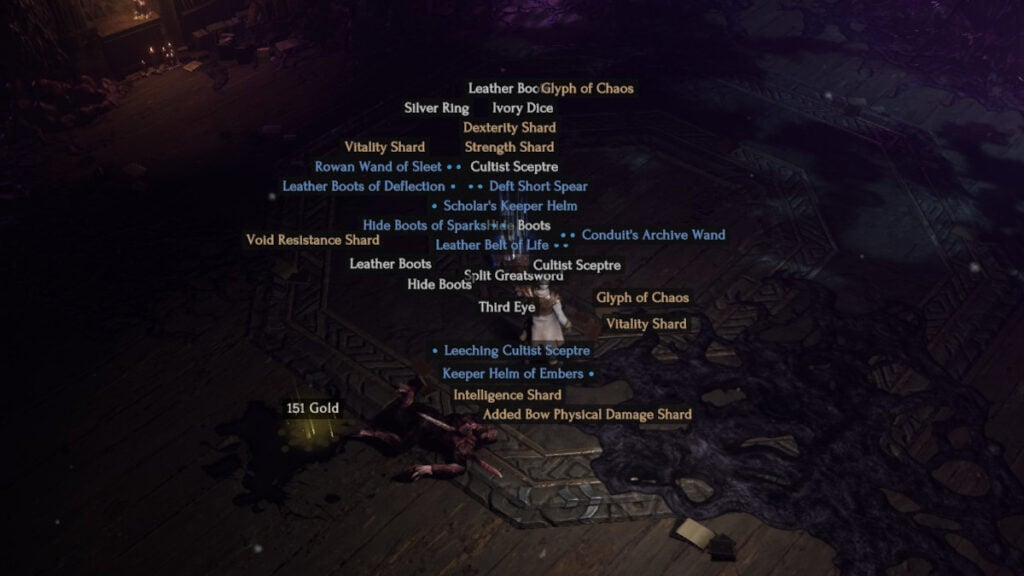
How to Link in Last Epoch Chat Gear
Image Source: Eleventh Hour Games via The Nerd Stash

Hold Ctrl and right-click on the gear you wish to showcase, which will let you add the link to your chat box. From there, it’s a matter of sending it to whichever channel you prefer. This allows users to hover over the link and see gear like armor or weapons for the sake of celebration, comparison, or maybe simply bragging rights.

What Other Chat Functions Are in Last Epoch?

Last Epoch has a chat box that resembles Diablo‘s, or any popular Blizzard games and MMOs in general. It’s meant to show the community’s vibrant feed of thoughts, recruiting pushes, cheers, and taunts. Helpful functions are highlighted in the info section of the chat box but include:

  • /w | /whisper | /t | /tell [name] — Send a private message.
  • /r — Reply to the last private message received.
  • /global | /all — Write to the Global channel.
  • /help — Write to the Help channel.
  • /party | /p — Write to your Party channel.
  • /lfg — Write to the Looking for Group channel (for seeking co-op).
How to Link in Last Epoch Chat
Image Source: Eleventh Hour Games via The Nerd Stash

Related:

How To Fix Error Code Le-61 in Last Epoch

Each of these opens a different chat function or channel without having to click anywhere else. Think of it as Command Prompt-lite, linking you to the right people for all of your questions. However, if you don’t wish to bother others or have questions you need to have resolved by the game’s rules as written, there’s another handy function just for you!

You Can Use the Chat to Link to In-Game Last Epoch Guides

That’s right: you can use the following function,

  • ??[guide name]

To let players read passages from Last Epoch‘s dedicated in-game guide. Of course, we advocate for using the most relevant information possible, shameless links or otherwise, but sometimes, if you have a game mechanics question or need a basics primer, this is a great resource. However, early on, it demonstrates a pattern of only linking to guides you recently opened, so for now, the best info can be found here first.

Related Topics
Guide Last Epoch
Share. Facebook Twitter LinkedIn Reddit Email
J.R. Waugh
  • Website
  • X (Twitter)

J.R. has been a passionate gamer and overall nerd for nearly 30 years. His prolific work can be found at The Nerd Stash as well as at Attack of the Fanboy and PC Invasion. When not writing, expect to find him begrudgingly accept another delayed chapter of Berserk and waxing poetic about why Ichiban Kasuga is the best recent protagonist in modern gaming.

SUGGESTED READS

Zenless Zone Zero Version 3.1 Anniversary
Gaming

Zenless Zone Zero Celebrates Its 2-Year Milestone With Free S-Rank Agents and a Crossover Announcement

All Black Marketeer Locations in Palworld
Gaming

All Black Marketeer Locations in Palworld

Gaming

A New Wolverine Trailer Playing in Front of the Odyssey is Getting Obliterated by PlayStation Fans: ‘Can’t wait for my PHYSICAL COPY’

Pal Awakening Guide - Palworld
Gaming

Complete Palworld Pal Awakening Guide

How to get Radiant Gems In Palworld 1.0
Gaming

How to get Radiant Gems In Palworld 1.0

gamescom dev 2026 Adds Subnautica 2 Creative Director as Keynote Speaker, Reveals New Awards
Gaming

gamescom dev 2026 Adds Subnautica 2 Creative Director as Keynote Speaker, Reveals New Awards

The Nerd Stash
Facebook X (Twitter) Instagram YouTube LinkedIn
  • About Us
  • Join Our Team
  • Meet the Team
  • Privacy Policy
  • DMCA Policy
  • Contact Us
  • Terms of Use
  • Sitemap
  • Editorial Guidelines
  • Advertising Policy
© 2026 The Nerd Stash. All Rights Reserved.

Type above and press Enter to search. Press Esc to cancel.