


Close Menu
  • Gaming
    • Game Guides
    • Codes
    • Game News
    • Game Previews
    • Game Reviews
    • Game Features
    • Game Lists
    • Platforms
      • Nintendo
      • PC
      • PlayStation
      • Xbox
      • Mobile
  • Entertainment
    • Movies
    • Movie Features
    • Movie Reviews
    • TV
    • Reality TV
    • Royals
  • Celebrity
    • Hollywood
  • Human Interest
  • Astrology
  • Videos
  • More
    • Anime
    • Lists
    • Podcasts
    • Reviews
Facebook X (Twitter) Instagram LinkedIn YouTube
  • About Us
  • Join Our Team
  • Meet the Team
  • Privacy Policy
  • DMCA Policy
  • Contact Us
  • Terms of Use
  • Sitemap
  • Editorial Guidelines
  • Advertising Policy
The Nerd Stash
  • Gaming
  • Celebrity
    • Hollywood
  • Human Interest
  • Videos
The Nerd Stash
Home»Game Guides»How To Perform a Fatality in Mortal Kombat 1

How To Perform a Fatality in Mortal Kombat 1

Performing a Fatality in Mortal Kombat 1 proves your warrior’s strength, and you’ll get more points by tearing your opponents apart. Fatalities have always been…

Amir NaseriBy Amir NaseriSeptember 17, 20233 Mins Read
Fatality in Mortal Kombat 1
Image Source: NetherRealm Studios via The Nerd Stash

Skip To...

  • Performing Fatality in Mortal Kombat 1
  • Where to Find Fatality Inputs for Mortal Kombat 1
This article is over 2 years old and may contain outdated information.

Performing a Fatality in Mortal Kombat 1 proves your warrior’s strength, and you’ll get more points by tearing your opponents apart. Fatalities have always been a part of Mortal Kombat games, and the way of executing it has remained the same as the previous titles. However, you would still need to figure out and unlock these moves in the new Mortal Kombat game. Here’s how you can perform and unlock a Fatality in MK1 by your main and Kameo characters.

Performing Fatality in Mortal Kombat 1
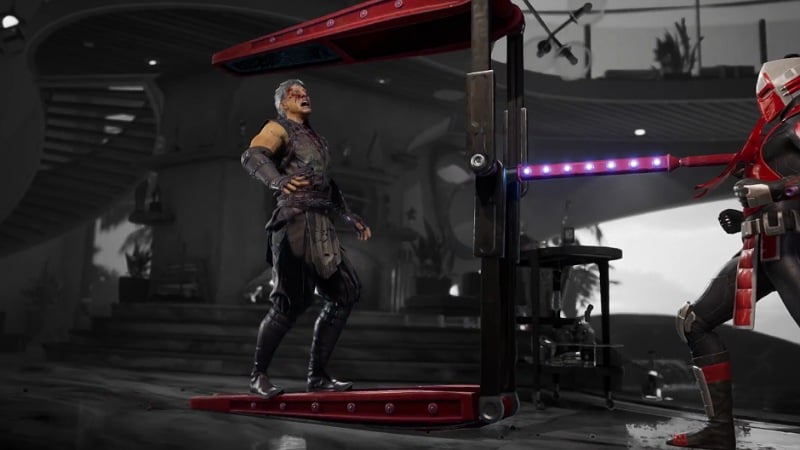
How to Unlock Mortal Kombat 1 Fatality
Image Source: NetherRealm Studios via The Nerd Stash

You can do Fatality moves after defeating your opponent in Mortal Kombat 1, by pressing a combination of inputs, just like you do combos with different characters. Fatality moves usually include 4 inputs, and the first three are mostly directional. For example, Liu Kang’s basic Fatality move is Down – Forward – Back – B/Circle.

Now one thing to remember is that you should not press all these inputs together. They need to be pressed one after another, at a certain distance from the enemy. For example, the mentioned Fatality for Liu Kang needs to be performed in mid-range. The same goes for your Kameo fighters.

Kameos do perform Fatality moves in Mortal Kombat 1 as well. The only difference is that you should press the RB/R1 button after the directional inputs. You should also note that each Kameo has his or her own set of Fatalities, which you use in MK1.

Where to Find Fatality Inputs for Mortal Kombat 1
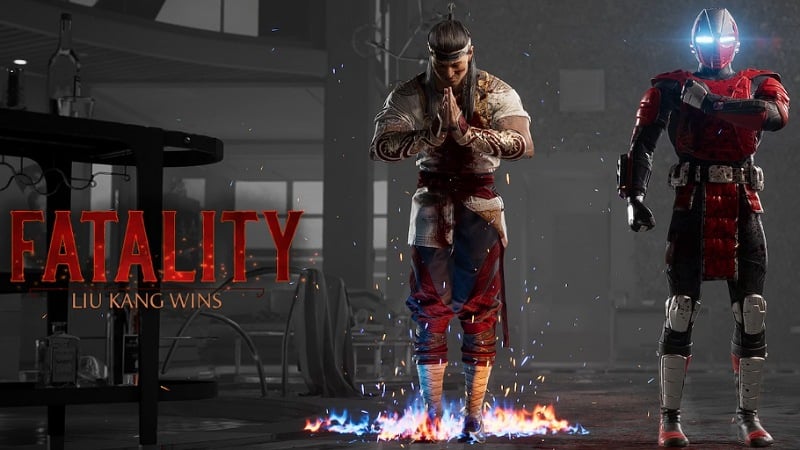
Liu kang and Sektor MK1
Image Source: NetherRealm Studios via The Nerd Stash

While in a match or in a practice arena, press the pause button and select the Move List menu. Here you’ll find the basic and special moves for your selected warrior, and if you pay close attention, you’ll find a Fatalities section as well. You can switch tabs with RB/R1 and LB/L1 buttons in this menu to reach the Fatality list. You can also find out about your Kameo fighter’s Fatality moves under the Kameo tab in this menu on Mortal Kombat 1.

Now one important thing to know is that you’ll only have one unlocked Fatality move for each MK1 character. You can see your character’s Fatalities in the Kustomize menu. You can also unlock more of these moves by playing more with the character you want and finishing different modes like Story, Invasion, and Towers. Reaching level 14 on each character’s mastery will unlock their second Fatality in Mortal Kombat 1.

You should also know that there’s another way of doing Fatalities in the game, which is called Easy Fatality. This is done without the directional inputs, and you can perform it pretty quickly by pressing RT/R2 and another dedicated button. However, you would need to have at least one Easy Fatality Token for this trick to work.

Related:
How To Amplify Special Moves in MK1

Mortal Kombat 1 is currently available to play on PlayStation 5, Xbox Series X|S, and PC.

Related Topics
Guide Mortal Kombat 1
Share. Facebook Twitter LinkedIn Reddit Email
Amir Naseri
  • Website

Amir is an absolute Call of Duty nerd, preferring shooter games more than everything. However, he does like to do uppercuts in Mortal Kombat and feel the NOS going through the engines in Need For Speed games.

SUGGESTED READS

Minecraft Accused of Mocking Lonely Kids, Sparking Mental Health Backlash: 'One of the Ickiest Things I've Seen'
Features

Minecraft Accused of Mocking Lonely Kids, Sparking Mental Health Backlash: ‘One of the Ickiest Things I’ve Seen’

Destiny 2 Renegades PS5 Review
8.5
Features

Destiny 2: Renegades Review – The Shooter Strikes Back

Clair Obscur: Expedition 33 Loses GOTY, Other Award from Indie Game Awards Over Generative AI: 'Some Weird Performative BS'
Game News

GOTY Stripped Over AI?: Clair Obscur: Expedition 33 Loses Awards at Indie Game Awards, ‘Some Weird Performative BS’

Sony Patents Real-time AI Game Censorship Tech That Could Even Make GTA 6 Kid-Friendly
Game News

Sony Patents Real-Time AI Game Censorship Tech That Could Even Make GTA 6 Kid-Friendly

Zenless Zone Zero Version 2.5 Announcement
Game News

Zenless Zone Zero Version 2.5 Is Ready To Wrap Up the Year With Two New Agents and a Free Outfit

PC Gamers Can't Catch a Break as Nvidia Plans 40% GeForce GPU Production Cuts, Report: 'Who Needs a PC Anyways'
Game News

PC Gamers Can’t Catch a Break as Nvidia Reportedly Plans 40% GeForce GPU Production Cuts: ‘Who Needs a PC Anyways’

Trending
Minecraft Accused of Mocking Lonely Kids, Sparking Mental Health Backlash: 'One of the Ickiest Things I've Seen'

Minecraft Accused of Mocking Lonely Kids, Sparking Mental Health Backlash: ‘One of the Ickiest Things I’ve Seen’

Destiny 2 Renegades PS5 Review
8.5

Destiny 2: Renegades Review – The Shooter Strikes Back

Clair Obscur: Expedition 33 Loses GOTY, Other Award from Indie Game Awards Over Generative AI: 'Some Weird Performative BS'

GOTY Stripped Over AI?: Clair Obscur: Expedition 33 Loses Awards at Indie Game Awards, ‘Some Weird Performative BS’

Sony Patents Real-time AI Game Censorship Tech That Could Even Make GTA 6 Kid-Friendly

Sony Patents Real-Time AI Game Censorship Tech That Could Even Make GTA 6 Kid-Friendly

The Nerd Stash
Facebook X (Twitter) Instagram YouTube LinkedIn
  • About Us
  • Join Our Team
  • Meet the Team
  • Privacy Policy
  • DMCA Policy
  • Contact Us
  • Terms of Use
  • Sitemap
  • Editorial Guidelines
  • Advertising Policy
© 2025 The Nerd Stash. All Rights Reserved.

Type above and press Enter to search. Press Esc to cancel.




