

Close Menu
  • Gaming
    • Game Guides
    • Codes
    • Game News
    • Game Previews
    • Game Reviews
    • Game Features
    • Game Lists
    • Platforms
      • Nintendo
      • PC
      • PlayStation
      • Xbox
      • Mobile
  • Entertainment
    • Movies
    • Movie Features
    • Movie Reviews
    • TV
    • Reality TV
    • Royals
  • Celebrity
    • Hollywood
  • Human Interest
  • Astrology
  • Videos
  • More
    • Anime
    • Lists
    • Podcasts
    • Reviews
Facebook X (Twitter) Instagram LinkedIn YouTube
  • About Us
  • Join Our Team
  • Meet the Team
  • Privacy Policy
  • DMCA Policy
  • Contact Us
  • Terms of Use
  • Sitemap
  • Editorial Guidelines
  • Advertising Policy
The Nerd Stash
  • Gaming
  • Celebrity
    • Hollywood
  • Human Interest
  • Videos
The Nerd Stash
Home»Game Guides»How To Turn Off Seikret Auto-pilot in Monster Hunter Wilds

How To Turn Off Seikret Auto-pilot in Monster Hunter Wilds

Not the smoothest ride for some

Julio La PineBy Julio La PineFebruary 27, 20253 Mins Read
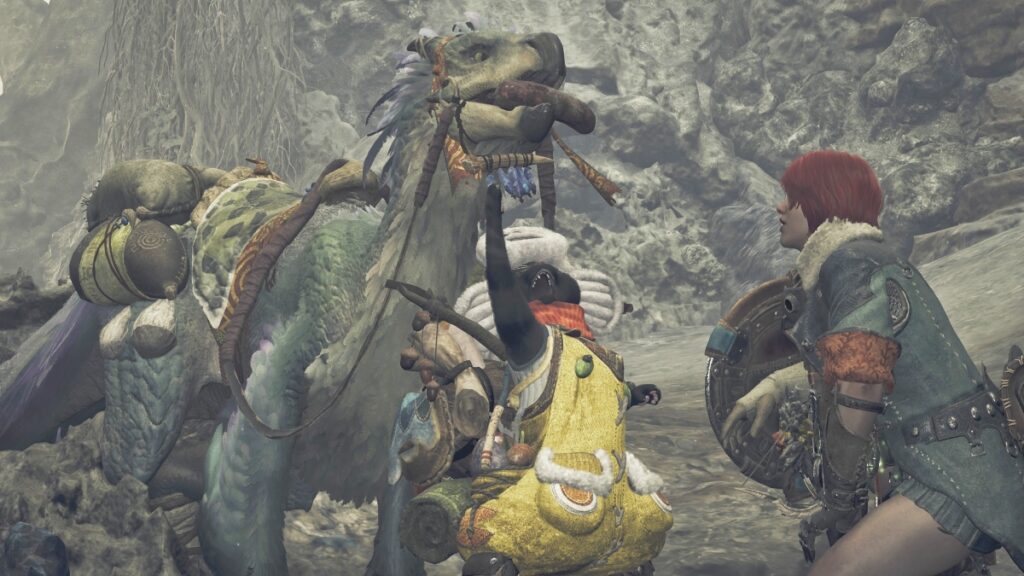
Monster Hunter Wilds Seikret Auto-pilot options
Image Source: Capcom via The Nerd Stash

While many love how fast exploration is with a Seikret, others don’t like how “janky” its movement feels in Monster Hunter Wilds, especially when in auto-pilot. Fortunately, MH Wilds has many options that aren’t limited to your character only. With a bit of searching and tweaking, you can make your Seikret go to wherever you want, and even fix its movements if there’s something you don’t like about it.

Turning Off Auto-pilot for your Seikret in Monster Hunter Wilds
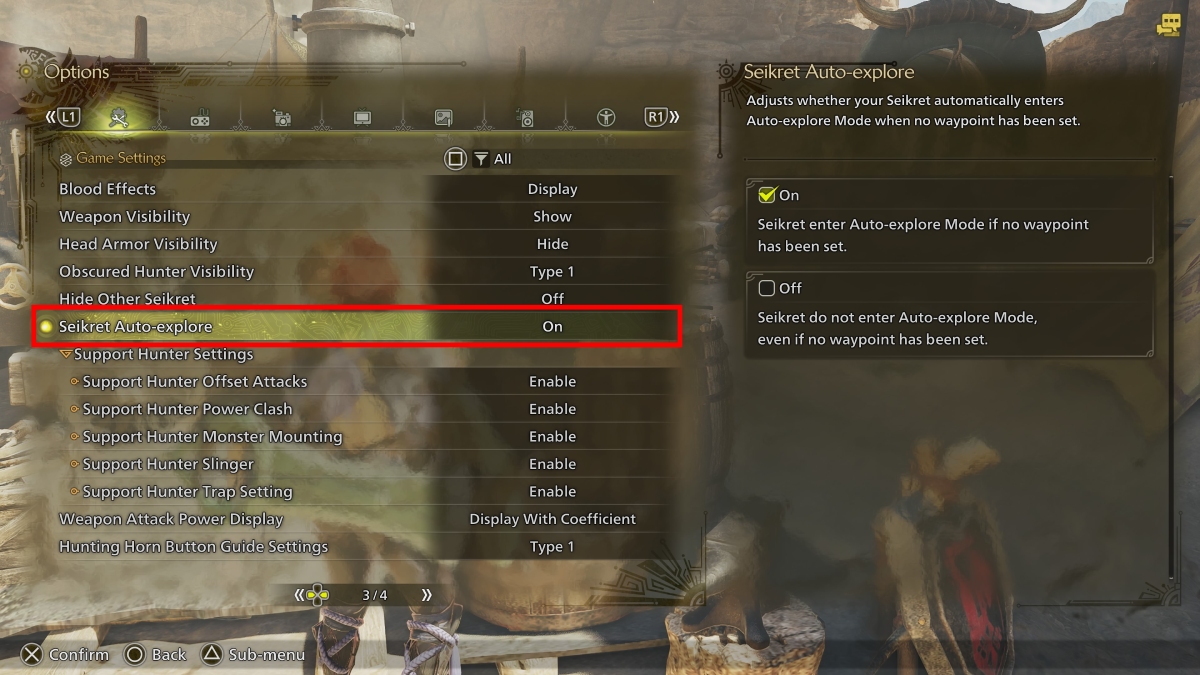
Seikret Movement Options
Image Source: Capcom via The Nerd Stash

If you don’t mind your Seikret’s movement, but are not a big fan of auto-pilot, you can head to the game settings of Monster Hunter Wilds, and turn it off. To do so, do the following:

  1. Open your options menu.
  2. Head to “Game Settings.”
  3. Scroll until you reach the third page.
  4. Turn off “Seikret Auto-explore.”

Doing so will let you have full control of your Seikret when exploring. However, if you still don’t like how it moves, there are a few other options you can play with.

Call Seikret Controls
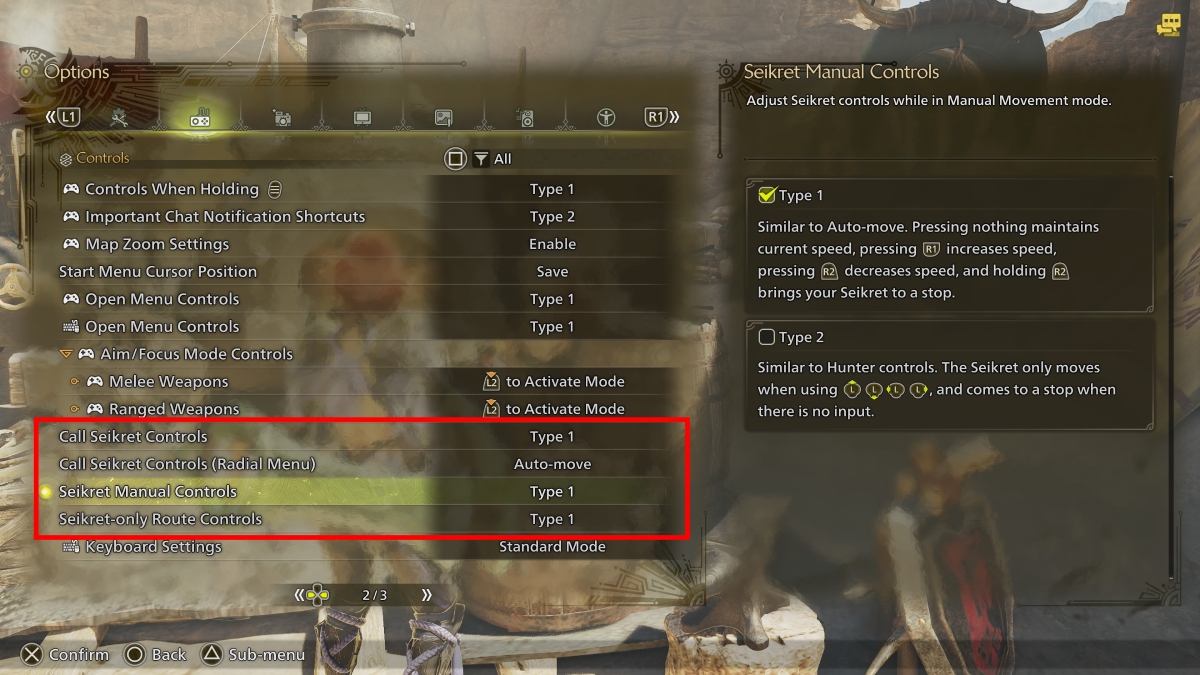
Seikret Movement Monster Hunter Wilds
Image Source: Capcom via The Nerd Stash

If you’re not a fan of how calling your Seikret works, you can change a few options. To do so, follow these steps:

  1. Head to your options menu.
  2. Select the “Controls” tab.
  3. Scroll to the second page to find the Call Seikret Controls and Seikret Manual Controls.

The options here allow you to change your Seikret’s behaviour when calling it, as well as how it behaves when moving.

The Call Seikret Controls can be changed to the following:

  • Type 1: Call Seikret With (D-Pad button) or a Custom Radial Menu Shortcut.
  • Type 2: In addition to Type 1 controls, holding B/Circle with your weapon sheathed calls your Seikret in Auto-move mode.
  • Type 3: In addition to Type 1 controls, holding B/CIrcle with your weapon sheathed calls your Seikret in Manual Movement Mode.

If you’re not a fan of the auto-pilot, Type 3 controls are the best option.

In addition to the above options, you can also change your Seikret’s movement behaviour. These are the options you can play with:

  • Seikret Manual Controls
    • Type 1: Similar to Auto-move. Pressing nothing maintains current speed, pressing R1/RB increases speed, pressing R2/RT decreases speed, and holding R2/RT brings your Seikret to a stop.
    • Type 2: Similar to Hunter controls. Your Seikret only moves when moving your Left Stick and stops when there’s no input.

For those not fond of auto-pilot, the best option is Type 2 controls.
If You Think Monster Hunter Wilds is ‘Too Easy,’ Then You Fell for Capcom’s ‘Trap’
Related: If You Think Monster Hunter Wilds is ‘Too Easy,’ Then You Fell for Capcom’s ‘Trap’

Ultimately, you can play around with all controls to find the best option for you. If you’re doing that, we recommend waiting until you’re outside of a hunt to experiment with your Seikret. Otherwise, the hunt might become even more chaotic, as you try to figure out how to steer your companion.


Related Topics
Guide Monster Hunter Wilds
Share. Facebook Twitter LinkedIn Reddit Email
Julio La Pine
  • Website

Been gaming since '99! I am a huge JRPG fan and my favorite franchise is Final Fantasy. I love writing about games and I hope I can do it for the rest of my days!

SUGGESTED READS

Best Steam Winter Sale Deals of 2025
Features

Best Holiday Steam Deals of 2025

Best PlayStation Holiday Deals of 2025
Features

Best Holiday PlayStation Deals of 2025

Best Gaming Holiday Deals of 2025
Features

Best Holiday Gaming Deals of 2025

Minecraft Accused of Mocking Lonely Kids, Sparking Mental Health Backlash: 'One of the Ickiest Things I've Seen'
Features

Minecraft Accused of Mocking Lonely Kids, Sparking Mental Health Backlash: ‘One of the Ickiest Things I’ve Seen’

Destiny 2 Renegades PS5 Review
8.5
Features

Destiny 2: Renegades Review – The Shooter Strikes Back

Clair Obscur: Expedition 33 Loses GOTY, Other Award from Indie Game Awards Over Generative AI: 'Some Weird Performative BS'
Game News

GOTY Stripped Over AI?: Clair Obscur: Expedition 33 Loses Awards at Indie Game Awards, ‘Some Weird Performative BS’

Trending
Best Steam Winter Sale Deals of 2025

Best Holiday Steam Deals of 2025

Best PlayStation Holiday Deals of 2025

Best Holiday PlayStation Deals of 2025

Best Gaming Holiday Deals of 2025

Best Holiday Gaming Deals of 2025

Minecraft Accused of Mocking Lonely Kids, Sparking Mental Health Backlash: 'One of the Ickiest Things I've Seen'

Minecraft Accused of Mocking Lonely Kids, Sparking Mental Health Backlash: ‘One of the Ickiest Things I’ve Seen’

The Nerd Stash
Facebook X (Twitter) Instagram YouTube LinkedIn
  • About Us
  • Join Our Team
  • Meet the Team
  • Privacy Policy
  • DMCA Policy
  • Contact Us
  • Terms of Use
  • Sitemap
  • Editorial Guidelines
  • Advertising Policy
© 2025 The Nerd Stash. All Rights Reserved.

Type above and press Enter to search. Press Esc to cancel.



