Close Menu
  • Gaming
    • Platforms
      • Nintendo
      • PC
      • PlayStation
      • Xbox
  • Entertainment
    • Movies
    • TV
    • Royals
  • Celebrity
    • Hollywood
  • Human Interest
  • Astrology
  • More
    • Reviews
Facebook X (Twitter) Instagram LinkedIn YouTube
  • About Us
  • Join Our Team
  • Meet the Team
  • Privacy Policy
  • DMCA Policy
  • Contact Us
  • Terms of Use
  • Sitemap
  • Editorial Guidelines
  • Advertising Policy
The Nerd Stash
  • Gaming
  • Celebrity
  • Hollywood
  • Human Interest
The Nerd Stash
Home»Gaming»How To Turn On Negative Edge in Street Fighter 6

How To Turn On Negative Edge in Street Fighter 6

[Updated on August 25, 2024, to revise outdated formatting and improve readability.] Negative Edge Input in Street Fighter 6 is a particular input setting that…

Nikola PajticBy Nikola PajticJune 11, 20232 Mins Read
How to Turn on Negative Edge in Street Fighter 6 Feature
Image Source: Capcom
This article is over 3 years old and may contain outdated information.

[Updated on August 25, 2024, to revise outdated formatting and improve readability.]

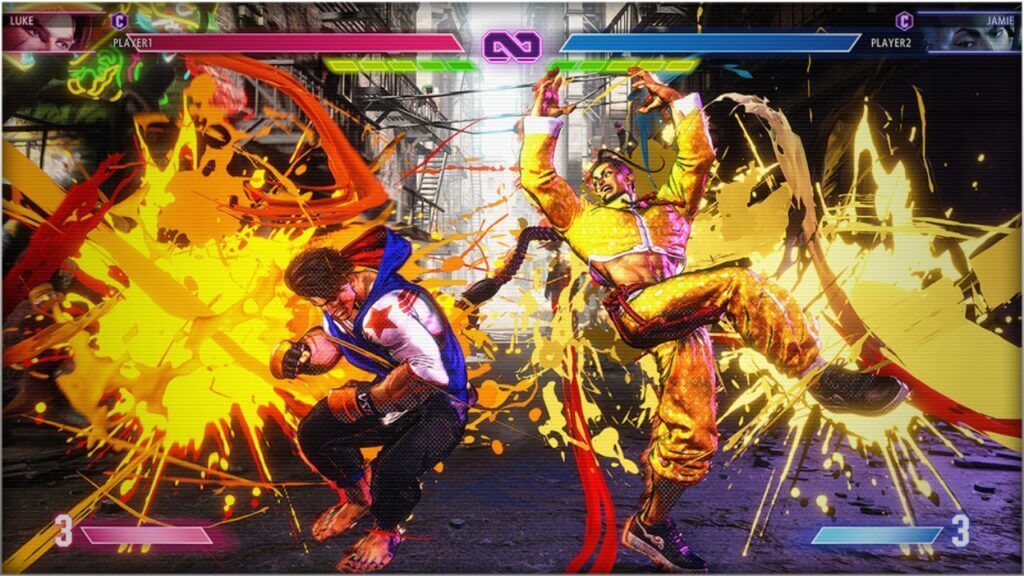
Negative Edge Input in Street Fighter 6 is a particular input setting that is off by default. Luckily, you can change it and make the most of your fights. Once you turn on Negative Edge, everything will be much easier. Negative Edge in Street Fighter 6 is a gameplay mechanic that allows players to execute special moves by releasing a button instead of pressing it. In fighting games, special moves are performed by inputting a specific combination of buttons or joystick movements. If you want to perform Ryu’s Hadoken, you need to input a quarter-circle motion and then quickly press the punch button.

To turn on this mechanic, follow our step-by-step guide:

  1. Open the Mode Select screen. We start from there since you can’t change controls from the pause menu during the match.
  2. Now, select the Options button and head over to Controls.
  3. Here, you will need to set the feature on for both Player 1 Side Control Settings (Battle) and Player 2 Side Control Settings (Battle) in order to turn on Negative Edge in Street Fighter 6.
  4. Enter the Player 1 Side Control Settings, and here you will find the ‘Button Release Input’. You will notice it is ‘Off’. One tap and the feature will be turned ‘On’. Repeat this for the second player.
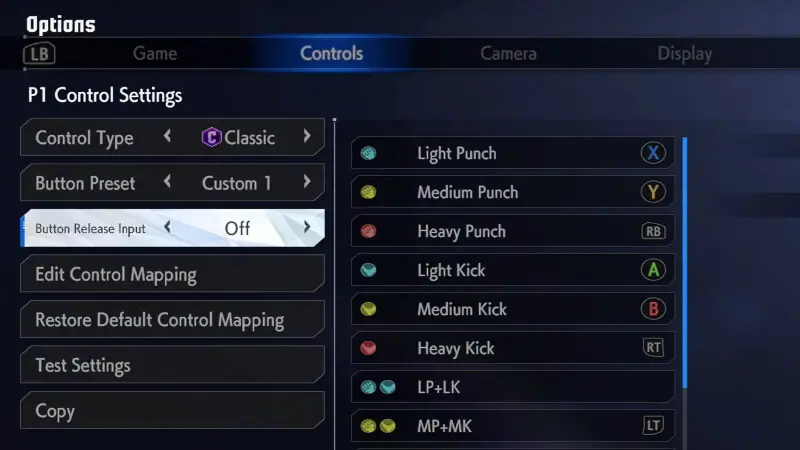
Turn on Negative Edge Input
Image Source: Capcom via MetalMusicMan YouTube

With Negative Edge input turned on in Street Fighter 6, if the player holds down a button while inputting the required motion for a special move and then releases the button at the right moment, the special move will still be executed. In other words, the game registers the button release as an input for the special move. This can be useful for players who find it more comfortable to release a button rather than pressing it precisely during the execution of a move.

Related:

Cheaters in Street Fighter 6 Ranked Are Getting Out of Hand & Capcom Needs to Do Something About it

Once you have toggled Negative Edge, it will make your fighting easier. For more experienced Street Fighter enthusiasts, this can come in handy when planning your attacks. You can hold down the button and release it when you are certain you will land your attack successfully.

Related Topics
Guide Street Fighter 6
Share. Facebook Twitter LinkedIn Reddit Email
Nikola Pajtic
  • Website

Nikola has been a gamer his whole life, and you can find him playing AAA titles but also unknown indie games.

SUGGESTED READS

All Black Marketeer Locations in Palworld
Gaming

All Black Marketeer Locations in Palworld

Gaming

A New Wolverine Trailer Playing in Front of the Odyssey is Getting Obliterated by PlayStation Fans: ‘Can’t wait for my PHYSICAL COPY’

Pal Awakening Guide - Palworld
Gaming

Complete Palworld Pal Awakening Guide

How to get Radiant Gems In Palworld 1.0
Gaming

How to get Radiant Gems In Palworld 1.0

gamescom dev 2026 Adds Subnautica 2 Creative Director as Keynote Speaker, Reveals New Awards
Gaming

gamescom dev 2026 Adds Subnautica 2 Creative Director as Keynote Speaker, Reveals New Awards

Fortnite Summer Skins Censored Rumors
Gaming

Fortnite Fans Disappointed as Upcoming Summer Skins Have Been Allegedly Censored One Day After Their Reveal: ‘They Folded Without Any Pressure’

The Nerd Stash
Facebook X (Twitter) Instagram YouTube LinkedIn
  • About Us
  • Join Our Team
  • Meet the Team
  • Privacy Policy
  • DMCA Policy
  • Contact Us
  • Terms of Use
  • Sitemap
  • Editorial Guidelines
  • Advertising Policy
© 2026 The Nerd Stash. All Rights Reserved.

Type above and press Enter to search. Press Esc to cancel.