
Close Menu
  • Gaming
    • Platforms
      • Nintendo
      • PC
      • PlayStation
      • Xbox
  • Entertainment
    • Movies
    • TV
    • Royals
  • Celebrity
    • Hollywood
  • Human Interest
  • Astrology
  • More
    • Anime
    • Reviews
Facebook X (Twitter) Instagram LinkedIn YouTube
  • About Us
  • Join Our Team
  • Meet the Team
  • Privacy Policy
  • DMCA Policy
  • Contact Us
  • Terms of Use
  • Sitemap
  • Editorial Guidelines
  • Advertising Policy
The Nerd Stash
  • Gaming
  • Celebrity
  • Hollywood
  • Human Interest
The Nerd Stash
Home»Gaming»Overwatch 2: How to Fix Match Replays and Game Reports Not Showing Up

Overwatch 2: How to Fix Match Replays and Game Reports Not Showing Up

Let me replay my matches!

Asanga WijeratneBy Asanga WijeratneJanuary 12, 20232 Mins Read
Overwatch 2 Replays
This article is over 3 years old and may contain outdated information.

[Updated on August 24, 2024, to revise outdated formatting and improve readability.]

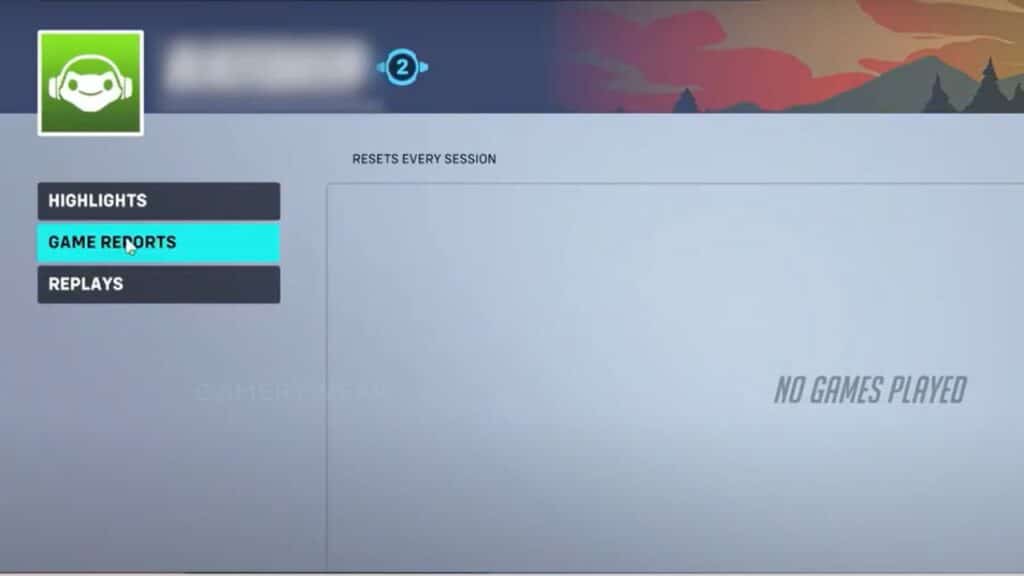
Do you want to know how to fix match replays and game reports not showing up in Overwatch 2? Some players are experiencing issues where these replays and messages are not showing up. This issue can be annoying for Overwatch 2 players trying to re-watch exciting match replays and review game reports, only to come up empty-handed. The problem usually occurs when you try to view data from your profile; instead, you get a message that no game has been played.

Fortunately, this issue can usually be resolved relatively quickly! Various causes may be at play, including server issues, outdated game files, or corrupted data. Still, with a few simple steps, you should be able to get back into the action in no time!

Related:

10 Tips to Climb the Competitive Ladder in Overwatch 2

You can fix match replays and game reports not showing up in Overwatch 2 by playing a match in Unranked, Competitive, or Arcade mode and checking back the replays. Many players have fixed this issue with this simple method. But remember, this is not a permanent fix. Once you have logged out from the game, you might reencounter this error when you log in again. There are some other methods you can try as well.

  1. Play in the practice range for a while and check whether the issue is fixed.
  2. Wait for some time and check to see whether the issue is fixed. Some players have found that waiting and checking it back solves this error. The waiting time may vary from 5 minutes to 30 minutes.
  3. Update Overwatch 2 to its latest version and check if it solves the issue.
  4. Clear stored caches in the game. This will ensure that any corrupted caches or files are removed and replaced with fresh, updated ones.

These are some simple steps to fix match replays and game reports not showing up in Overwatch 2. You may contact Blizzard Support for further assistance if these methods do not work.

Related Topics
Guide Overwatch 2
Share. Facebook Twitter LinkedIn Reddit Email
Asanga Wijeratne
  • Website

SUGGESTED READS

Shuhei Yoshida Says He Was Fired From Playstation Studios for Saying 'No' to Jim Ryan: 'He Asked For Ridiculous Things'
Gaming

Shuhei Yoshida Says He Was Fired From Playstation Studios for Saying ‘No’ to Jim Ryan: ‘He Asked For Ridiculous Things’

Splinter Cell Remake Shows Signs of Life Despite Recent Layoffs at Ubisoft Toronto
Gaming

Splinter Cell Remake Shows Signs of Life Despite Recent Layoffs at Ubisoft Toronto

Fastest Ways to Get a Purrowl in Roblox Adopt Me
Gaming

Fastest Ways to Get a Purrowl & Trade Value in Roblox Adopt Me

Fatal Fury City of the Wolves Krauser Hands-On Preview
Gaming

Fatal Fury: City of the Wolves Wolfgang Krauser Hands-On Preview – A Regal Fighter

EU Warns Live-Service Games Ownership is 'Fleeting,' Plans Regulation This Year: 'A Disgrace for the Consumers'
Gaming

EU Warns Live-Service Games Ownership is ‘Fleeting,’ Plans Regulation This Year: ‘A Disgrace for the Consumers’

REPLACED game
8.5
Gaming

REPLACED Review – Absolute Cyberpunk Cinema

The Nerd Stash
Facebook X (Twitter) Instagram YouTube LinkedIn
  • About Us
  • Join Our Team
  • Meet the Team
  • Privacy Policy
  • DMCA Policy
  • Contact Us
  • Terms of Use
  • Sitemap
  • Editorial Guidelines
  • Advertising Policy
© 2026 The Nerd Stash. All Rights Reserved.

Type above and press Enter to search. Press Esc to cancel.




