Close Menu
  • Gaming
    • Platforms
      • Nintendo
      • PC
      • PlayStation
      • Xbox
  • Entertainment
    • Movies
    • TV
    • Royals
  • Celebrity
    • Hollywood
  • Human Interest
  • Astrology
  • More
    • Anime
    • Reviews
Facebook X (Twitter) Instagram LinkedIn YouTube
  • About Us
  • Join Our Team
  • Meet the Team
  • Privacy Policy
  • DMCA Policy
  • Contact Us
  • Terms of Use
  • Sitemap
  • Editorial Guidelines
  • Advertising Policy
The Nerd Stash
  • Gaming
  • Celebrity
  • Hollywood
  • Human Interest
The Nerd Stash
Home»Gaming»Phasmophobia: How To Use Night Vision Goggles

Phasmophobia: How To Use Night Vision Goggles

Splinter Cell mode activated.

Jordan MoyerBy Jordan MoyerNovember 6, 20233 Mins Read
Night Vision Goggles in Phasmophobia
Image Source: Kinetic Games via The Nerd Stash
This article is over 2 years old and may contain outdated information.

Sometimes, it can be pretty dark to see with the seemingly weak flashlight you’re given in Phasmophobia, but having access to Night Vision Goggles can make a huge difference. Night Vision Goggles do exactly as the name suggests: they allow you to see at night without the hassle of blind spots caused by the concentrated beam of a flashlight. However, the controls required to activate Night Vision Goggles are quite a bit different than the typical ones you’d use to turn off your flashlight. It’s well worth it, though, as Night Vision Goggles provide hands-free vision and allow you an extra free inventory slot.
Turn on Night Vision Goggles in Phasmophobia
Image Source: Kinetic Games via The Nerd Stash

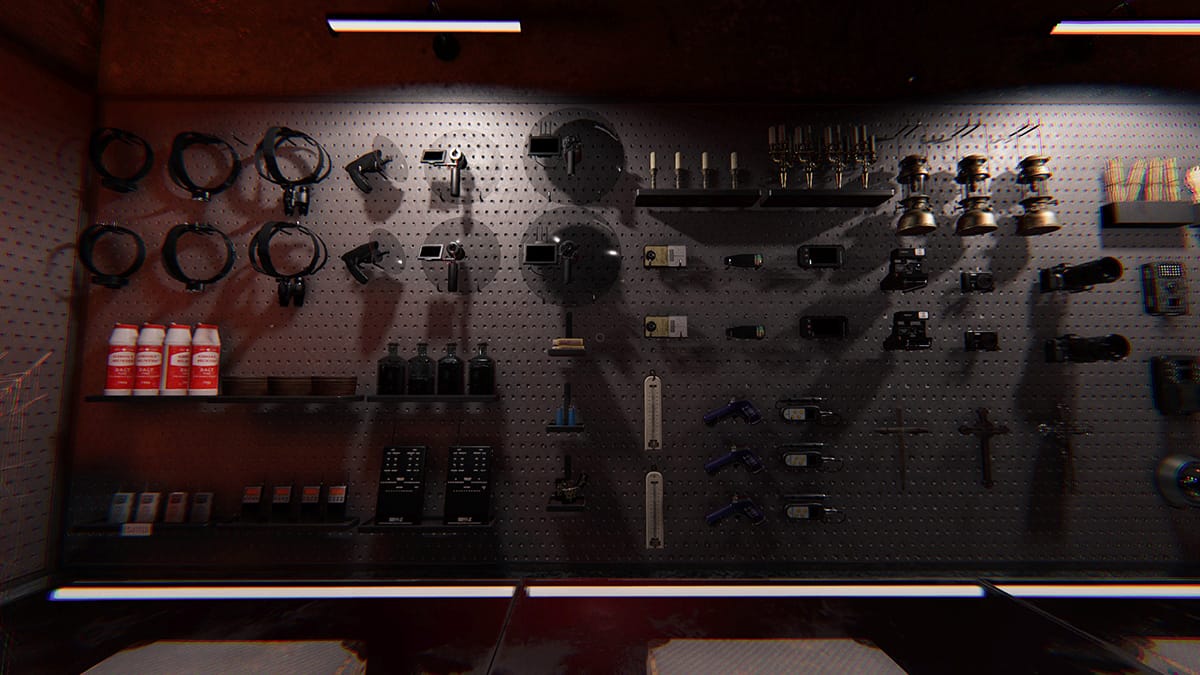
While the controls may be different than they are for the flashlight, turning on Night Vision Goggles in Phasmophobia is still relatively easy. It’s as simple as holding down a key on your keyboard for a few seconds. First, you must equip the Night Vision Goggles by clicking the E key when aimed at them in the truck, then hold down the T key for a few seconds to engage the Night Vision mode.

Once you’ve got your Night Vision Goggles on and working, it’s time to work with them. Night Vision Goggles can be pretty useful when it comes to nighttime visibility. If you’ve noticed, with a flashlight or even a headlamp, there are quite a few blind spots. Since all your visibility must be focused on the weak flashlight beam’s location and doesn’t cover a large area, the NV goggles are a huge help.

With Night Vision Goggles, you can see much better. Often, you can see everything in your normal field of view as if it were daytime. The only difference is the green hue that everything has now. However, it’s important to remember that during a hunt, you should turn off your Night Vision Goggles by holding down the T button on your keyboard. Otherwise, you will attract ghosts quite quickly and likely die in the process.

How To Get the Night Vision Goggles in Phasmophobia

Obtaining the Night Vision Goggles can be done from your safe house. First, head over to the loadout screen. From there, you can purchase new items. To get the Tier 3 Head Gear, you must be at least Level 82. Once you’ve purchased it, you can return to the loadout tab and add it to your loadout for the next haunt.
Related Topics
Guide Phasmophobia
Share. Facebook Twitter LinkedIn Reddit Email
Jordan Moyer
  • Website
  • X (Twitter)

Jordan is an experienced fantasy writer who spends hours behind her laptop, and lost in the pages of a book. She strives to be a successful gaming blogger, and has no complaint about the hours of game time she used to increase her knowledge of all things “geek”. She primarily writes gaming articles and fantasy novels. Ark: Survival Evolved is a favorite, along with Diablo 3, Warframe and Minecraft lately, though you can’t forget the good old Magic the Gathering card game! Writing about games truly gives her joy as it gives her another perspective to look at games from, a reason to really look into the mechanics of the game.

SUGGESTED READS

Adopt Me Kicks Off Summer With Journey to Summer Camp Update, Here's All The New Week 1 Pets & Rewards
Gaming

Roblox Adopt Me Launches Journey to Summer Camp Update, Here’s All the Week 1 Pets & Rewards

LEGO Batman Legacy of the Dark Knight PC Review
9
Gaming

LEGO Batman: Legacy of the Dark Knight Review – A Hero Rises

Call of Duty: Modern Warfare 4 Launching This October on Next-Gen Consoles & Switch 2, But Not Game Pass
Gaming

Call of Duty: Modern Warfare 4 Launching This October on Next-Gen Consoles & Switch 2, But Not Game Pass

Hideo Kojima Teams Up With Prada for an AI Film, And Fans Aren't Happy: 'Beyond Incredibly Disappointing'
Gaming

Hideo Kojima Teams Up With Prada for an AI Film, And Fans Aren’t Happy: ‘Beyond Incredibly Disappointing’

The Witcher 3 Songs of the Past expansion
Gaming

A Witcher 3 Leak Just Forced CD Projekt Red to Announce a Brand-New Expansion: Songs of the Past

CDPR Announces The Witcher 3 'Special Anniversary Stream' Amid New Massive DLC Rumor
Gaming

CDPR Announces The Witcher 3 ‘Special Anniversary Stream’ Amid New Massive DLC Expansion Rumor

The Nerd Stash
Facebook X (Twitter) Instagram YouTube LinkedIn
  • About Us
  • Join Our Team
  • Meet the Team
  • Privacy Policy
  • DMCA Policy
  • Contact Us
  • Terms of Use
  • Sitemap
  • Editorial Guidelines
  • Advertising Policy
© 2026 The Nerd Stash. All Rights Reserved.

Type above and press Enter to search. Press Esc to cancel.