Close Menu
  • Gaming
    • Platforms
      • Nintendo
      • PC
      • PlayStation
      • Xbox
  • Entertainment
    • Movies
    • TV
    • Royals
  • Celebrity
    • Hollywood
  • Human Interest
  • Astrology
  • More
    • Reviews
Facebook X (Twitter) Instagram LinkedIn YouTube
  • About Us
  • Join Our Team
  • Meet the Team
  • Privacy Policy
  • DMCA Policy
  • Contact Us
  • Terms of Use
  • Sitemap
  • Editorial Guidelines
  • Advertising Policy
The Nerd Stash
  • Gaming
  • Celebrity
  • Hollywood
  • Human Interest
The Nerd Stash
Home»Gaming»PS Plus Players Can Now Get Lina Scorch Skin Free in Fortnite

PS Plus Players Can Now Get Lina Scorch Skin Free in Fortnite

It’s time to race to victory in style with Lina Scorch!

Asanga WijeratneBy Asanga WijeratneMarch 15, 20242 Mins Read
PS Plus Players Can Now Get Lina Scorch Skin Free in Fortnite
Image Source: Epic Games
This article is over 2 years old and may contain outdated information.

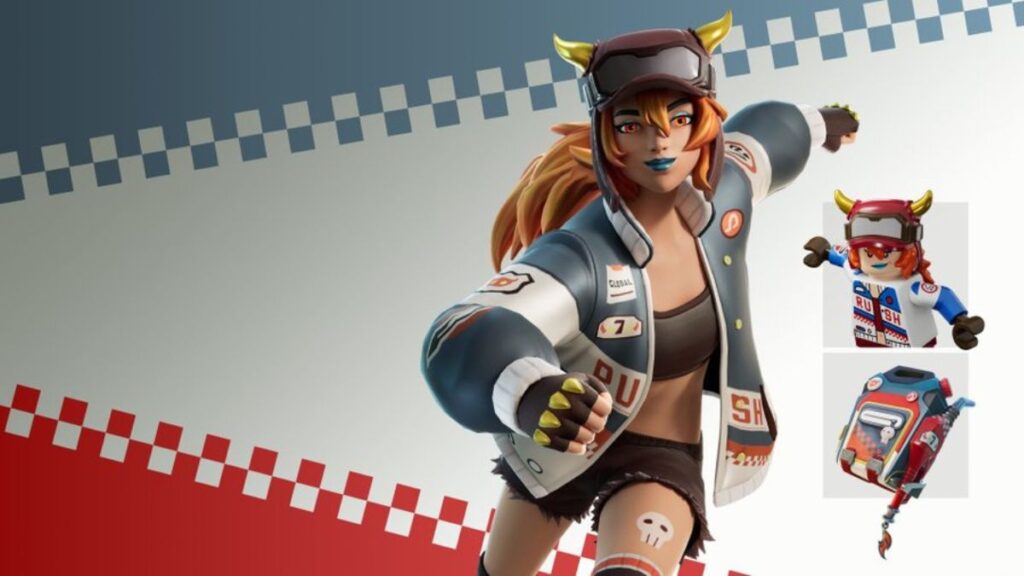
Epic Games has given PS4 and PS5 Fortnite players with PS Plus Subscriptions a special treat: a free Blazin’ Wheels Pack. This Fortnite bundle also includes the Lina Scorch Skin for free. Any player who claims the Blazin’ Wheels Pack will also receive the Gas Up Pack Back Bling and Lina Scorch Lego Skin. Lina Scorch Skin has a sporty look with a racing jacket and goggles.

How To Get Lina Scorch Skin in Fortnite

Fortnite Blazin' Wheels Pack
Image Source: Epic Games via The Nerd Stash

You can get the Lina Scorch skin by claiming the Blazin’ Wheels Pack from the PlayStation Store. But remember, only PlayStation Plus subscribers can claim this pack free. Below are the steps you need to follow.

How To Redeem Blazin’ Wheels Pack  On Console

  1. Go to the Home page of the console and find the PlayStation Store.
  2. Search the game ‘Fortnite’ and scroll down until you find ‘Add ons.’
  3. Select the Fortnite Blazin’ Wheels Pack.
  4. Click the purchase button.
  5. Log in to Fortnite and find Lina Scorch skin in the locker.

Related:

Fortnite Players Having Fun With New Wings of Icarus Glitch

How To Redeem Blazin’ Wheels Pack On The Website

  1. Go to the PlayStation Store online.
  2. Search Fortnite on the Search tab.
  3. Open the Fortnite Store and find ‘Add ons.’
  4. Select ‘Show More’ and Blazin’ Wheels Pack.
  5. Click on ‘Add to Library’
  6. Log in to Fortnite and check the Lina Scorch in the locker section.

When you click the purchase button, you will not be charged anything if you are a PS Plus subscriber. PlayStation Plus Subscribers have been receiving free packs for around four years of time. However, receiving free skin is a bit rare. But still, if you have subscribed to PS Plus, you might have also collected Blizzard Bomber, Sultura Fixer, and other skins. So, Lina Scorch will be the latest skin for this Fortnite collection.


Related Topics
Fortnite Guide
Share. Facebook Twitter LinkedIn Reddit Email
Asanga Wijeratne
  • Website

SUGGESTED READS

Sony’s President Sees No Issues With PS5 Pro’s $700 Price Tag: ‘Hardcore Users Are the Target'
Gaming

PlayStation Store’s Massive Summer Sale Starts Tomorrow: Here’s The Full List of Games Getting Massive Discounts

How to get to the World Tree in Palworld 1.0
Gaming

How to get to the World Tree in Palworld 1.0

How To Keep Pals in Good Working Condition in Palworld 1.0
Gaming

How To Keep Pals in Good Working Condition in Palworld 1.0

How To Get High Quality Pal Oil in Palworld
Gaming

How to Get High Quality Pal Oil in Palworld

Palworld 1.0 Best Mods
Gaming

Palworld 1.0 Modding Guide: 10 Best Mods to Download First

Palworld Best Server Settings
Gaming

Best Palworld 1.0 Server Settings: Complete Configuration Guide

The Nerd Stash
Facebook X (Twitter) Instagram YouTube LinkedIn
  • About Us
  • Join Our Team
  • Meet the Team
  • Privacy Policy
  • DMCA Policy
  • Contact Us
  • Terms of Use
  • Sitemap
  • Editorial Guidelines
  • Advertising Policy
© 2026 The Nerd Stash. All Rights Reserved.

Type above and press Enter to search. Press Esc to cancel.