
Close Menu
  • Gaming
    • Platforms
      • Nintendo
      • PC
      • PlayStation
      • Xbox
  • Entertainment
    • Movies
    • TV
    • Royals
  • Celebrity
    • Hollywood
  • Human Interest
  • Astrology
  • More
    • Anime
    • Reviews
Facebook X (Twitter) Instagram LinkedIn YouTube
  • About Us
  • Join Our Team
  • Meet the Team
  • Privacy Policy
  • DMCA Policy
  • Contact Us
  • Terms of Use
  • Sitemap
  • Editorial Guidelines
  • Advertising Policy
The Nerd Stash
  • Gaming
  • Celebrity
  • Hollywood
  • Human Interest
The Nerd Stash
Home»Gaming»Sea of Stars: How To Get Traders Signet

Sea of Stars: How To Get Traders Signet

Sea of Stars is a fun RPG inspired by retro games. Therefore, by exploring the locations in it, you will be able to learn new…

Alina NovichenkoBy Alina NovichenkoSeptember 5, 20233 Mins Read
Sea of Stars: How To Get Traders Signet
Image Source: Sabotage Studio via JedoRPG Screenshot
This article is over 2 years old and may contain outdated information.

Sea of Stars is a fun RPG inspired by retro games. Therefore, by exploring the locations in it, you will be able to learn new abilities necessary for battles, solving puzzles, and obtaining rare items. In addition, the game has a large number of secrets, some of which are very well hidden. For example, the Traders Signet can only be found by clearing almost all the Wind Tunnel Mines. So, read on to find out how to solve the Wind Tunnel Mines Puzzle and get Traders Signet in Sea of Stars.

Where To Find Mistral Bracelet and Mines Key
Where To Find Mistral Bracelet and Mines Key
Image Source: Sabotage Studio via JedoRPG Screenshot

Wind Tunnel Mines is a rather confusing area in Sea of Stars, as it has many corridors and hidden passages. In addition, there, you can get a new ability for your team and find a secret item called Traders Signet. Let’s talk about everything in order.

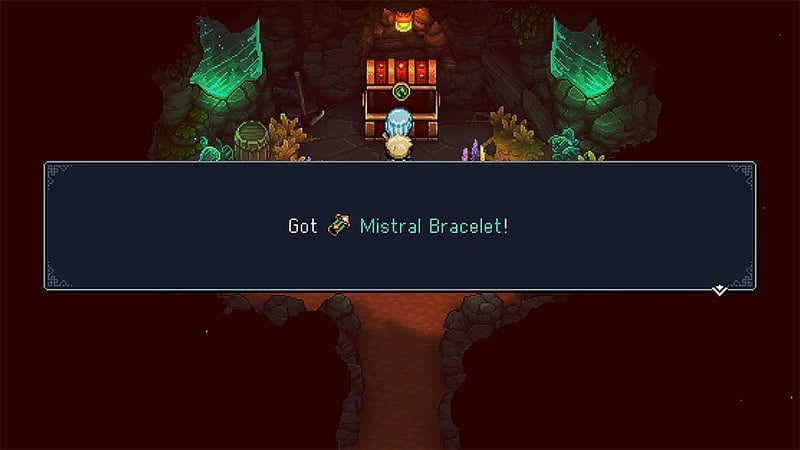
While exploring the caves in this location, you can find a place with a fire. Jump down to the right and climb up the wall to find a huge chest containing a Mistral Bracelet. This item will come in handy throughout your adventure, including getting Traders Signet in Sea of Stars.

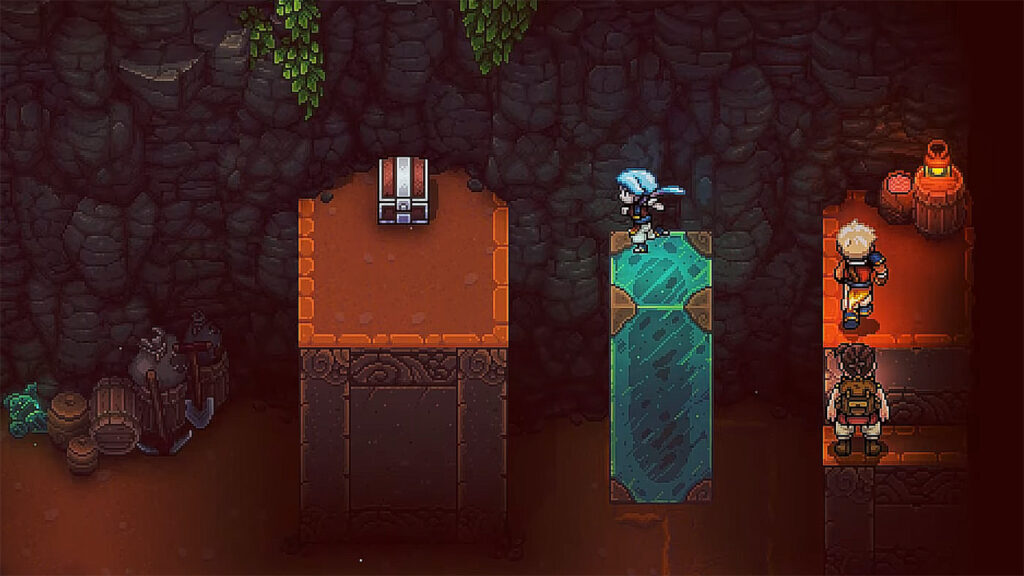
With the Mistral Bracelet, you can push various objects, such as the green pillars in the Wind Tunnel Mines. With this item, new areas are available to you. So, you must find a place with a large green crystal that you can move. Use your new item to move the Crystal to the platform. Then, climb onto the column that appears, go further, move another column, and finally take the Mines Key from the chest. After that, you will be able to open the door leading to the Traders Signet.

How To Solve Wind Tunnel Mines Puzzle

Opening the only locked door in Wind Tunnel Mines will reveal a puzzle. Fortunately, it is quite easy and can be solved in a few simple steps:

  1. Use the Mistral Bracelet to move the right column towards the left.
  2. Then, move the left column down and to the right.
  3. Move the first column onto the platform to activate the barrier.
  4. Move the remaining column to the barrier and drop it down into the hole in the floor.
  5. Jump down behind the pillar, slide it against the wall, and you will reach the chest with the Traders Signet in Sea of Stars.

You will need this item to gain access to the Secret Store located in Brisk. But like the Signet, it is also hidden. Therefore, you will have to jump into the water at the docks and swim under the pier to get to the cave with the secret merchant you need.

That’s all you need to know about how to solve the Wind Tunnel Mines Puzzle and get Traders Signet in Sea of Stars. This item is well hidden, so follow our tips to find it without any problems. And while you are here, take a look at our guide on how to get a Golden Pelican Reservation.

Sea of Stars is available for the PlayStation, Xbox, Nintendo Switch, and PC.

Related Topics
Guide Sea of Stars
Share. Facebook Twitter LinkedIn Reddit Email
Alina Novichenko
  • Website

Alina is a professional freelance game guides writer, with 2 years experience in this industry. She joined TheNerdStash in 2022 and is glad to be part of a friendly team of writers.

SUGGESTED READS

MindsEye Layoffs 2026
Gaming

Studio Behind GTA-like Game, MindsEye, Hit With More Layoffs, and Nobody is Surprised: ‘Shocked There’s Even a Janitor Working There’

Princess Peach Spin-Off Movie May Already Be in Development, Job Listing Suggests
Gaming

Princess Peach Spin-Off Movie May Already Be in Development, Job Listing Suggests

Xbox's New CEO Wants to Reconnect With the 'Community,' Yet Brings In More CoreAI Leaders
Gaming

Xbox’s New CEO Wants to Reconnect With the ‘Community,’ Yet Brings In More CoreAI Leaders

Diablo 4 Season 13 Tier List
Gaming

Class Tier List for Diablo 4 Season 13 (Best Classes for Endgame & Leveling)

Take-Two Boss Finally Explains Why GTA 6 Is Skipping PC at Launch: 'We'll See How It Works Out'
Gaming

Take-Two Boss Finally Explains Why GTA 6 Is Skipping PC at Launch: ‘We’ll See How It Works Out’

Rockstar Employee Review Claims 'Unrealistic' Crunch as GTA 6 Development Intensifies: 'Had to Work Till 3AM'
Gaming

Rockstar Employee Review Claims ‘Unrealistic’ Crunch as GTA 6 Development Intensifies: ‘Had to Work Till 3AM’

The Nerd Stash
Facebook X (Twitter) Instagram YouTube LinkedIn
  • About Us
  • Join Our Team
  • Meet the Team
  • Privacy Policy
  • DMCA Policy
  • Contact Us
  • Terms of Use
  • Sitemap
  • Editorial Guidelines
  • Advertising Policy
© 2026 The Nerd Stash. All Rights Reserved.

Type above and press Enter to search. Press Esc to cancel.





