Close Menu
  • Gaming
    • Platforms
      • Nintendo
      • PC
      • PlayStation
      • Xbox
  • Entertainment
    • Movies
    • TV
    • Royals
  • Celebrity
    • Hollywood
  • Human Interest
  • Astrology
  • More
    • Anime
    • Reviews
Facebook X (Twitter) Instagram LinkedIn YouTube
  • About Us
  • Join Our Team
  • Meet the Team
  • Privacy Policy
  • DMCA Policy
  • Contact Us
  • Terms of Use
  • Sitemap
  • Editorial Guidelines
  • Advertising Policy
The Nerd Stash
  • Gaming
  • Celebrity
  • Hollywood
  • Human Interest
The Nerd Stash
Home»Gaming»How to Get Sodium in Minecraft Education Edition

How to Get Sodium in Minecraft Education Edition

Salty? Not yet!

Patrick ArmstrongMadison BensonBy Patrick Armstrong and Madison BensonMay 6, 20242 Mins Read
A microscope in Minecraft: Education Edition
Image Source: Pixel Cluster and Minecraft & Chill YouTube via The Nerd Stash
This article is over 2 years old and may contain outdated information.

Put your thinking cap on, because Minecraft is taking us back to school. Education Edition expands upon this already limitless sandbox by adding a variety of tools to teach real science. From baking soda volcanos to static balloons, almost everything comes back to the periodic table of elements eventually. The chart’s 11th entry can make meals tastier, clean up messes, or create noxious chemicals. In Minecraft, you can even use it to create Underwater TNT and Ice Bombs, giving Hange and Senku a run for their money as scientists. That next Creeper won’t know what hit it. Here’s how to make Sodium in Minecraft Education Edition.

Minecraft Education Edition Sodium Guide

(Updated on May 5th, 2024 – updated images and expanded instructions)
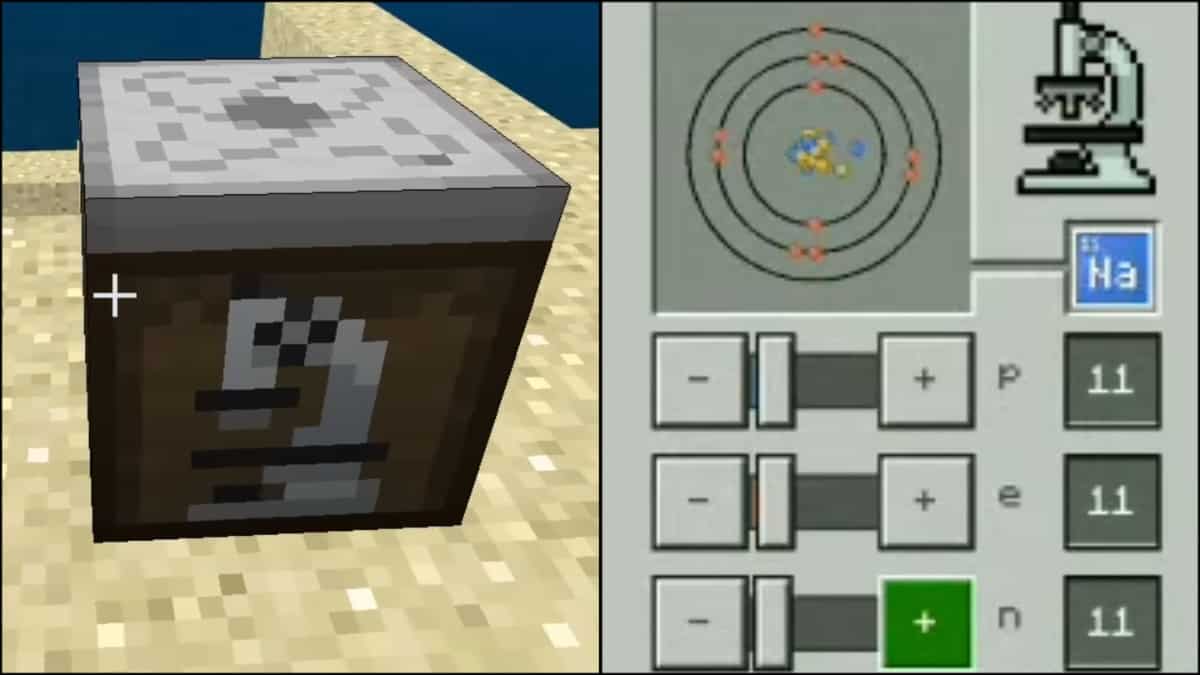
The Element Constructor and recipe used to make Sodium in Minecraft: Education Edition
Image Source: xisumavoid and Pixel Cluster YouTube via The Nerd Stash

For some players, if there’s one thing scarier than Minecraft‘s horror mods, it’s science class. Creating Sodium doesn’t have to be a terrifying experience in Minecraft, however. Education Edition introduces the Element Constructor, allowing you to create elements and isotopes. When playing in Survival mode, the only way to obtain an Element Constructor is through in-game commands. In Creative mode, you can find the Element Constructor by using an inventory search if “Education Edition” is turned on in your World Settings. Here’s what you need to do next:

  1. Interact with the Element Constructor
  2. Set Protons to 11
  3. Set Electrons to 11
  4. Set Neutrons to 11-13

Related:

How To Tame a Horse in Minecraft

Once you’ve used the “p+”, “e-“, and “n” sliders to set the appropriate numbers, you’ll create Sodium. You’ll know you did it right when the “Na” symbol appears beside the circle. Now that you have Sodium you can combine it with TNT at a crafting table to give you Underwater TNT. Minecraft Education Edition contains many other compounds you can create using Sodium, including NaCL for salt. It’s time to give all those Piglins a taste of science. At least you’re not being graded this time.

Minecraft is available for PC, PlayStation 4, PlayStation 5, Xbox One, Xbox Series X/S, Nintendo Switch, and Mobile.

Related Topics
Guide Minecraft
Share. Facebook Twitter LinkedIn Reddit Email
Patrick Armstrong, Madison Benson
  • Website

Artist and writer with a lifelong love of video games. Their favorite games include Dead by Daylight, Meet Your Maker, and Project Zomboid.

Patrick Armstrong, Madison Benson
  • Website

Artist and writer with a lifelong love of video games. Their favorite games include Dead by Daylight, Meet Your Maker, and Project Zomboid.

SUGGESTED READS

Sony Finally 'Has an Issue' With $300 Million Games After Years of Funding Them
Gaming

Sony Finally ‘Has an Issue’ With $300 Million Games After Years of Funding Them

Outward 2 PC Preview
Features

Outward 2 Preview – Nothing Is Given, Everything Is Earned

Fatal Fury City of the Wolves Hands-On Preview Mr Karate
Features

Fatal Fury: City of the Wolves Mr. Karate Hands-On Preview – Patience is Key

Honkai Star Rail Version 4.3 Announcements
Gaming

Honkai: Star Rail Version 4.3 Unveils Blade’s New Form and More Fate Collab Characters

Take-Two CEO Reveals Fans Will Be Forced To Wait a Bit Longer for GTA 6 News 'This Summer,' But Insiders Disagree
Gaming

Take-Two CEO Reveals Fans Will Be Forced To Wait a Bit Longer for GTA 6 News ‘This Summer,’ But Insiders Disagree

007 First Light Launch Trailer
Gaming

007 First Light Celebrates the Long-Awaited Return of James Bond With Its Launch Trailer

The Nerd Stash
Facebook X (Twitter) Instagram YouTube LinkedIn
  • About Us
  • Join Our Team
  • Meet the Team
  • Privacy Policy
  • DMCA Policy
  • Contact Us
  • Terms of Use
  • Sitemap
  • Editorial Guidelines
  • Advertising Policy
© 2026 The Nerd Stash. All Rights Reserved.

Type above and press Enter to search. Press Esc to cancel.