
Close Menu
  • Gaming
    • Platforms
      • Nintendo
      • PC
      • PlayStation
      • Xbox
  • Entertainment
    • Movies
    • TV
    • Royals
  • Celebrity
    • Hollywood
  • Human Interest
  • Astrology
  • More
    • Anime
    • Reviews
Facebook X (Twitter) Instagram LinkedIn YouTube
  • About Us
  • Join Our Team
  • Meet the Team
  • Privacy Policy
  • DMCA Policy
  • Contact Us
  • Terms of Use
  • Sitemap
  • Editorial Guidelines
  • Advertising Policy
The Nerd Stash
  • Gaming
  • Celebrity
  • Hollywood
  • Human Interest
The Nerd Stash
Home»Gaming»How To Dive in Hogwarts Legacy

How To Dive in Hogwarts Legacy

Care for a swim?

Asanga WijeratneBy Asanga WijeratneFebruary 9, 20231 Min Read
How to Dive in Hogwarts Legacy
This article is over 3 years old and may contain outdated information.

[Updated on September 14, 2024, to revise outdated formatting and improve readability.]

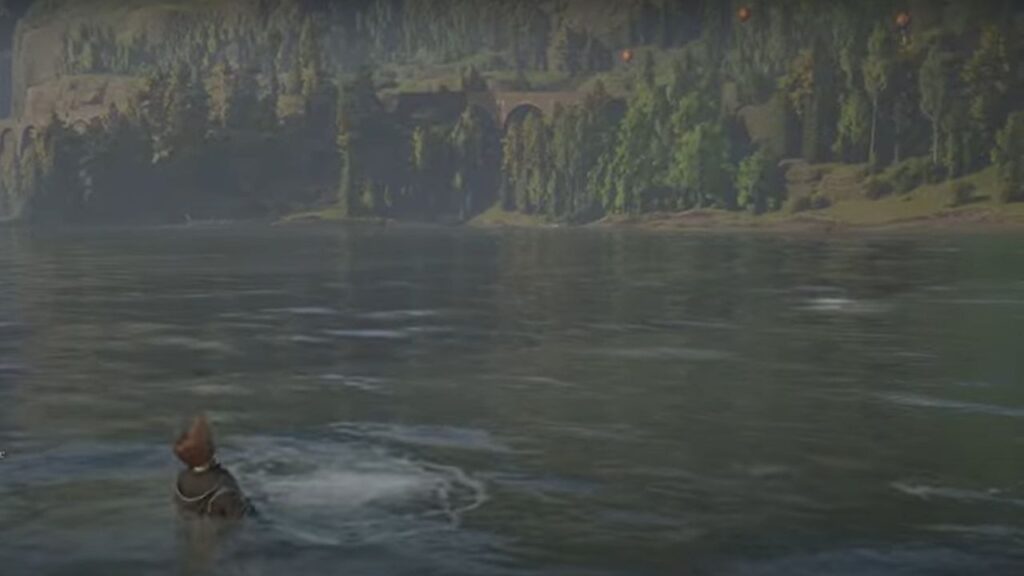
You can dive into Hogwarts Legacy by pressing F on PC, Square on Playstation, and X on Xbox. Here are the detailed steps you need to follow.

  1. Go to the water body where you want to dive.
  2. Jump into the water and swim to the exact spot where you need to Dive.
  3. Once you are in the correct position, press F on PC, Square on Playstation, or X on Xbox to Dive.

Now, you can explore the underwater world and complete your objectives. There are plenty of swirling points on various lakes around the map. These swirling points obtain multiple items you can loot if you dive in. You can use your broom to explore the lake and identify these swirling points.

Related:

How To Contact Hogwarts Legacy Support or Report Bugs

Remember, Diving is a physical activity, and you can not use any spell on it. So, that’s how you dive into Hogwarts Legacy. This was a short guide on how to do so and use it to your advantage. Enjoy the game and use this spell to explore Hogwarts Legacy further. Have fun!


Related Topics
Guide Hogwarts Legacy
Share. Facebook Twitter LinkedIn Reddit Email
Asanga Wijeratne
  • Website

SUGGESTED READS

MindsEye Layoffs 2026
Gaming

Studio Behind GTA-like Game, MindsEye, Hit With More Layoffs, and Nobody is Surprised: ‘Shocked There’s Even a Janitor Working There’

Princess Peach Spin-Off Movie May Already Be in Development, Job Listing Suggests
Gaming

Princess Peach Spin-Off Movie May Already Be in Development, Job Listing Suggests

Xbox's New CEO Wants to Reconnect With the 'Community,' Yet Brings In More CoreAI Leaders
Gaming

Xbox’s New CEO Wants to Reconnect With the ‘Community,’ Yet Brings In More CoreAI Leaders

Diablo 4 Season 13 Tier List
Gaming

Class Tier List for Diablo 4 Season 13 (Best Classes for Endgame & Leveling)

Take-Two Boss Finally Explains Why GTA 6 Is Skipping PC at Launch: 'We'll See How It Works Out'
Gaming

Take-Two Boss Finally Explains Why GTA 6 Is Skipping PC at Launch: ‘We’ll See How It Works Out’

Rockstar Employee Review Claims 'Unrealistic' Crunch as GTA 6 Development Intensifies: 'Had to Work Till 3AM'
Gaming

Rockstar Employee Review Claims ‘Unrealistic’ Crunch as GTA 6 Development Intensifies: ‘Had to Work Till 3AM’

The Nerd Stash
Facebook X (Twitter) Instagram YouTube LinkedIn
  • About Us
  • Join Our Team
  • Meet the Team
  • Privacy Policy
  • DMCA Policy
  • Contact Us
  • Terms of Use
  • Sitemap
  • Editorial Guidelines
  • Advertising Policy
© 2026 The Nerd Stash. All Rights Reserved.

Type above and press Enter to search. Press Esc to cancel.




