Close Menu
  • Gaming
    • Platforms
      • Nintendo
      • PC
      • PlayStation
      • Xbox
  • Entertainment
    • Movies
    • TV
    • Royals
  • Celebrity
    • Hollywood
  • Human Interest
  • Astrology
  • More
    • Anime
    • Reviews
Facebook X (Twitter) Instagram LinkedIn YouTube
  • About Us
  • Join Our Team
  • Meet the Team
  • Privacy Policy
  • DMCA Policy
  • Contact Us
  • Terms of Use
  • Sitemap
  • Editorial Guidelines
  • Advertising Policy
The Nerd Stash
  • Gaming
  • Celebrity
  • Hollywood
  • Human Interest
The Nerd Stash
Home»Gaming»How to make a Standing Torch in Sons of the Forest

How to make a Standing Torch in Sons of the Forest

Do you want to know how to make a Standing Torch in Sons of the Forest? Sons of the Forest is a survival game where…

Asanga WijeratneBy Asanga WijeratneMarch 4, 20233 Mins Read
How to make a Standing Torch in Sons of the Forest
Image via Gamepur
This article is over 3 years old and may contain outdated information.

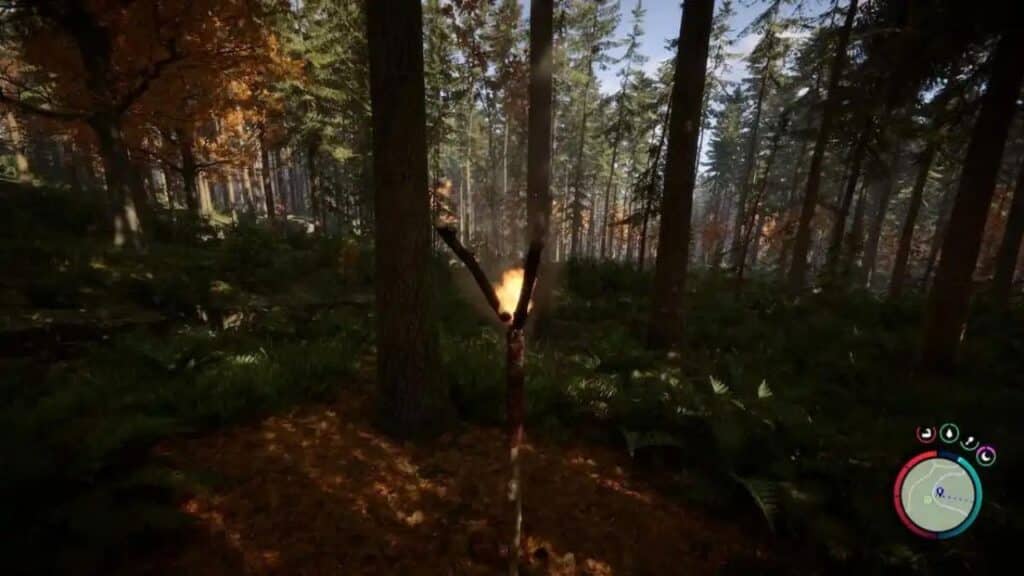
Do you want to know how to make a Standing Torch in Sons of the Forest? Sons of the Forest is a survival game where you can craft items to build and survive. It is an excellent game if you want something to keep you occupied for hours. Making a Standing Torch is an integral part of the game and can be done quickly. This guide will tell you how to make a Standing Torch in Sons of the Forest.

What is A Standing Torch?

Standing Torches have many valuable applications. Beyond lighting up dark places and providing a degree of visibility, Standing Torches can also be placed down on the ground to designate the boundaries of an area. This is especially helpful if you need a haven or want to set areas apart that you don’t wish others to enter. Crafting this item requires specific materials; however, users can use them creatively once prepared. It’s no wonder why Standing Torches are so prevalent in Sons of the Forest!

How to Craft a Standing Torch in Sons of the Forest?

How to make a Standing Torch in Sons of the Forest

You can craft a Standing Torch in Sons of the Forest using two pieces of Stick and Once Piece of Cloth. Sticks are easy to find in the wild. You can keep some in your Inventory. However, Clothes are a little more difficult to find than sticks. You can find them by searching in containers and keeping some in Inventory. Once you have found the necessary materials, here are the steps you must follow.

  1. Open the Inventory and equip one Stick.
  2. Look toward the ground and Right-click where you want to place the Standing Torch. It will mark the location.
  3. Place the Stick vertically by left-clicking.
  4. Open the Inventory and equip one piece of cloth.
  5. Go to the Stick and wrap the cloth around it.
  6. Equip the Second Stick, hover over the Torch, and click the Right Button again.
  7. Get the Lighter from the Inventory and light the Torch.

Congratulations on crafting your Standing Torch in Sons of the Forest! A light source has a range of uses, such as providing safety while exploring, preventing enemies from sneaking up on you, and giving a sense of security when trying to survive. Be sure to keep plenty of sticks and cloth at hand to craft more standing torches if needed; you never know when you will find yourself in the dark! Congratulations on completing this task, and best wishes for your continued exploration and survival in this exciting game.

Sons of the Forest is available only on PC.

Related Topics
Guide Sons of The Forest
Share. Facebook Twitter LinkedIn Reddit Email
Asanga Wijeratne
  • Website

SUGGESTED READS

MindsEye Layoffs 2026
Gaming

Studio Behind GTA-like Game, MindsEye, Hit With More Layoffs, and Nobody is Surprised: ‘Shocked There’s Even a Janitor Working There’

Princess Peach Spin-Off Movie May Already Be in Development, Job Listing Suggests
Gaming

Princess Peach Spin-Off Movie May Already Be in Development, Job Listing Suggests

Xbox's New CEO Wants to Reconnect With the 'Community,' Yet Brings In More CoreAI Leaders
Gaming

Xbox’s New CEO Wants to Reconnect With the ‘Community,’ Yet Brings In More CoreAI Leaders

Diablo 4 Season 13 Tier List
Gaming

Class Tier List for Diablo 4 Season 13 (Best Classes for Endgame & Leveling)

Take-Two Boss Finally Explains Why GTA 6 Is Skipping PC at Launch: 'We'll See How It Works Out'
Gaming

Take-Two Boss Finally Explains Why GTA 6 Is Skipping PC at Launch: ‘We’ll See How It Works Out’

Rockstar Employee Review Claims 'Unrealistic' Crunch as GTA 6 Development Intensifies: 'Had to Work Till 3AM'
Gaming

Rockstar Employee Review Claims ‘Unrealistic’ Crunch as GTA 6 Development Intensifies: ‘Had to Work Till 3AM’

The Nerd Stash
Facebook X (Twitter) Instagram YouTube LinkedIn
  • About Us
  • Join Our Team
  • Meet the Team
  • Privacy Policy
  • DMCA Policy
  • Contact Us
  • Terms of Use
  • Sitemap
  • Editorial Guidelines
  • Advertising Policy
© 2026 The Nerd Stash. All Rights Reserved.

Type above and press Enter to search. Press Esc to cancel.