Close Menu
  • Gaming
    • Game Guides
    • Codes
    • Game News
    • Game Previews
    • Game Reviews
    • Game Features
    • Game Lists
    • Platforms
      • Nintendo
      • PC
      • PlayStation
      • Xbox
      • Mobile
  • Entertainment
    • Movies
    • Movie Features
    • Movie Reviews
    • TV
    • Reality TV
    • Royals
  • Celebrity
  • Human Interest
  • Astrology
  • Videos
  • More
    • Anime
    • Lists
    • Podcasts
    • Reviews
Facebook X (Twitter) Instagram LinkedIn YouTube
  • About Us
  • Join Our Team
  • Meet the Team
  • Privacy Policy
  • DMCA Policy
  • Contact Us
  • Terms of Use
  • Sitemap
  • Editorial Guidelines
  • Advertising Policy
The Nerd Stash
  • Gaming
  • Celebrity
  • Human Interest
  • Videos
The Nerd Stash
Home»Features»How to Use a Typewriter in Resident Evil 4 Remake

How to Use a Typewriter in Resident Evil 4 Remake

Want to know how to use a Typewriter in Resident Evil 4 Remake? Although the long-awaited remake of the legendary Resident Evil 4 gave players…

Artur NovichenkoBy Artur NovichenkoMarch 23, 20233 Mins Read
how-to-use-a-typewriter-in-resident-evil-4-remake
This article is over 2 years old and may contain outdated information.

Want to know how to use a Typewriter in Resident Evil 4 Remake? Although the long-awaited remake of the legendary Resident Evil 4 gave players unforgettable nostalgic emotions, the game has undergone many changes compared to its predecessor. And the changes affected not only graphics and plot but also such simple items as Typewriter. Previously, you could only use Typewriter to save game progress manually. But believe us, now you will use this device much more often. So we are here to help you and tell you how to use a Typewriter in Resident Evil 4 Remake.

How Typewriter Works in Resident Evil 4 Remake
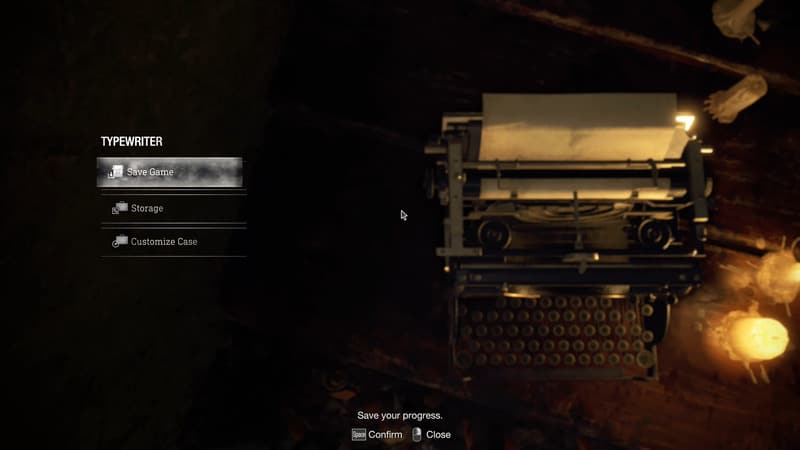
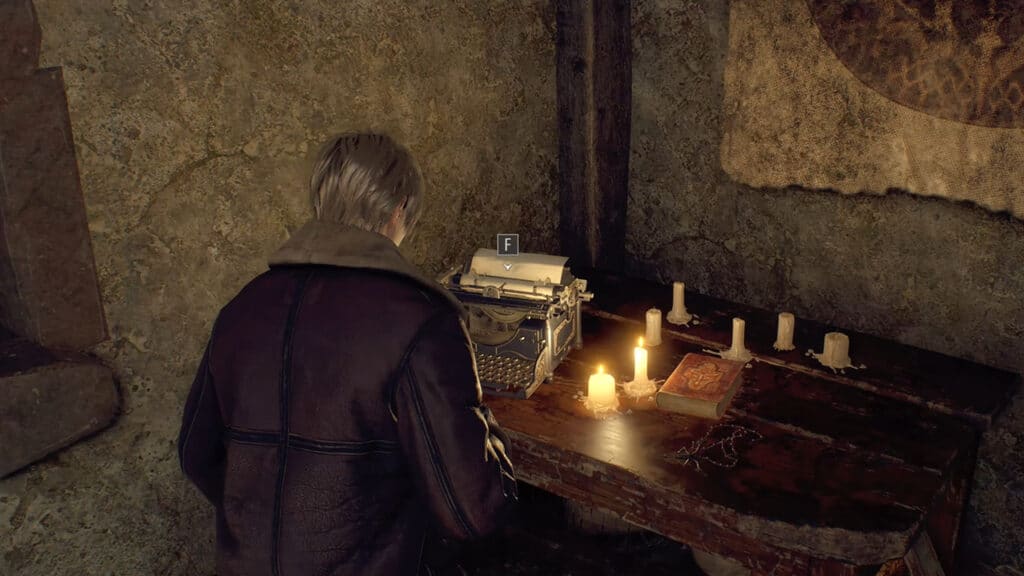
As you begin your adventures in Resident Evil 4 Remake, you will first encounter the Typewriter in a small house in the first half hour of gameplay. To interact with the Typewriter, you only need to approach it and press the F key. As we said earlier, Typewriter’s functionality has increased significantly, and you will see a small menu with several functions:

  • Save Game
  • Storage
  • Customize Case

These features come in handy during gameplay in one way or another, so let’s talk about each in a little more detail.

Save Game in Typewriter

If you played the original Resident Evil 4, this feature be familiar to you. Being able to save the game manually was quite handy if the next checkpoint is far. In addition, it never hurts to Save the game between checkpoints. By their genre, all games in the Resident Evil series have extremely unfriendly populations that can kill you at any moment.

Thanks to Typewriter, you can make some extra saves. It will allow you to check out more dangerous paths, do something reckless, or watch all of the game’s endings without too much difficulty.

Storage in Typewriter

Being able to store items in Typewriter looks a bit odd, but it’s what you need. Traveling through the game spaces, you can find a lot of valuables, and sometimes you have to choose what to throw away. Storage makes your life a little easier because now you can accumulate treasures without sacrificing vital consumables.

In addition, you can store in Storage situational weapons or items you do not need now but will be helpful later. Also, you can store treasures, sell everything to the merchant and buy something valuable. You will encounter this NPC quite often as you progress through the game.

Related:

Resident Evil 4 Remake: How to Solve Manor Cabinet Lock Puzzle

Customize Case in Typewriter

Case, talismans, charms, and upgrades are vital mechanics for Resident Evil 4 Remake. Your success depends on what case and customization you use. You can carry more items or get a couple of good buffs. So we strongly recommend that you use this game feature.

That’s all you need to know about how to use a Typewriter in Resident Evil 4 Remake. As you can see, the remake of the beloved game has retained everyone’s favorite features and added a lot of damn cool innovations. So do not hesitate, and it’s time to dive into the gameplay.

Resident Evil 4 Remake is available on PC, PlayStation, and Xbox consoles.

Related Topics
Guide Resident Evil 4 Remake
Share. Facebook Twitter LinkedIn Reddit Email
Artur Novichenko
  • Website

Artur is a copywriter and SEO specialist, as well as a small business owner. In his free time, he loves to play computer games and is glad that he was able to connect his professional career with his hobby.

SUGGESTED READS

Avatar TLA Fans Are Finally Getting the Open-World Game They've Been Waiting For: 'We Got Avatar's Creed Before GTA 6'
Game News

Avatar TLA Fans Are Finally Getting the Open-World Game They’ve Been Waiting For: ‘We Got Avatar’s Creed Before GTA 6’

Best Augments in Black Ops 7 Zombies
Game Guides

Best Augments You Need To Fully Research In Call of Duty: Black Ops 7 Zombies

All Steps in the Destiny 2 Renegades Campaign
Game Guides

How To Complete the Renegades Campaign in Destiny 2

Octopath Traveler 0 PS5 Review
9
Features

Octopath Traveler 0 Review – A Tale of Revenge and Restoration

Destiny 2 Renegades Eververse Store Items
Game Guides

All Destiny 2: Renegades Eververse Cosmetics

Destiny 2 Renegades All Season Pass Rewards
Game Guides

All Destiny 2: Renegades Season Pass Rewards

Trending
Avatar TLA Fans Are Finally Getting the Open-World Game They've Been Waiting For: 'We Got Avatar's Creed Before GTA 6'

Avatar TLA Fans Are Finally Getting the Open-World Game They’ve Been Waiting For: ‘We Got Avatar’s Creed Before GTA 6’

Best Augments in Black Ops 7 Zombies

Best Augments You Need To Fully Research In Call of Duty: Black Ops 7 Zombies

All Steps in the Destiny 2 Renegades Campaign

How To Complete the Renegades Campaign in Destiny 2

Octopath Traveler 0 PS5 Review
9

Octopath Traveler 0 Review – A Tale of Revenge and Restoration

The Nerd Stash
Facebook X (Twitter) Instagram YouTube LinkedIn
  • About Us
  • Join Our Team
  • Meet the Team
  • Privacy Policy
  • DMCA Policy
  • Contact Us
  • Terms of Use
  • Sitemap
  • Editorial Guidelines
  • Advertising Policy
© 2025 The Nerd Stash. All Rights Reserved.

Type above and press Enter to search. Press Esc to cancel.