Close Menu
  • Gaming
    • Game Guides
    • Codes
    • Game News
    • Game Previews
    • Game Reviews
    • Game Features
    • Game Lists
    • Platforms
      • Nintendo
      • PC
      • PlayStation
      • Xbox
      • Mobile
  • Entertainment
    • Movies
    • Movie Features
    • Movie Reviews
    • TV
    • Reality TV
    • Royals
  • Celebrity
  • Human Interest
  • Astrology
  • Videos
  • More
    • Anime
    • Lists
    • Podcasts
    • Reviews
Facebook X (Twitter) Instagram LinkedIn YouTube
  • About Us
  • Join Our Team
  • Meet the Team
  • Privacy Policy
  • DMCA Policy
  • Contact Us
  • Terms of Use
  • Sitemap
  • Editorial Guidelines
  • Advertising Policy
The Nerd Stash
  • Gaming
  • Celebrity
  • Human Interest
  • Videos
The Nerd Stash
Home»Game Guides»How to Turn Off Baserunning in MLB The Show 23

How to Turn Off Baserunning in MLB The Show 23

Want to know how to turn off Baserunning in MLB The Show 23? Every year a series of baseball simulators MLB The Show becomes more…

Artur NovichenkoBy Artur NovichenkoMarch 30, 20233 Mins Read
how-to-turn-off-baserunning-in-mlb-the-show-23
This article is over 2 years old and may contain outdated information.

Want to know how to turn off Baserunning in MLB The Show 23? Every year a series of baseball simulators MLB The Show becomes more and more realistic. After all, besides the most current rosters of the world league teams, you can abandon the auto functions and take on most of the controls. It’s not just about good hits followed by a Home Run, but things like Baserunning. So if you want to get the most realistic gaming experience from MLB The Show 23, we will tell you how to disable Baserunning.

MLB The Show 23: How to Disable Baserunning
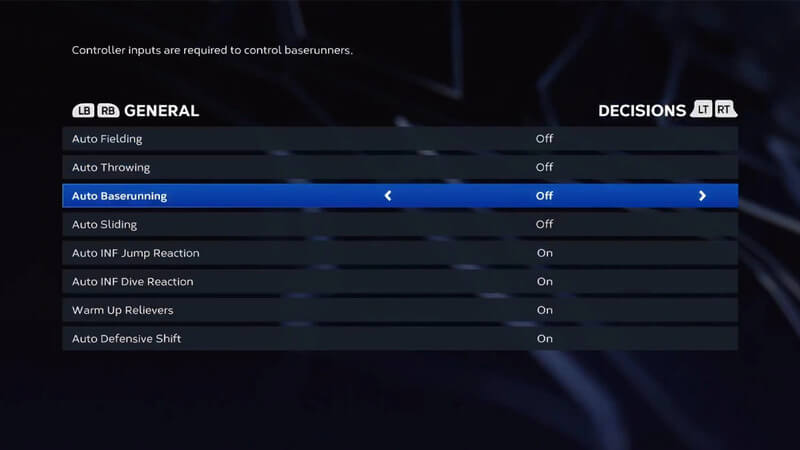
Image via Attackfthefanboy

First, it is worth noting that if you decide to turn off Baserunning in MLB The Show 23, you must be confident in what you are doing. While this function is active, the game forgives your mistakes, and the Baserunning process is almost automatic. At the same time, if you disable this function, the control will be in your hands, and the game will be more difficult.

However, if you’re ready to move on to more professional gameplay, here’s what you should do to disable Baserunning in MLB The Show 23:

  • Launch MLB The Show 23 and go to the Settings menu by clicking on the gear in the top right corner.
  • Next, select the Gameplay tab and go to the General and Decisions section.
  • After that, find the Auto Baserunning function in the list and switch it to the Off position.

Related:

How To Remove Created Player In MLB The Show 23

If you’ve been playing with Auto Baserunning for a while now, you’ll find it hard to get used to the new type of gameplay. So first, go to the Baserunning Interface setup and choose the option that suits you. But first, we recommend trying the Analog Select interface. By choosing this option, you should learn the control buttons and what these are responsible for. After all, now you have to control all the baserunners yourself:

  • Select baserunners: R2, RT, or ZR (depending on your platform).
  • Order baserunners to stop: L1,LB, or L.
  • Order baserunners to attack: R1, RB, or R.

It is the most important thing you need to know to turn off Baserunning in MLB The Show 23 and play after that. After you complete all the steps described above, you will have to practice a little. But on the other hand, by controlling Baserunning yourself, you can enjoy your favorite baseball game even more.

MLB The Show 23 is available on Nintendo Switch, PlayStation, and Xbox consoles.

Related Topics
Guide MLB The Show 23
Share. Facebook Twitter LinkedIn Reddit Email
Artur Novichenko
  • Website

Artur is a copywriter and SEO specialist, as well as a small business owner. In his free time, he loves to play computer games and is glad that he was able to connect his professional career with his hobby.

SUGGESTED READS

Path of Exile 2 The Last of the Druids Update Preview
Features

One Of the Most Unique Druid Archetypes Is Ready to Land on Path of Exile 2: The Last of the Druids

Avatar TLA Fans Are Finally Getting the Open-World Game They've Been Waiting For: 'We Got Avatar's Creed Before GTA 6'
Game News

Avatar TLA Fans Are Finally Getting the Open-World Game They’ve Been Waiting For: ‘We Got Avatar’s Creed Before GTA 6’

Best Augments in Black Ops 7 Zombies
Game Guides

Best Augments You Need To Fully Research In Call of Duty: Black Ops 7 Zombies

All Steps in the Destiny 2 Renegades Campaign
Game Guides

How To Complete the Renegades Campaign in Destiny 2

Octopath Traveler 0 PS5 Review
9
Features

Octopath Traveler 0 Review – A Tale of Revenge and Restoration

Destiny 2 Renegades Eververse Store Items
Game Guides

All Destiny 2: Renegades Eververse Cosmetics

Trending
Path of Exile 2 The Last of the Druids Update Preview

One Of the Most Unique Druid Archetypes Is Ready to Land on Path of Exile 2: The Last of the Druids

Avatar TLA Fans Are Finally Getting the Open-World Game They've Been Waiting For: 'We Got Avatar's Creed Before GTA 6'

Avatar TLA Fans Are Finally Getting the Open-World Game They’ve Been Waiting For: ‘We Got Avatar’s Creed Before GTA 6’

Best Augments in Black Ops 7 Zombies

Best Augments You Need To Fully Research In Call of Duty: Black Ops 7 Zombies

All Steps in the Destiny 2 Renegades Campaign

How To Complete the Renegades Campaign in Destiny 2

The Nerd Stash
Facebook X (Twitter) Instagram YouTube LinkedIn
  • About Us
  • Join Our Team
  • Meet the Team
  • Privacy Policy
  • DMCA Policy
  • Contact Us
  • Terms of Use
  • Sitemap
  • Editorial Guidelines
  • Advertising Policy
© 2025 The Nerd Stash. All Rights Reserved.

Type above and press Enter to search. Press Esc to cancel.