

Close Menu
  • Gaming
    • Platforms
      • Nintendo
      • PC
      • PlayStation
      • Xbox
  • Entertainment
    • Movies
    • TV
    • Royals
  • Celebrity
    • Hollywood
  • Human Interest
  • Astrology
  • More
    • Reviews
Facebook X (Twitter) Instagram LinkedIn YouTube
  • About Us
  • Join Our Team
  • Meet the Team
  • Privacy Policy
  • DMCA Policy
  • Contact Us
  • Terms of Use
  • Sitemap
  • Editorial Guidelines
  • Advertising Policy
The Nerd Stash
  • Gaming
  • Celebrity
  • Hollywood
  • Human Interest
The Nerd Stash
Home»Gaming»How To Fly In Valheim (2023)

How To Fly In Valheim (2023)

The map size of a randomly generated world in Valheim is massive, making flying an effective form of “fast travel” across the landscapes. Of course, the ability…

AugustBy AugustApril 2, 20233 Mins Read
Enable Console Commands to Fly in Valheim
Image by The Nerd Stash
This article is over 3 years old and may contain outdated information.

The map size of a randomly generated world in Valheim is massive, making flying an effective form of “fast travel” across the landscapes. Of course, the ability to fly is enabled via console commands, which allow players to use “cheats” in Valheim. While flying can break one’s immersion in their survival experience, it’s a helpful way to save time and cover distances that would have otherwise taken hours. 

Enabling Flying in Valheim

Enable Console Commands or Cheats in Valheim
Image by The Nerd Stash

To gain the ability to fly in Valheim, you must first enable console use in-game by altering the launch options in your Steam client. You can access these options by right-clicking the game’s tab or pressing the gear icon on the Steam Library page. In the box below the statement, “Advanced users may choose to enter modifications to their launch options,” type in “-console” without quotes.
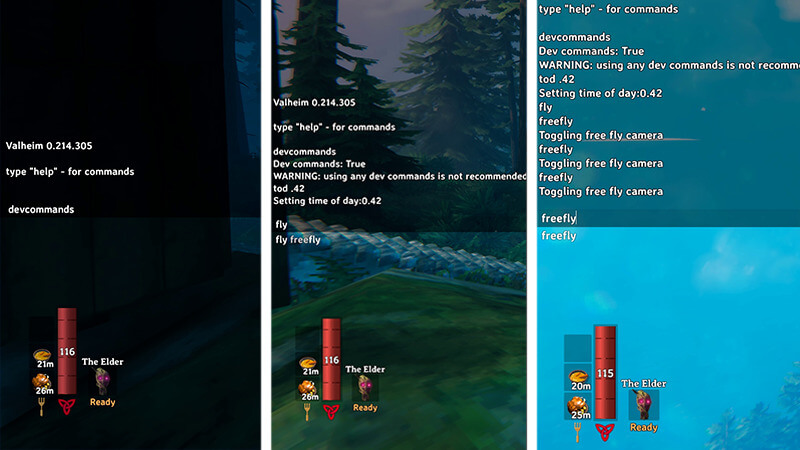
Enable flying in Valheim via console commands
Image by The Nerd Stash

After altering the launch options for Valheim, boot up the game and enter your world. After your save file loads, open the in-game console by pressing F5 on your keyboard. Typing “devcommands” and hitting enter will make “cheat true,” mechanics-wise. To enable flying in Valheim, type “fly” and press enter. Your character will then be capable of soaring through the sky without restriction. Do note that this ability does not turn off collision, so your avatar can still run into environmental objects and the terrain. 
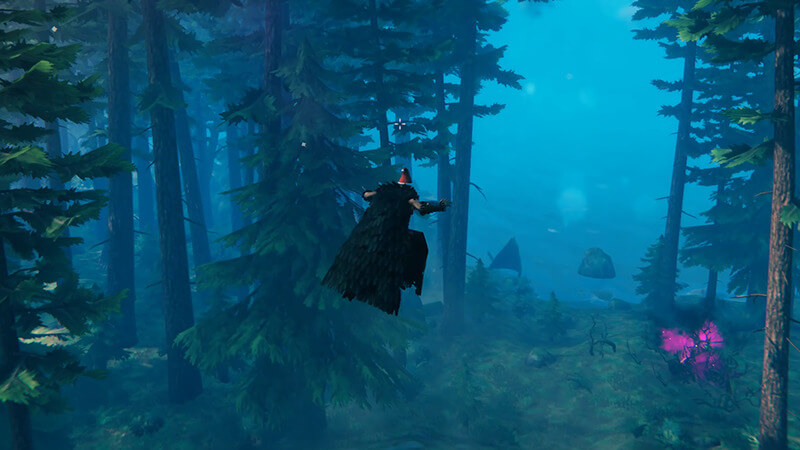
Using the Feather Cape to Glide Fly in Valheim
Image by The Nerd Stash

By typing in “fly” again, your character will fall back to the ground. Before doing this, we recommend inputting “god” into the console to enable “god mode.” This action will prevent your avatar from taking fall damage or accidentally dying after coming into contact with the ground. If you have crafted and equipped the Feather Cape, you will slowly glide to the ground and avoid taking any fall damage, thanks to the Feather Fall passive status effect.

Another way to enable flying in Valheim is by using the “freefly” console command, which allows you to control a camera view independent of your character. This option is excellent for snapping stylish or cinematic screenshots for your playthrough. If you want to remove the UI for a less cluttered image, press Ctrl and F3 at the same time. Make sure you hold down Ctrl first, not vice versa. Like flying, the free-camera mode can be deactivated by typing “freefly” again into the console. 

Valheim is available on PC, Xbox One, and Xbox Series X|S.

Related Topics
Guide Valheim
Share. Facebook Twitter LinkedIn Reddit Email
August

August Webb is a Staff Writer and former Lead Guide Editor of TNS. When not working, she's playing a visual novel, fanning over an indie gem, or lost in the world of VR.

SUGGESTED READS

Beast of Reincarnation Game Previews
Gaming

Beast of Reincarnation Previews Just Made It One of the Most Anticipated Games of 2026

Palworld 1.0 Patched the Tower Boss Glitch, but You Can Recruit Them Instead
Gaming

Palworld 1.0 Patched the Tower Boss Glitch, but You Can Recruit Them Instead

Sony’s President Sees No Issues With PS5 Pro’s $700 Price Tag: ‘Hardcore Users Are the Target'
Gaming

PlayStation Store’s Massive Summer Sale Starts Tomorrow: Here’s The Full List of Games Getting Massive Discounts

How to get to the World Tree in Palworld 1.0
Gaming

How to get to the World Tree in Palworld 1.0

How To Keep Pals in Good Working Condition in Palworld 1.0
Gaming

How To Keep Pals in Good Working Condition in Palworld 1.0

How To Get High Quality Pal Oil in Palworld
Gaming

How to Get High Quality Pal Oil in Palworld

The Nerd Stash
Facebook X (Twitter) Instagram YouTube LinkedIn
  • About Us
  • Join Our Team
  • Meet the Team
  • Privacy Policy
  • DMCA Policy
  • Contact Us
  • Terms of Use
  • Sitemap
  • Editorial Guidelines
  • Advertising Policy
© 2026 The Nerd Stash. All Rights Reserved.

Type above and press Enter to search. Press Esc to cancel.