

Close Menu
  • Gaming
    • Game Guides
    • Codes
    • Game News
    • Game Previews
    • Game Reviews
    • Game Features
    • Game Lists
    • Platforms
      • Nintendo
      • PC
      • PlayStation
      • Xbox
      • Mobile
  • Entertainment
    • Movies
    • Movie Features
    • Movie Reviews
    • TV
    • Reality TV
    • Royals
  • Celebrity
    • Hollywood
  • Human Interest
  • Astrology
  • Videos
  • More
    • Anime
    • Lists
    • Podcasts
    • Reviews
Facebook X (Twitter) Instagram LinkedIn YouTube
  • About Us
  • Join Our Team
  • Meet the Team
  • Privacy Policy
  • DMCA Policy
  • Contact Us
  • Terms of Use
  • Sitemap
  • Editorial Guidelines
  • Advertising Policy
The Nerd Stash
  • Gaming
  • Celebrity
    • Hollywood
  • Human Interest
  • Videos
The Nerd Stash
Home»Game Guides»How To Get Kangaskhan in Pokemon Go

How To Get Kangaskhan in Pokemon Go

Time to find the mama Pokemon

Nat CollazoArtur NovichenkoBy Nat Collazo and Artur NovichenkoJune 25, 20242 Mins Read
How To Get Kangaskhan in Pokemon Go
Image Source: Niantic via The Nerd Stash

Skip To...

  • Finding Kangaskhan in Pokemon Go
  • How To Trade For Kangaskhan

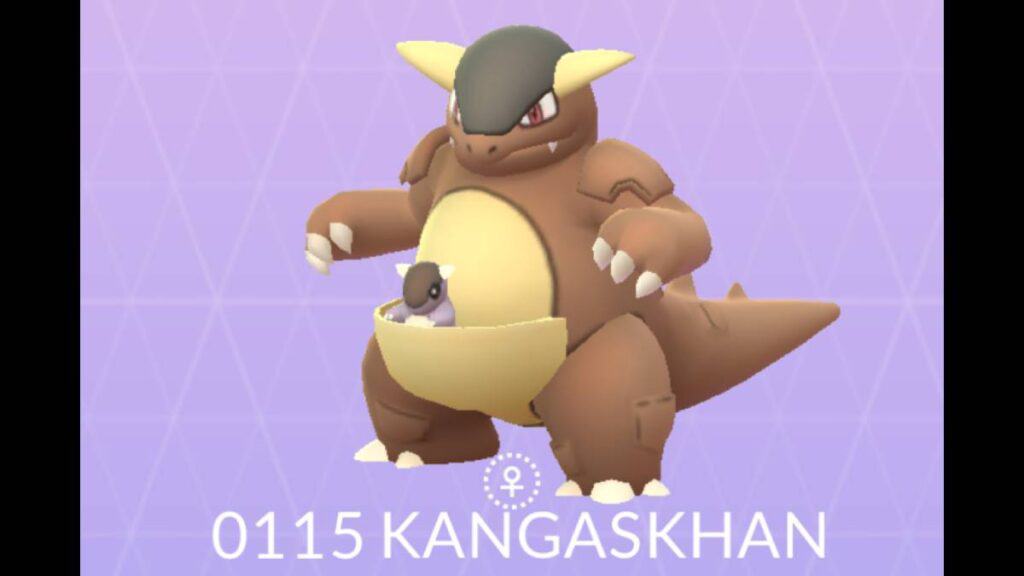
Kangaskhan is one of the many Pokemon from the first generation that many players consider to be rare. That is still the case, even in Pokemon Go, making it highly sought after regularly. It’s tough, but getting one is completely possible. Let’s take a look at how to get Kangaskhan in Pokemon Go.

Finding Kangaskhan in Pokemon Go

Updated on June 25 – New information added.

Unfortunately, Kangaskhan in Pokemon Go is exclusively available in Australia. Although it’s a region-exclusive, the Pokemon is quite common if you live there. Considering that, the only way to get Kangaskhan outside of Australia is to trade with someone who’s caught one.

Some events grant you opportunities to catch Pokemon that are unavailable otherwise. Keeping a close eye on these events might award you with a Kangaskhan or at least the chance to trade with someone who does.

How To Trade For Kangaskhan

To trade for a Kangaskhan or any Pokemon, you need to meet certain requirements:

  • You must be friends within the Pokemon Go app.
  • The player must be within 100 meters of you.
  • Both players must have a Trainer Level higher than ten.

Once those requirements have been met, then you can trade using these instructions.

  1. Press your avatar icon on the bottom left-hand side of the screen.
  2. Select the Friends tab.
  3. Click on the friend you want to trade with.
  4. In their player profile, select the Trade icon.

You will immediately be put into a trade room. Here, you’ll know whether or not you’re close enough to the player for a trade. This might prove to be a little difficult because, as explained, Pokemon is exclusive to Australia, meaning that the person either had to have it traded by someone who lives there or had visited.

Related:

Pokemon Go Scorching Steps Event: Timed Research Tasks & Rewards

Pokemon Go is available to play on mobile devices.

Related Topics
Guide Pokemon Go
Share. Facebook Twitter LinkedIn Reddit Email
Nat Collazo, Artur Novichenko
  • Website
  • X (Twitter)
  • Instagram

I am a game journalist and guide writer with ten years of experience as well as the CEO/ Founder of Frowns Marketing, a marketing company that caters to indie games, tabletop games, and board games to help developers get more wishlists, backers, and players!

Nat Collazo, Artur Novichenko
  • Website
  • X (Twitter)
  • Instagram

I am a game journalist and guide writer with ten years of experience as well as the CEO/ Founder of Frowns Marketing, a marketing company that caters to indie games, tabletop games, and board games to help developers get more wishlists, backers, and players!

SUGGESTED READS

Minecraft Accused of Mocking Lonely Kids, Sparking Mental Health Backlash: 'One of the Ickiest Things I've Seen'
Features

Minecraft Accused of Mocking Lonely Kids, Sparking Mental Health Backlash: ‘One of the Ickiest Things I’ve Seen’

Destiny 2 Renegades PS5 Review
8.5
Features

Destiny 2: Renegades Review – The Shooter Strikes Back

Clair Obscur: Expedition 33 Loses GOTY, Other Award from Indie Game Awards Over Generative AI: 'Some Weird Performative BS'
Game News

GOTY Stripped Over AI?: Clair Obscur: Expedition 33 Loses Awards at Indie Game Awards, ‘Some Weird Performative BS’

Sony Patents Real-time AI Game Censorship Tech That Could Even Make GTA 6 Kid-Friendly
Game News

Sony Patents Real-Time AI Game Censorship Tech That Could Even Make GTA 6 Kid-Friendly

Zenless Zone Zero Version 2.5 Announcement
Game News

Zenless Zone Zero Version 2.5 Is Ready To Wrap Up the Year With Two New Agents and a Free Outfit

PC Gamers Can't Catch a Break as Nvidia Plans 40% GeForce GPU Production Cuts, Report: 'Who Needs a PC Anyways'
Game News

PC Gamers Can’t Catch a Break as Nvidia Reportedly Plans 40% GeForce GPU Production Cuts: ‘Who Needs a PC Anyways’

Trending
Minecraft Accused of Mocking Lonely Kids, Sparking Mental Health Backlash: 'One of the Ickiest Things I've Seen'

Minecraft Accused of Mocking Lonely Kids, Sparking Mental Health Backlash: ‘One of the Ickiest Things I’ve Seen’

Destiny 2 Renegades PS5 Review
8.5

Destiny 2: Renegades Review – The Shooter Strikes Back

Clair Obscur: Expedition 33 Loses GOTY, Other Award from Indie Game Awards Over Generative AI: 'Some Weird Performative BS'

GOTY Stripped Over AI?: Clair Obscur: Expedition 33 Loses Awards at Indie Game Awards, ‘Some Weird Performative BS’

Sony Patents Real-time AI Game Censorship Tech That Could Even Make GTA 6 Kid-Friendly

Sony Patents Real-Time AI Game Censorship Tech That Could Even Make GTA 6 Kid-Friendly

The Nerd Stash
Facebook X (Twitter) Instagram YouTube LinkedIn
  • About Us
  • Join Our Team
  • Meet the Team
  • Privacy Policy
  • DMCA Policy
  • Contact Us
  • Terms of Use
  • Sitemap
  • Editorial Guidelines
  • Advertising Policy
© 2025 The Nerd Stash. All Rights Reserved.

Type above and press Enter to search. Press Esc to cancel.




