Close Menu
  • Gaming
    • Platforms
      • Nintendo
      • PC
      • PlayStation
      • Xbox
  • Entertainment
    • Movies
    • TV
    • Royals
  • Celebrity
    • Hollywood
  • Human Interest
  • Astrology
  • More
    • Reviews
Facebook X (Twitter) Instagram LinkedIn YouTube
  • About Us
  • Join Our Team
  • Meet the Team
  • Privacy Policy
  • DMCA Policy
  • Contact Us
  • Terms of Use
  • Sitemap
  • Editorial Guidelines
  • Advertising Policy
The Nerd Stash
  • Gaming
  • Celebrity
  • Hollywood
  • Human Interest
The Nerd Stash
Home»Gaming»How To Play VRChat Mobile Alpha

How To Play VRChat Mobile Alpha

VRChat helps people connect through virtual reality and interact with each other. It’s not just a way to chat but a way to play games…

Victor TanBy Victor TanAugust 24, 20232 Mins Read
How To Join VRChat Mobile Alpha Featured Image
Image Source: VRChat Press Kit
This article is over 3 years old and may contain outdated information.

VRChat helps people connect through virtual reality and interact with each other. It’s not just a way to chat but a way to play games with other people. VRChat has improved with several patches and it remains a solid way for people to play virtually. With VRChat Mobile Alpha, you can now bring the app with you wherever you go. But getting the mobile app isn’t a simpe process, which means you can’t just download it immediately. Here’s how to play VRChat Mobile Alpha as soon as possible.

Get Started Playing VRChat Mobile Alpha
VRChat Mobile Alpha User Image
Image Source: VRChat Press Kit

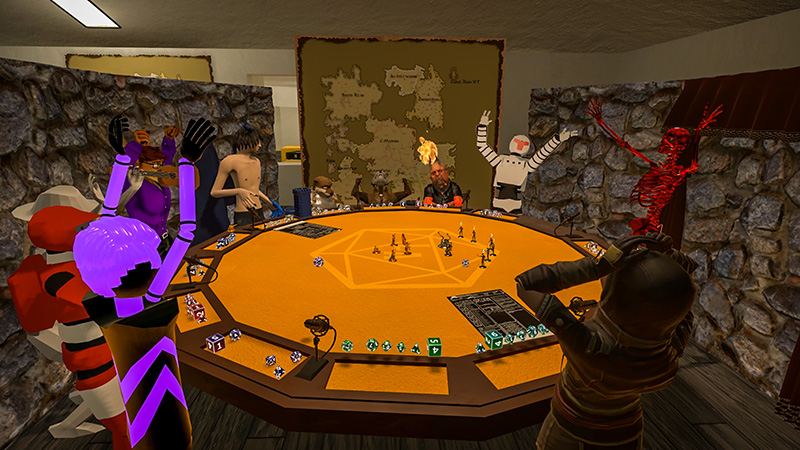
You can’t play VRChat Mobile Alpha unless you have an existing VRChat Plus account. If you do, you can download the app and get started right away. If you don’t have a Plus account, you won’t be able to access the app or download it. The app is still in the testing stage, and there are many aspects that require work. Rather than letting everyone get started right away, it will be limited to those who have a Plus account.

The app is only for Android and can be found on the Google store. If you want to check the recent list of updates, the mobile release list has been labeled “m”. This lets you separate the mobile updates from the regular version. Your Android phone should have six gigabytes of RAM and Android 10 software to run VRChat Mobile Alpha successfully. If you don’t meet the requirements, you may not be able to run the app or could run into other problems.

Related

Best Free Virtual Reality Games for April 2023

If you get the chance to participate in the alpha build, sending feedback and pointing out bugs will help speed up the development process. Otherwise, it shouldn’t be too different from using VRChat except it’s obvious you are using it on mobile. But the ability to take the app with you wherever you go means you always have a way to interact with your friends.


Related Topics
Guide
Share. Facebook Twitter LinkedIn Reddit Email
Victor Tan
  • Website

Victor enjoys helping players succeed when video games are too difficult. He knows what it's like to get stuck in tricky situations and he wants to make sure other players don't suffer the same fate.

SUGGESTED READS

Onimusha Way of the Sword PS5 Review
9.5
Gaming

Onimusha: Way of the Sword Review – A Flawless Samurai Tale

The Blood of Dawnwalker PS5 Review
9
Gaming

The Blood of Dawnwalker Review – Dark Fantasy Done Right

GTA 6's Lucia Shows How Far Latina Representation in Games Has Come
Gaming

GTA 6’s Lucia Shows How Far Latina Representation in Games Has Come

Rogue Fortune Reveal
Gaming

Rogue Fortune Approaches Roguelikes With In-Depth Build-Crafting and Puzzle-Solving Systems

GTA 6 Extended Look Netflix
Gaming

How & Where to Watch the GTA 6 Extended Look

Resonance A Plague Tale Legacy PC Review
8
Gaming

Resonance: A Plague Tale Legacy Review – Bold Ideas, Predictable Story

The Nerd Stash
Facebook X (Twitter) Instagram YouTube LinkedIn
  • About Us
  • Join Our Team
  • Meet the Team
  • Privacy Policy
  • DMCA Policy
  • Contact Us
  • Terms of Use
  • Sitemap
  • Editorial Guidelines
  • Advertising Policy
© 2026 The Nerd Stash. All Rights Reserved.

Type above and press Enter to search. Press Esc to cancel.