Close Menu
  • Gaming
    • Game Guides
    • Codes
    • Game News
    • Game Previews
    • Game Reviews
    • Game Features
    • Game Lists
    • Platforms
      • Nintendo
      • PC
      • PlayStation
      • Xbox
      • Mobile
  • Entertainment
    • Movies
    • Movie Features
    • Movie Reviews
    • TV
    • Reality TV
    • Royals
  • Celebrity
    • Hollywood
  • Human Interest
  • Astrology
  • Videos
  • More
    • Anime
    • Lists
    • Podcasts
    • Reviews
Facebook X (Twitter) Instagram LinkedIn YouTube
  • About Us
  • Join Our Team
  • Meet the Team
  • Privacy Policy
  • DMCA Policy
  • Contact Us
  • Terms of Use
  • Sitemap
  • Editorial Guidelines
  • Advertising Policy
The Nerd Stash
  • Gaming
  • Celebrity
    • Hollywood
  • Human Interest
  • Videos
The Nerd Stash
Home»Game Guides»Starfield Automatic Outpost Mining Guide

Starfield Automatic Outpost Mining Guide

You can’t just hop from one star system to another looking for resources all the time, so learn from our Starfield automatic outpost mining guide…

Cande MaldonadoBy Cande MaldonadoSeptember 6, 20233 Mins Read
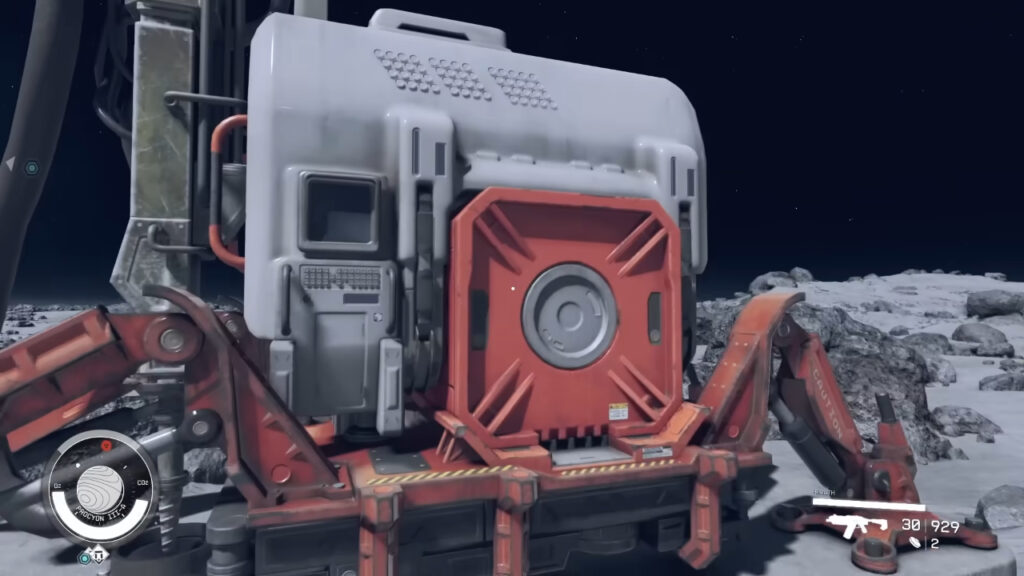
Extractor Starfield
Image Source: TotalXclipse Youtube
This article is over 2 years old and may contain outdated information.

You can’t just hop from one star system to another looking for resources all the time, so learn from our Starfield automatic outpost mining guide and gather what you need. If you want to make good money without getting into trouble with the law, selling minerals in shops on different planets is a good idea. But if you want to be entrepreneurial and dream big – what could be better than automatically collecting your goods? In Starfield, ores and other resources have many uses, and you’d better exploit their potential to the fullest. In the following guide, we will explain to you how to extract resources without making too much effort step by step.

Starfield: How To Make an Automatic Outpost Mining
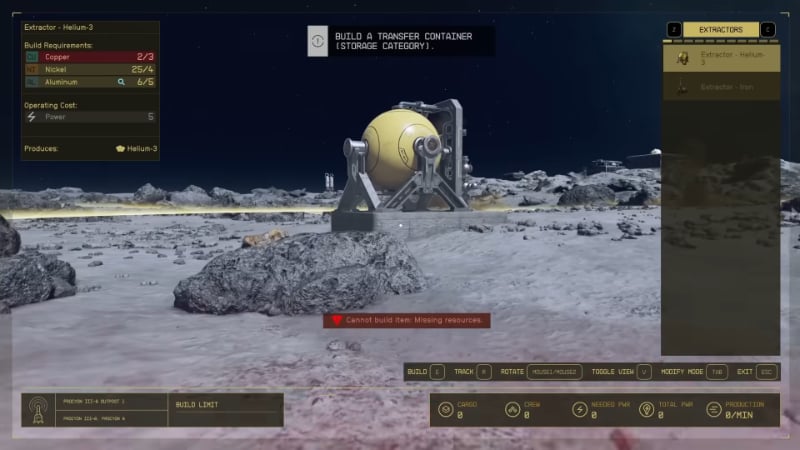
Starfield Automatic Outpost Mining
Image Source: TotalXclipse Youtube

These are the steps to making an automatic outpost for mining in Starfield:

  1. Set up an outpost.
  2. Develop a power source.
  3. Create an extractor.
  4. Make a storage container.
  5. Link your extractor to the container.

First, to achieve an automatic outpost Mining in Starfield, you’ll have to find a planet rich in minerals. So, you’ll have to play tourist until you find one. Once you’ve found the perfect spot, you must place an outpost beacon and interact with it. To do this, go to the Outpost option at the bottom of your scanner. 

The second step is to select the energy source. A good option would be to choose a wind turbine or a solar panel. Once the source is selected, choose an extractor fan.

Note that your chosen extractor must be specific to the resource you wish to extract. You can find the different extractors by clicking the “Extractors” button.

Although the extractors collect automatically, you will need to control their storage with the help of a container. The extractor’s internal storage will be overloaded and must be emptied to keep it working correctly. This way you will be closer to the last step of crafting an automatic outpost mining in Starfield. 

Related:
Best Thief Build In Starfield

To connect your extractor to the selected container, you must create an “output link.” Once the cable has been created, you can choose the container for your storage. Press the button again, and they will be linked. 

There are three types of containers to achieve the automatic outpost mining in Starfield. Gaseous, liquid, and solid. Each mineral must go with its corresponding container. You can find this classification by clicking the “Storage” button and using the one you need. 

In this way, you can get the resources you want from the interplanetary location you have chosen automatically. Don’t forget to assign a crew to each new outpost you create for optimal automated mining in Starfield.

Starfield is available on PC and Xbox. 

Related Topics
Guide Starfield
Share. Facebook Twitter LinkedIn Reddit Email
Cande Maldonado
  • Website

Pot-smasher, NPC-annoyer, side quest-completionist. Oh, there's that writing gig, too.

SUGGESTED READS

Marathon Raid Map
Features

Marathon Will Break Extraction Shooter Conventions by Bringing Destiny-like Raids Into the Mix

Hytale Reddit Moderator Clarifies 2.8 Million Player Count: 'How the Table Turns…'
Game News

Hytale Reddit Moderator Clarifies the Mindboggling 2.8 Million Player Count Situation: ‘How the Table Turns…’

Hytale Reaches 2.8 Million Active Players on Release Day, Says Developer: 'Eat Your Heart Out'
Game News

Hytale Reaches 2.8 Million Active Players on Release Day, Says Developer: ‘Eat Your Heart Out’

All Hytale Creative Mode and Server Console Commands
Game Guides

All Hytale Creative Mode and Server Console Commands

Hytale Email Not Sending error
Game Guides

How To Fix the ‘Email Not Sending’ Error in Hytale

Hytale How To Install Mods
Game Guides

How To Install Mods in Hytale

Trending
Marathon Raid Map

Marathon Will Break Extraction Shooter Conventions by Bringing Destiny-like Raids Into the Mix

Hytale Reddit Moderator Clarifies 2.8 Million Player Count: 'How the Table Turns…'

Hytale Reddit Moderator Clarifies the Mindboggling 2.8 Million Player Count Situation: ‘How the Table Turns…’

Hytale Reaches 2.8 Million Active Players on Release Day, Says Developer: 'Eat Your Heart Out'

Hytale Reaches 2.8 Million Active Players on Release Day, Says Developer: ‘Eat Your Heart Out’

All Hytale Creative Mode and Server Console Commands

All Hytale Creative Mode and Server Console Commands

The Nerd Stash
Facebook X (Twitter) Instagram YouTube LinkedIn
  • About Us
  • Join Our Team
  • Meet the Team
  • Privacy Policy
  • DMCA Policy
  • Contact Us
  • Terms of Use
  • Sitemap
  • Editorial Guidelines
  • Advertising Policy
© 2026 The Nerd Stash. All Rights Reserved.

Type above and press Enter to search. Press Esc to cancel.