

Close Menu
  • Gaming
    • Platforms
      • Nintendo
      • PC
      • PlayStation
      • Xbox
  • Entertainment
    • Movies
    • TV
    • Royals
  • Celebrity
    • Hollywood
  • Human Interest
  • Astrology
  • More
    • Anime
    • Reviews
Facebook X (Twitter) Instagram LinkedIn YouTube
  • About Us
  • Join Our Team
  • Meet the Team
  • Privacy Policy
  • DMCA Policy
  • Contact Us
  • Terms of Use
  • Sitemap
  • Editorial Guidelines
  • Advertising Policy
The Nerd Stash
  • Gaming
  • Celebrity
  • Hollywood
  • Human Interest
The Nerd Stash
Home»Gaming»Risk of Rain Returns: Complete Multiplayer Guide

Risk of Rain Returns: Complete Multiplayer Guide

It’s always better to play with someone.

Vladyslav PetrenkoBy Vladyslav PetrenkoNovember 13, 20233 Mins Read
Risk of Rain Returns: Complete Multiplayer Guide
Image Source: Hopoo Games via The Nerd Stash
This article is over 2 years old and may contain outdated information.

Risk of Rain Returns is a 2D platformer with many enemies, bosses, and secrets that you will need to overcome alone or with other players. Yes, you got it right: you can enjoy the gameplay and chaos with friends or strangers, so we’ll show you how to play Risk of Rain Returns in multiplayer mode. If cooperative play on a single monitor doesn’t work for you and you want to play with friends online, there are a few steps to follow. Read on to find out how to do it using our instructions.

Risk of Rain Returns: How to Play in Multiplayer Mode
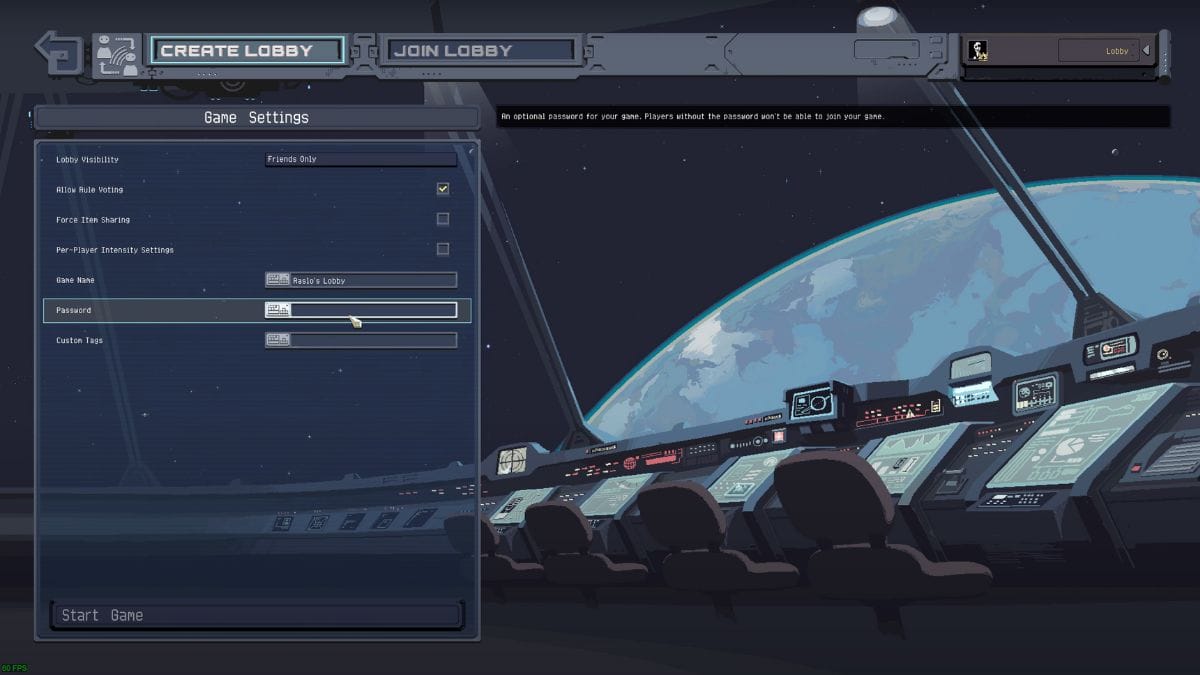
Risk of Rain Returns: create lobby
Image Source: Hopoo Games via MySpaceGuide Screenshot

Connecting to multiplayer mode is based on servers you can join or create your own. To view the list of available lobbies, go to the main menu and click on the Start Online Co-op button. You will now be taken to a new interface where you can join a public lobby or create your own and customize the game settings.
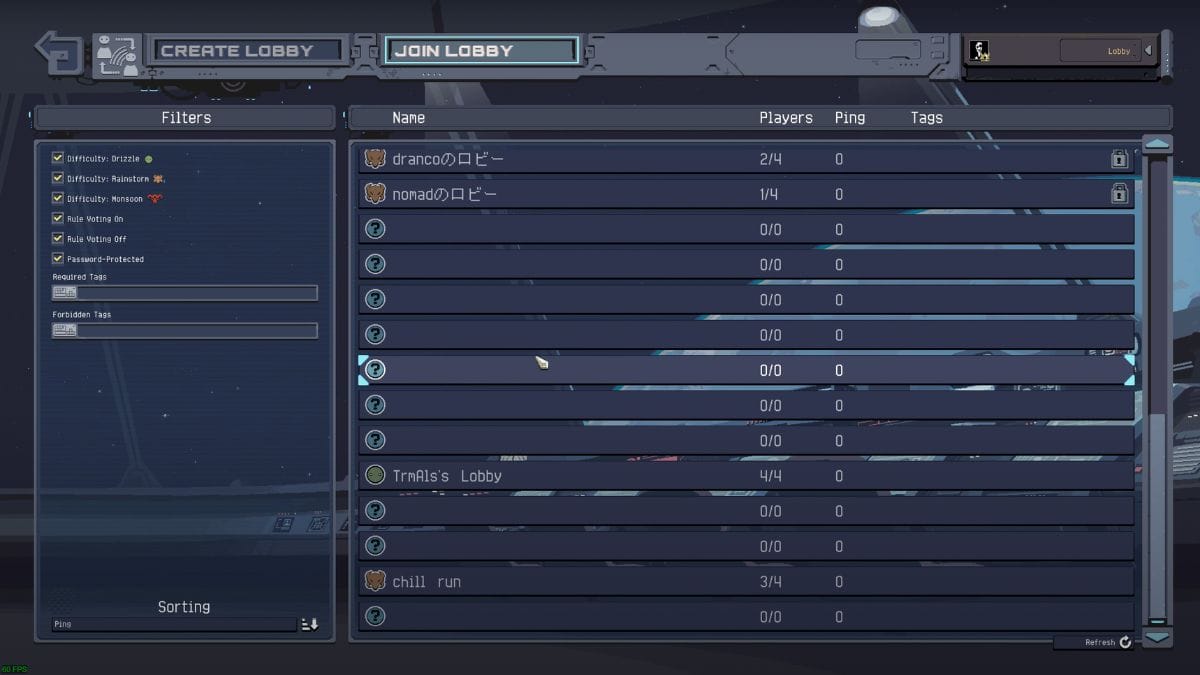
Risk of Rain Returns: join lobby
Image Source: Hopoo Games via MySpaceGuide Screenshot

If you would like to join the game of other users, firstly, you need to pay attention to the Game Settings section, which is located on the left side of the screen. You can filter the list of games according to your difficulty preferences, choosing from Drizzle, Rainstorm, or Monsoon. If you’re looking for a game created by a friend, you can check the Password-Protected option if the lobby is password-protected, and enter specific tags to help you find the game you want faster.

Related:

How to Unlock Robomando in Risk of Rain Returns

Risk of Rain Returns: How to Create Your Own Lobby
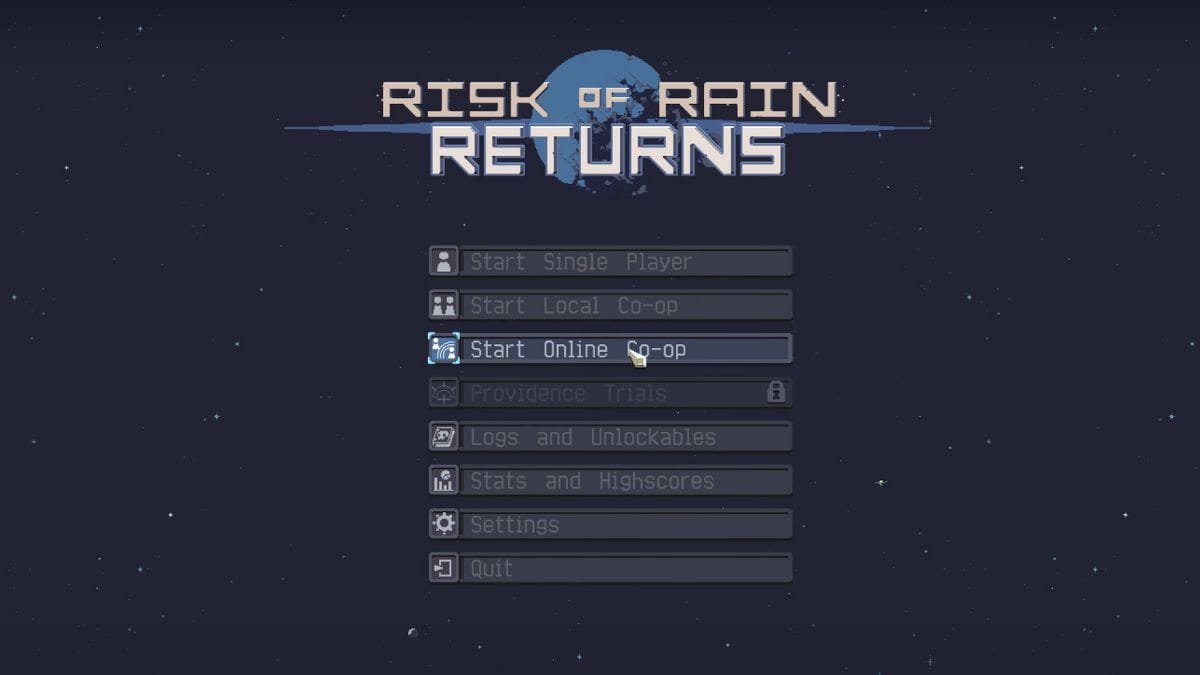
Risk of Rain Returns: the Start Online Co-op button
Image Source: Hopoo Games via MySpaceGuide Screenshot

If you are the initiator of an online game and want to host your own lobby, you will need to learn a few things first. To create your own lobby, you should do the following:

  1. Select Main Menu Multiplayer.

    Go to the main menu and click the Start Online Co-op button. 

  2. Create lobby.

    Now, go to the next tab, which is called Create Lobby and located in the upper left corner.

  3. Change the online rules.

    Now, you can fully customize the game settings by selecting the desired parameters, ranging from the game style to the intensity. 

  4. Adjust online privacy settings.

    Once you’ve selected your preferred game settings, enter your desired lobby name and the “Friends Only” option if you don’t want anyone else to join you. 

  5. Enable or disable password protection.

    As with joining a lobby, you can also enter unique tags to make the game easier to find, and enable the Password Protected option if you want to provide access only to those who know the password.

  6. When people join the lobby, start the match.

    Now, you have to wait for your friends to join the lobby. Send them the necessary info to find and authorize themselves in the lobby, or switch the option from Friends to Public so they can find your game among the list of other publicly available games. 

Once your friends have joined the lobby, you can start the game and enjoy the gameplay with them.

Related:

How to Unlock the Artifact of Sacrifice in Risk of Rain Returns

Risk of Rain Returns is now available for PC and Nintendo Switch.

Related Topics
Guide Risk of Rain Returns
Share. Facebook Twitter LinkedIn Reddit Email
Vladyslav Petrenko
  • Website
  • Facebook

Vladyslav Petrenko is a freelance contributor for TNS.

SUGGESTED READS

LEGO Batman Legacy of the Dark Knight PC Review
9
Gaming

LEGO Batman: Legacy of the Dark Knight Review – A Hero Rises

Call of Duty: Modern Warfare 4 Launching This October on Next-Gen Consoles & Switch 2, But Not Game Pass
Gaming

Call of Duty: Modern Warfare 4 Launching This October on Next-Gen Consoles & Switch 2, But Not Game Pass

Hideo Kojima Teams Up With Prada for an AI Film, And Fans Aren't Happy: 'Beyond Incredibly Disappointing'
Gaming

Hideo Kojima Teams Up With Prada for an AI Film, And Fans Aren’t Happy: ‘Beyond Incredibly Disappointing’

The Witcher 3 Songs of the Past expansion
Gaming

A Witcher 3 Leak Just Forced CD Projekt Red to Announce a Brand-New Expansion: Songs of the Past

CDPR Announces The Witcher 3 'Special Anniversary Stream' Amid New Massive DLC Rumor
Gaming

CDPR Announces The Witcher 3 ‘Special Anniversary Stream’ Amid New Massive DLC Expansion Rumor

007 First Light All Challenges
Gaming

All Challenges in 007 First Light

The Nerd Stash
Facebook X (Twitter) Instagram YouTube LinkedIn
  • About Us
  • Join Our Team
  • Meet the Team
  • Privacy Policy
  • DMCA Policy
  • Contact Us
  • Terms of Use
  • Sitemap
  • Editorial Guidelines
  • Advertising Policy
© 2026 The Nerd Stash. All Rights Reserved.

Type above and press Enter to search. Press Esc to cancel.





