Close Menu
  • Gaming
    • Platforms
      • Nintendo
      • PC
      • PlayStation
      • Xbox
  • Entertainment
    • Movies
    • TV
    • Royals
  • Celebrity
    • Hollywood
  • Human Interest
  • Astrology
  • More
    • Reviews
Facebook X (Twitter) Instagram LinkedIn YouTube
  • About Us
  • Join Our Team
  • Meet the Team
  • Privacy Policy
  • DMCA Policy
  • Contact Us
  • Terms of Use
  • Sitemap
  • Editorial Guidelines
  • Advertising Policy
The Nerd Stash
  • Gaming
  • Celebrity
  • Hollywood
  • Human Interest
The Nerd Stash
Home»Gaming»How To Feed a Monkey in Disney Dreamlight Valley – Monkey’s Favorite Food

How To Feed a Monkey in Disney Dreamlight Valley – Monkey’s Favorite Food

They don’t like Bananas, don’t even try.

Nerd Stash StaffBy Nerd Stash StaffDecember 8, 20232 Mins Read
How To Feed a Monkey in Disney Dreamlight Valley
Image Source: Gameloft via Serroh YouTube
This article is over 2 years old and may contain outdated information.

Disney Dreamlight Valley has a lot of cute little animals for you to make friends with. And with each update, there are more and more of them. For example, players who purchased A Rift in Time expansion will be able to find funny Monkeys. However, feeding the Monkeys at Disney Dreamlight Valley can be quite challenging since their favorite food is definitely not bananas. But fortunately, in reality, everything is quite simple.

Where To Find Monkey

Where To Find Monkey
Image Source: Gameloft via Serroh YouTube

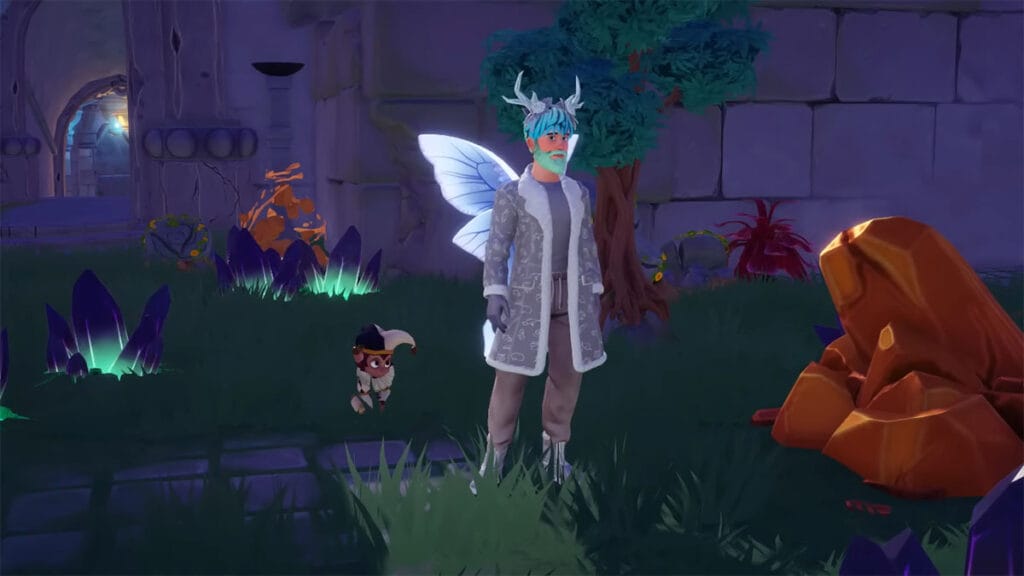
The Monkeys spawn in the Eternity Isle biome in Disney Dreamlight Valley, so they are only available to players who have purchased the A Rift in Time expansion. Also, these cute animals come in different types, depending on the location where you find them. There are five of them in total:

  • Red and Beige Monkey – The Overlook
  • Classic Monkey – The Docks
  • Black and Gray Monkey – The Ruins
  • Black and Brown Monkey – The Courtyard
  • Beige Monkey – The Ruins

What Is Monkeys’ Favorite Food?

So, to feed the Monkeys in Disney Dreamlight Valley, it is not enough for you to know where they live. You should also know their eating habits. Unfortunately, the most obvious option, bananas, is not liked by monkeys. Instead, players can feed Monkeys only 3-star dishes or higher in Disney Dreamlight Valley.

We recommend you make a Berry Salad, as it only requires a Gooseberry, a Raspberry, and a Blueberry. It is also worth noting that despite their dislike for regular bananas, Monkeys like Banana Split dish. Players can make it with Slush Ice, Milk, Banana, Sweet, and Sugarcane. However, even with their favorite food, the Monkeys are quite hard to feed at Disney Dreamlight Valley. They are very playful and love to play tag, even too much.

Therefore, having found the Monkey, you will have to run after it for quite a long time. But if you don’t lose sight of this cute animal, it won’t be a difficult task. When the Monkey has had enough of playing, you can approach them and feed them a delicious Berry Salad. After this, you have to repeat these steps for several days to befriend the Monkeys in Disney Dreamlight Valley.


Related Topics
disney dreamlight valley Guide
Share. Facebook Twitter LinkedIn Reddit Email
Nerd Stash Staff
  • Website

SUGGESTED READS

Gears of War E-Day All Collectibles
Gaming

All Collectibles in Gears of War: E-Day and Where to Find Them

March of Giants MOBA
Gaming

March of Giants Is What the MOBA Genre Needs Right Now

Gears of War E-Day All Act 3 Collectibles
Gaming

All Act 3 Collectibles in Gears of War: E-Day

Age of Wonders 4 Expansion Pass 4 Announcement
Gaming

Age of Wonders 4 Is Setting Sail With Its Expansion Pass 4

Gears of War E-Day Act 2 All Collectibles
Gaming

All Act 2 Collectibles in Gears of War: E-Day

Gears of War E-Day Act 1 Collectibles
Gaming

All Act 1 Collectibles in Gears of War: E-Day

The Nerd Stash
Facebook X (Twitter) Instagram YouTube LinkedIn
  • About Us
  • Join Our Team
  • Meet the Team
  • Privacy Policy
  • DMCA Policy
  • Contact Us
  • Terms of Use
  • Sitemap
  • Editorial Guidelines
  • Advertising Policy
© 2026 The Nerd Stash. All Rights Reserved.

Type above and press Enter to search. Press Esc to cancel.