Close Menu
  • Gaming
    • Platforms
      • Nintendo
      • PC
      • PlayStation
      • Xbox
  • Entertainment
    • Movies
    • TV
    • Royals
  • Celebrity
    • Hollywood
  • Human Interest
  • Astrology
  • More
    • Reviews
Facebook X (Twitter) Instagram LinkedIn YouTube
  • About Us
  • Join Our Team
  • Meet the Team
  • Privacy Policy
  • DMCA Policy
  • Contact Us
  • Terms of Use
  • Sitemap
  • Editorial Guidelines
  • Advertising Policy
The Nerd Stash
  • Gaming
  • Celebrity
  • Hollywood
  • Human Interest
The Nerd Stash
Home»Gaming»How to Sleep in Lego Fortnite

How to Sleep in Lego Fortnite

Sleep with all your friends around… for protection.

Nat CollazoBy Nat CollazoDecember 8, 20232 Mins Read
How to Sleep in Lego Fortnite
Image Source: Epic Games via The Nerd Stash
This article is over 2 years old and may contain outdated information.

LEGO Fortnite grabs all of the best creation cues from Minecraft. Like the latter, you’re collecting resources in order to craft more resources, furniture, weapons, etc. Unfortunately, the game doesn’t really walk you through any of it, making you have to figure a lot on your own. While you’re crafting, and the night comes, sleeping cozy in your bed sounds much more appealing than staying up with spiders. As previously mentioned, crafting a bed isn’t as easy as it seems. Let’s dive into how to sleep and how to craft a bed in LEGO Fortnite.

How to Craft a Bed in Lego Fortnite

How to Sleep in Lego Fortnite
Image Source: Epic Games via The Nerd Stash

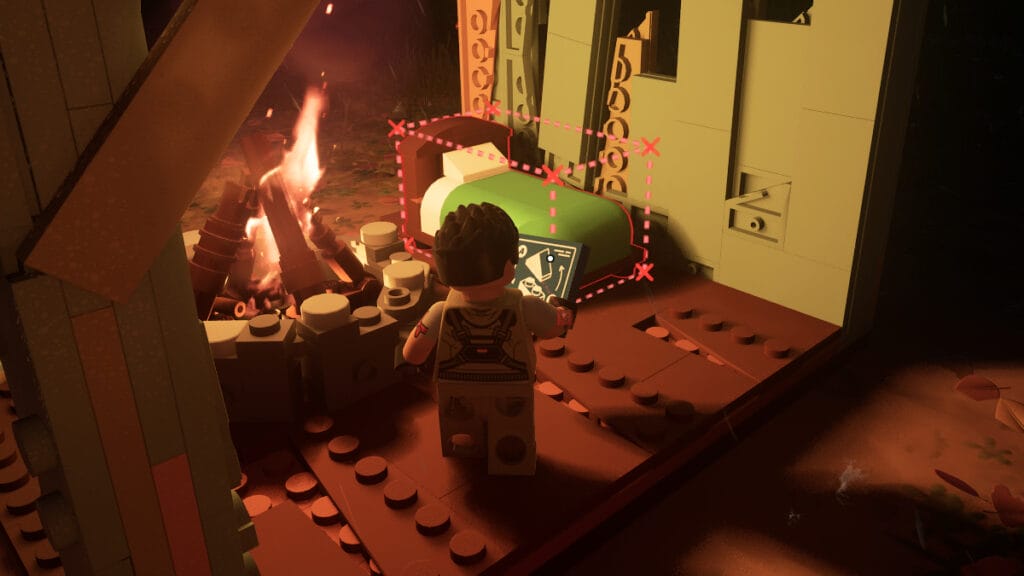
Even though you can craft a bed in LEGO Fortnite, you can’t use it to sleep through the night. The beds are assigned to you and your friends and are used as spawn points that let you recover health. To craft one you need to have progressed through the in-game tutorial to the point where you can create furniture. In the crafting menu, select the Beds folder and you’ll see a green, single bed that you can craft for ten wood pieces.

It takes a bit of time to get through to this point since the bed isn’t accessible to you from the beginning. After you’ve created a fire, a crafting bench, and your first shelter, you’ll have the option to craft furniture. The beds are assigned to your new friends so that they can be recruited into your world. It makes playing this version of the acclaimed FPS a little more fun for those who really value playing with their friends.

Related:

How To Invite an NPC To Live in Any Village in Lego Fortnite

Lego Fortnite is available now on Nintendo Switch, PS4, PS5, Xbox One, Xbox Series X|S, and PC.

Related Topics
Fortnite Guide
Share. Facebook Twitter LinkedIn Reddit Email
Nat Collazo
  • Website
  • X (Twitter)
  • Instagram

Nat is a journalist with over ten years of online publishing experience. They are a massive fan of hanging out with both their wife and cat which would ideally be all the time. Nat received an undergraduate degree in English Literature from Florida International University, then returned to complete a graduate degree in Mass Communications before moving across the country to settle in New England.

SUGGESTED READS

How To Get High Quality Pal Oil in Palworld
Gaming

How to Get High Quality Pal Oil in Palworld

Palworld 1.0 Best Mods
Gaming

Palworld 1.0 Modding Guide: 10 Best Mods to Download First

Palworld Best Server Settings
Gaming

Best Palworld 1.0 Server Settings: Complete Configuration Guide

The Best Gold Farming Methods to Become a True Pal Tycoon in Palworld
Gaming

The Best Gold Farming Methods to Become a True Pal Tycoon in Palworld

soulframe clair obscur
Gaming

Soulframe Heads Into Darker Territory With Clair Obscur: Expedition 33 Talent

Is Steam Down? How to Check Steam Network Server Status
Gaming

Is Steam Down? How to Check Steam Network Server Status

The Nerd Stash
Facebook X (Twitter) Instagram YouTube LinkedIn
  • About Us
  • Join Our Team
  • Meet the Team
  • Privacy Policy
  • DMCA Policy
  • Contact Us
  • Terms of Use
  • Sitemap
  • Editorial Guidelines
  • Advertising Policy
© 2026 The Nerd Stash. All Rights Reserved.

Type above and press Enter to search. Press Esc to cancel.